Kahua 2026 Q1 Release Notes
The Kahua 2026 Q1 release will be deployed to our Production environments on February 6, 2026. A preview of this functionality can be accessed at https://earlyaccesslaunch.kahua.com beginning on January 24, 2026. Please click here for more information on the Early Access program.
Note Please note that major releases are now performed on the Friday of a release weekend instead of Saturday.
The release notes below are subject to change. For any changes to these notes, please see the change log at the bottom of the article.
In addition to various bug fixes, performance improvements, and minor UI updates, this release includes the updates described below in the following functional areas:
 General
Display Navigable Project Hierarchy
Users can now have a fully navigable project breadcrumb appear at the top of their screen. This provides improved navigation and visibility into the project structure and allows them to know exactly what level of the hierarchy they are currently in.
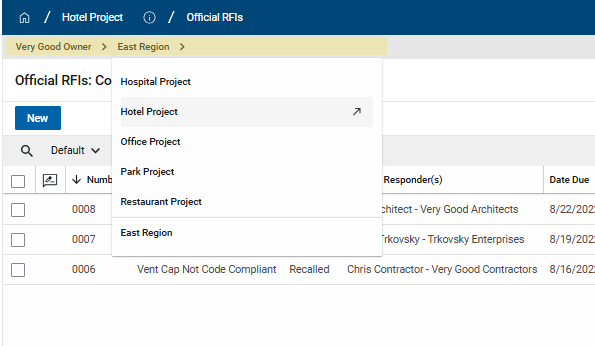
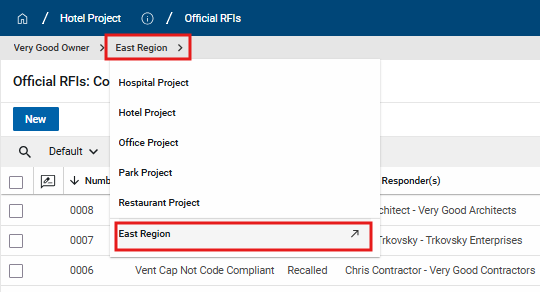
In order to utilize this functionality, users simply need to click on one of the partitions displayed in the breadcrumb to open the hierarchy dropdown. From there, users are able to navigate via the hierarchy. The user's current project changes only when users click a project with the ↗ icon. The "parent project" is always displayed at the bottom of the list, separated from the child projects. In order to navigate to a "parent project", it will need to be selected from the list displaying its child projects.
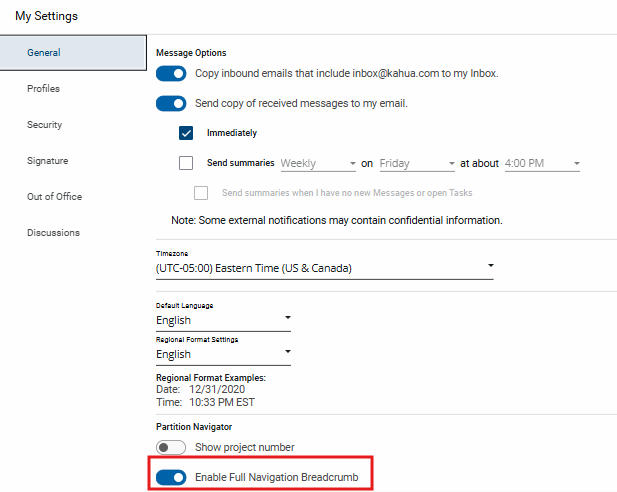
The configuration, Enable Full Navigation Breadcrumb, is at the user level and can be found in My Settings. It is enabled by default for all users.
Added tracking of Portable View access in History
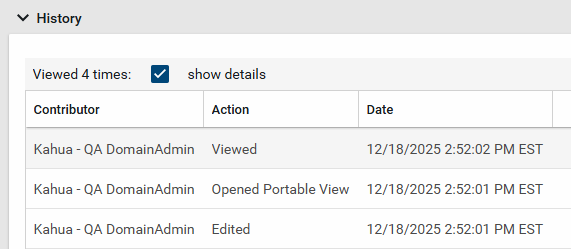
We have enhanced the History functionality to give you greater visibility into record access. Now when users open Portable Views through the View action on a record, these actions are recorded in the record's history for improved transparency and documentation.
To review the "Opened Portable View" actions, open your record of interest and navigate to the History tab. Click View Complete History and select the Show Details check box. Once selected, you'll find both record "Viewed" actions and "Opened Portable View" actions populated in the History table, alongside the user name and time stamp.
This update will allow you to confirm who has seen the contents of a record and maintain a clear audit trail for compliance and accountability.
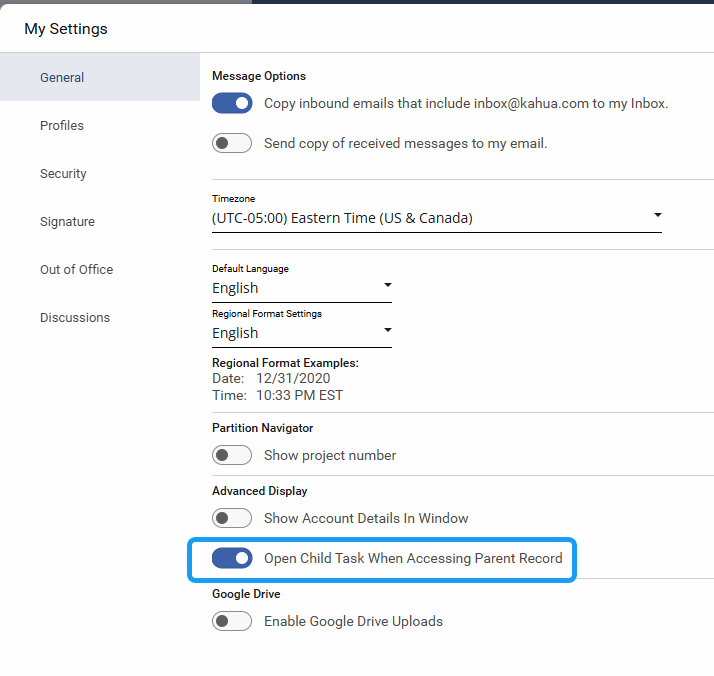
Added new user setting to select view behavior when a child task is present
In Kahua, when you open a record that is associated with one of your active tasks, the task view appears. We recently added the ability for you to control what happens when you open a record and you are assigned a task for a child item on that record (for example, when you open a submittal package and you have been assigned a task for one of the associated submittal items).
We have added a new My Settings option that controls what happens when you select a parent record where you have an active task on one of its child records.
-
When the setting is enabled (this is the default), the system automatically opens the child item task view.
-
When the setting is disabled, the system displays the parent record preview instead.
Administration
Snapshot Performance and Scalability Upgrade
Project Snapshot has been upgraded with various performance and scalability enhancements with this release. You should not notice any functional changes with your experience when using the Project Snapshot application. Please report any issues or discrepancies to the Kahua Support Team.
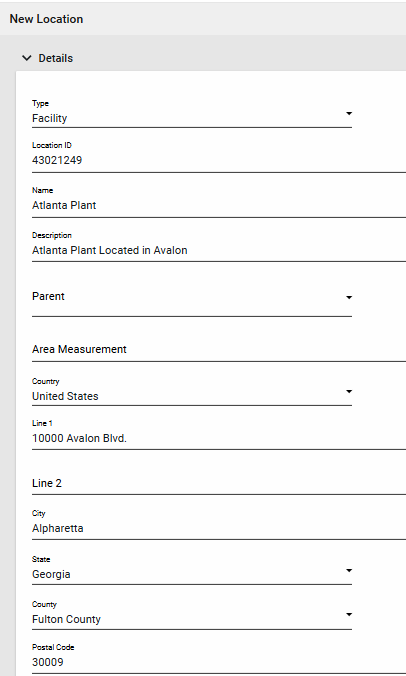
Locations app - Enabled Address Fields for Facility Location Types
You are now able to define address fields when the Location Type of a location record is set to "Facility". The following fields are now visible in Preview and Edit for "Facility" location types: Country, Line 1, Line 2, City, State, County, Postal Code.
Added ability to manage .kahua file attachments in Domain Settings
We’ve added a new setting that gives you control over whether the .kahua file is included when records are shared in Kahua.
The .kahua file contains technical details about the record in JSON format and was previously attached by default. While beneficial for technical use cases, we realize the extra attachment isn’t always necessary and can be confusing.
We've added a new setting that allows domain administrators to enable or disable this functionality. The setting can be found by navigating to Domain Settings > Domain Defaults > Include .kahua File in Message Attachments.
Existing domains will have this setting enabled at release to avoid disrupting any existing workflows. New domains will have this feature disabled by default.
Reporting
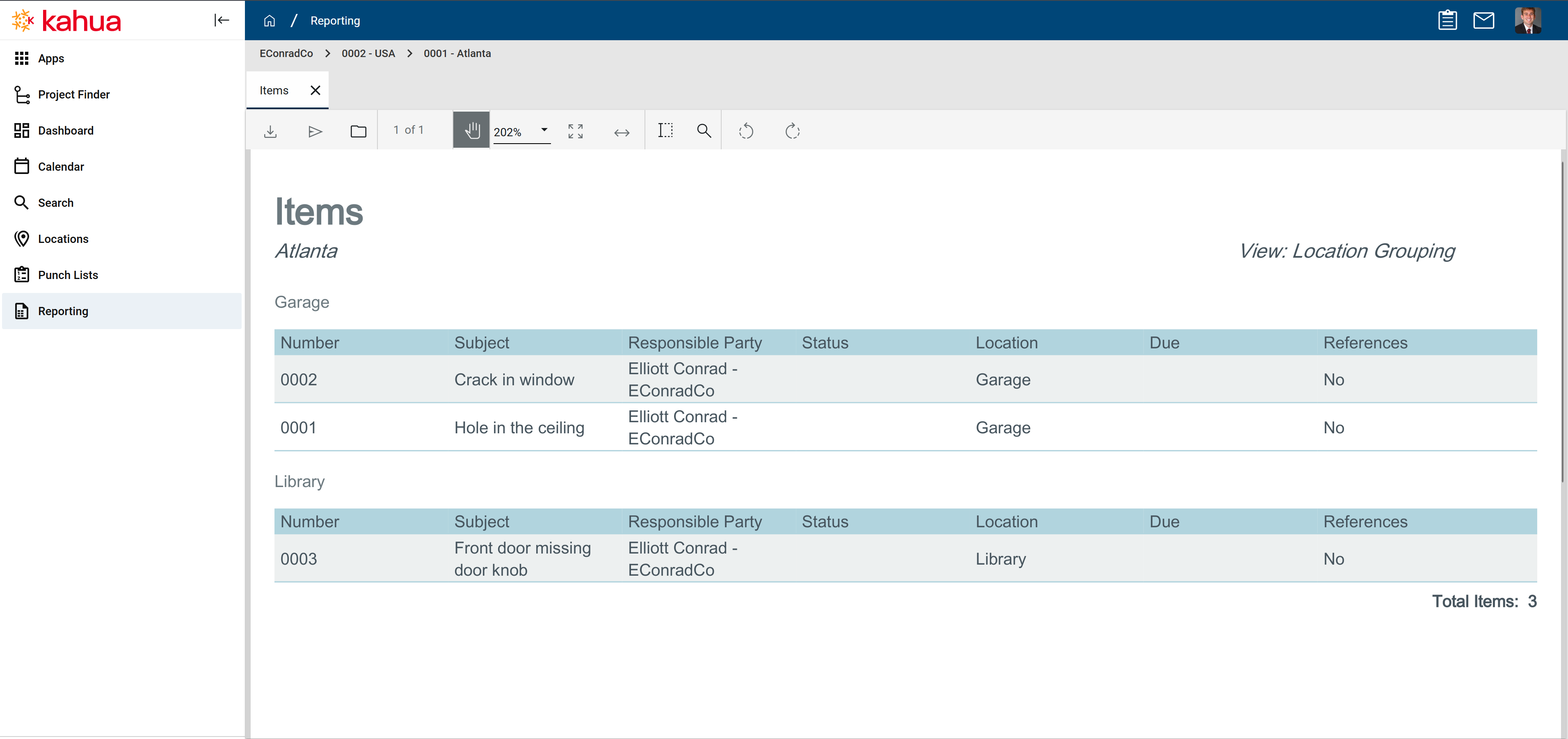
Log view reports now support groupings
We’ve added support for groupings in log view reports.
These groupings will now mirror what you see in the log view itself, providing a consistent experience between the log view and its corresponding report. This makes it easier to interpret and analyze grouped data directly in your reports.
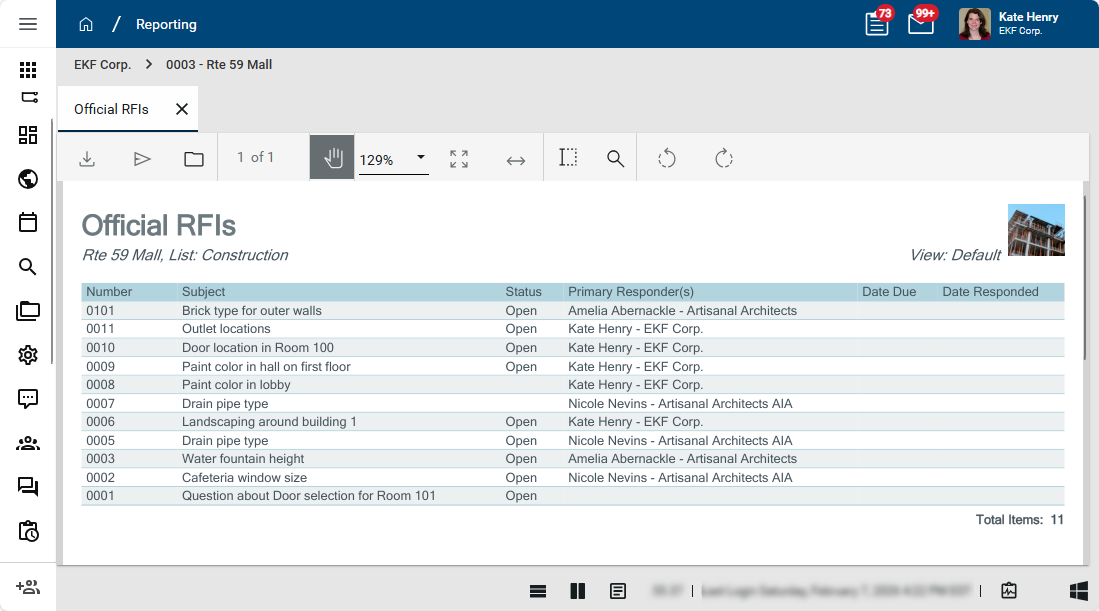
Column widths in log view reports to respect column widths in log views
We’ve improved the usability of log view reports to make them more consistent with the log view experience. Previously, all columns in log view reports were distributed evenly, regardless of their content size. This often resulted in smaller fields taking up unnecessary space. Now, column widths in log view reports match the proportions of the column widths as you set them in the log view.
Document Management
Daily Reports - Added Asset and Location tagging
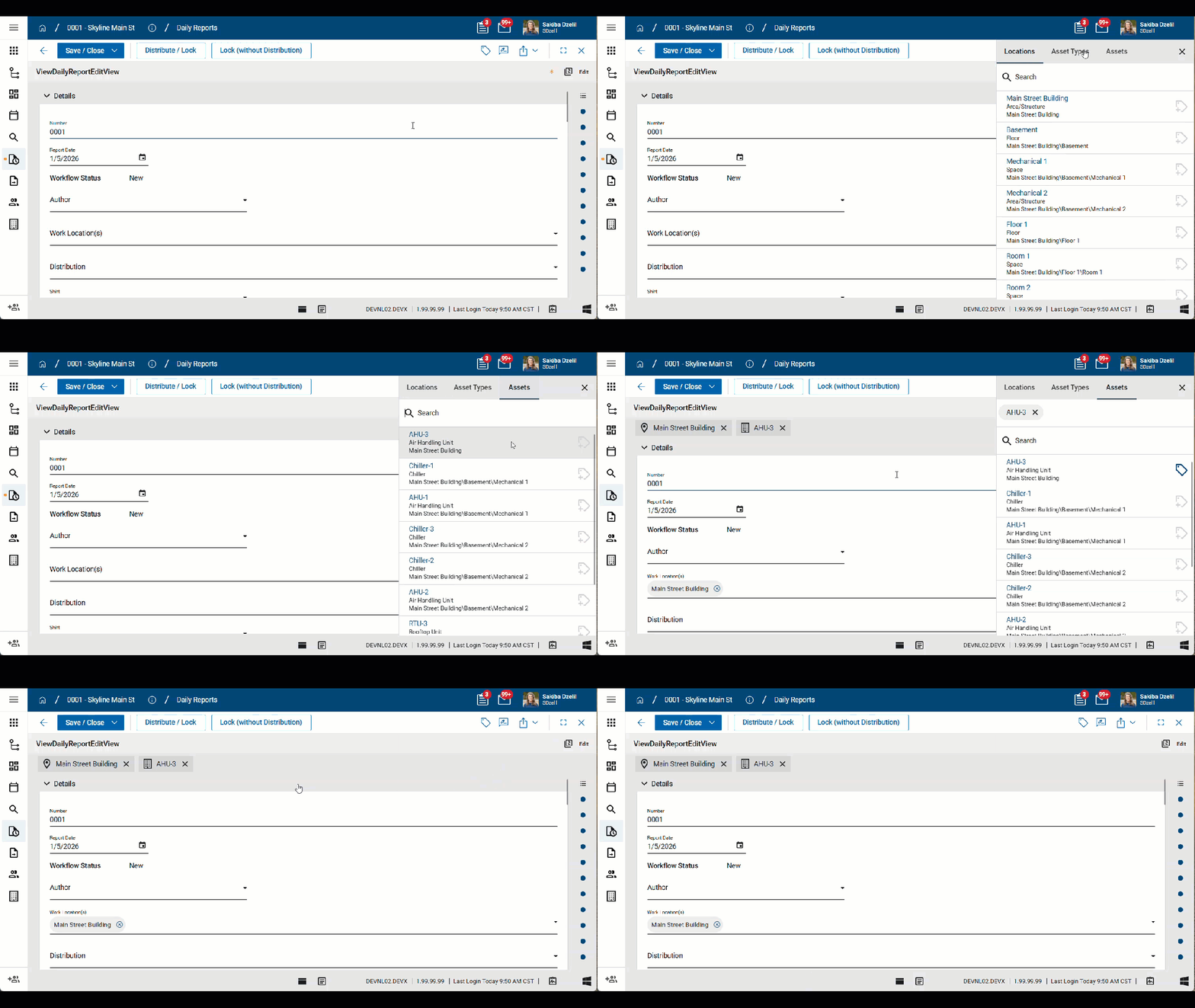
Daily Reports can now be tagged with Assets and Locations.
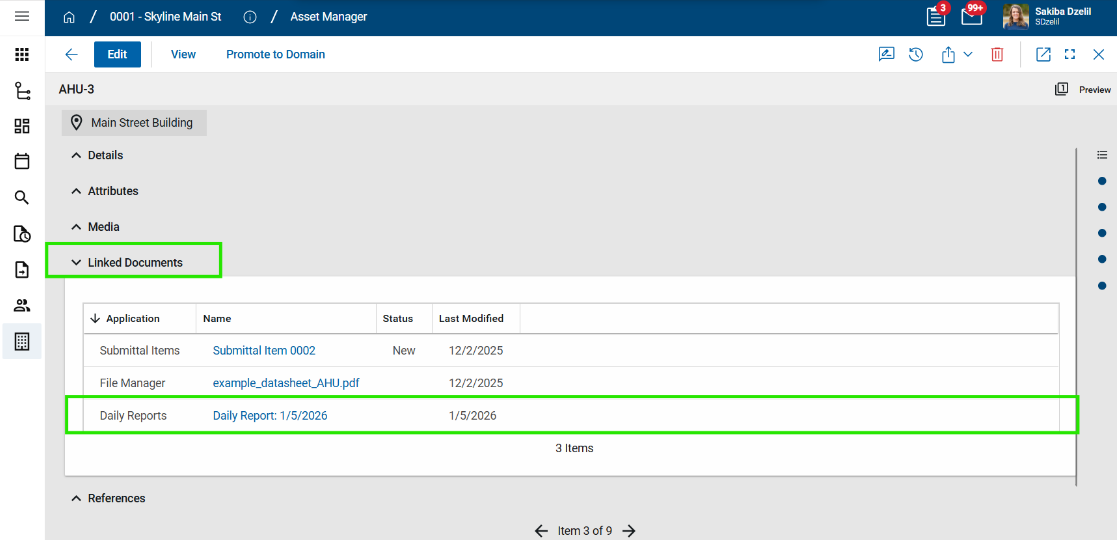
The tagged Daily Report will appear in the Linked Documents section of the corresponding Asset or Location record.
Design Review Comments - Added new sub-applications to support batch actions and multi-edit for Evaluation and Backcheck statuses
In the Design Review Comments workflow, users assigned comment tasks for comments in the "Evaluation" or "Backcheck" status can batch update (multi-edit) and batch action their tasks.
To support this activity, the Design Review suite includes two new applications:
-
Comments – Evaluation
-
Comments – Backcheck
When comments enter the "Evaluation" or "Backcheck" status, assigned users can navigate to the related project and act on those tasks. Users will only see records in these applications if they are assigned a task in the corresponding workflow status.
During the Evaluation process, users can multi-edit their assigned tasks and select Submit for Backcheck.
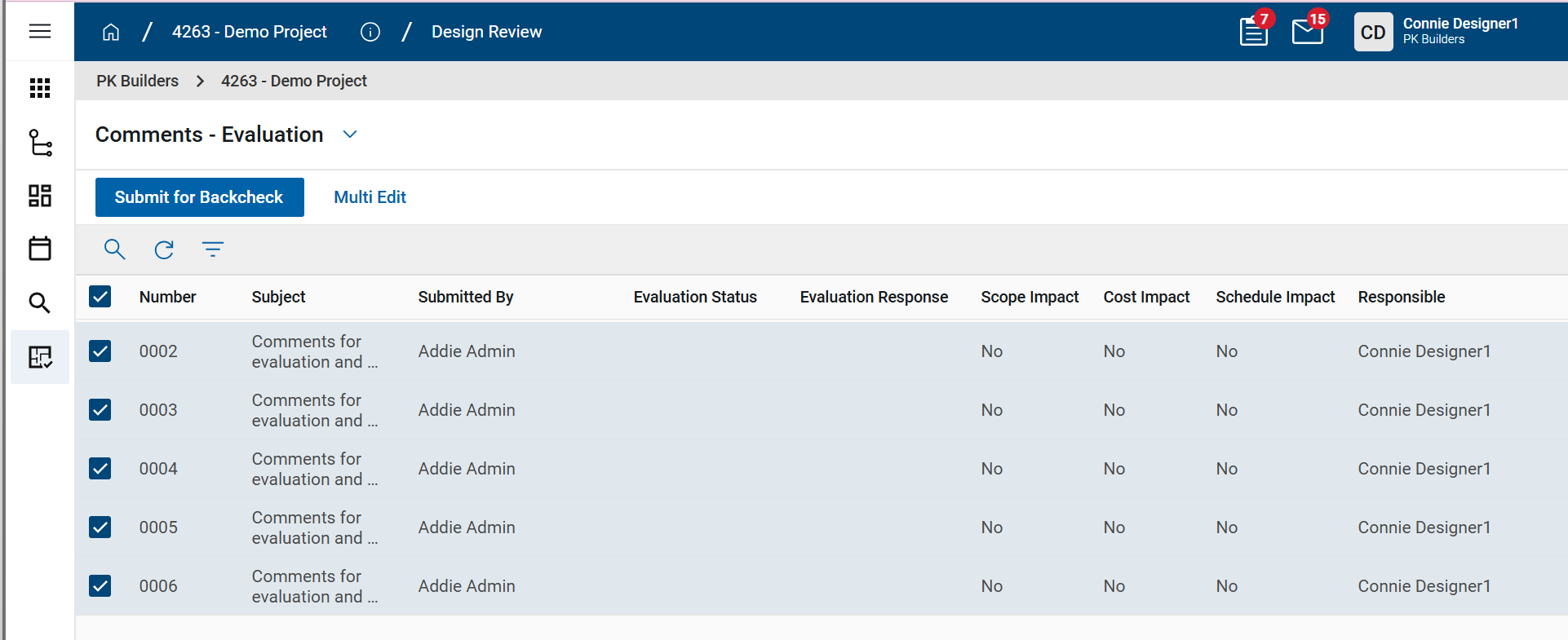
During the Backcheck process, users can multi-edit their assigned tasks and select Mark Complete or Resend for Evaluation.
Once a task is assigned, it appears in the appropriate new application. Users can still act on individual comment tasks from the Task application if desired. These new applications allow users to act on all assigned comment tasks for a specific project at once.
Note Users must have permission to access the Review Comments application to have access the new sub-applications.
Meetings - Updated time zone used for imports and exports
Previously, when importing records into the Meetings app, time values were imported using the UTC time zone.
With the 2026.1 release, imported time values use the time zone of the user performing the import, as selected on their profile's My Settings page. When the import is complete, the confirmation message will note that the time values were imported in the user's time zone. Additionally, when performing an export, any time values are exported in the time zone of the user performing the export. The time zone used will be noted in the column description for those fields on the "Instructions" sheet of the export file.
These changes align the import and export behavior for the Meetings app with the import behavior of other apps on the Kahua platform.
Punch Lists - Added detailed report with pin image
Punch list Items that are pinned to a drawing will now include an image of the drawing with the pin location.
This image appears on a new standard report named "Punch List Item Details with Media Images". The image can also be added to custom reports.
Important The pinned image will be available for punch list Items pinned after the 2026.1 release.
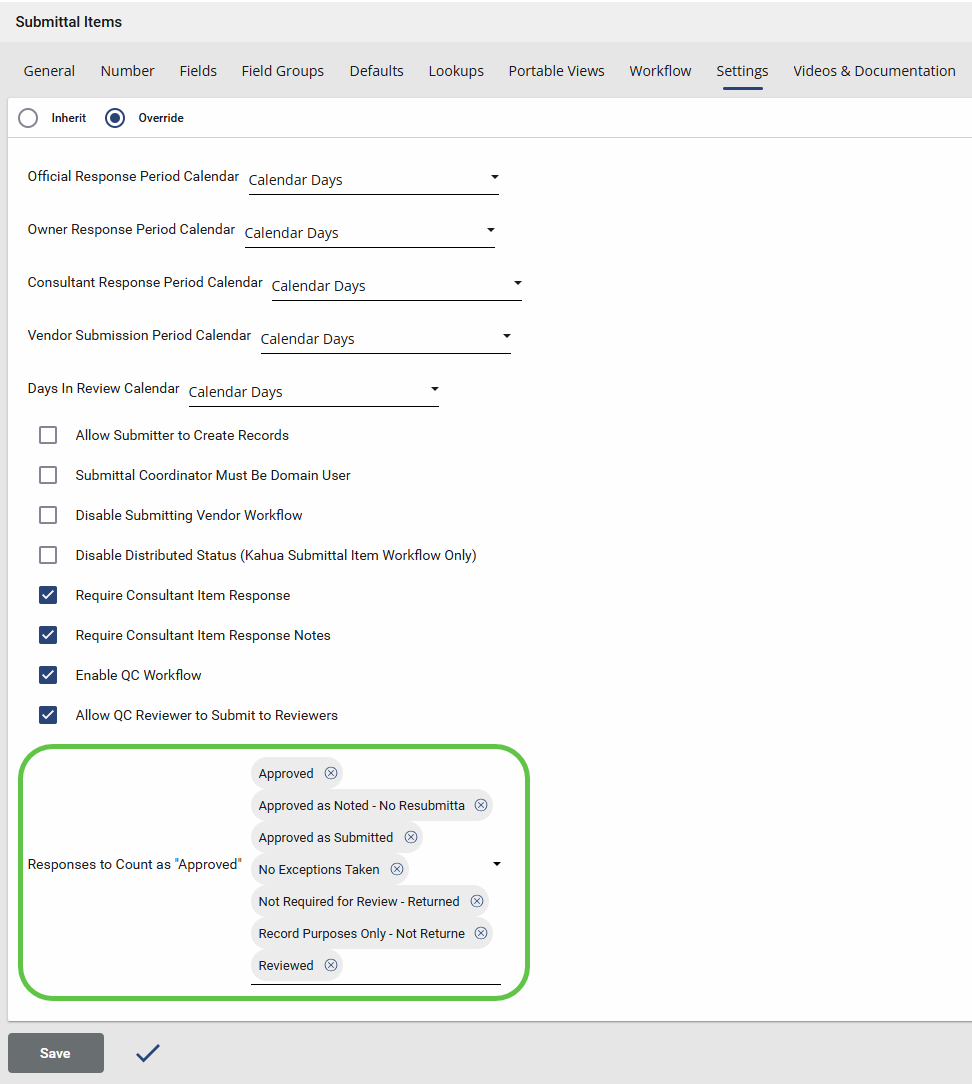
Submittal Items - Added "Count as Approved" flag
Kahua’s configurable Submittal Response field gives users flexibility in defining response options for Submittal reviews. However, answering a common question—“What’s left to submit?”—often required manually grouping custom response values into broader categories such as "Approved/Not Approved" or "Complete/Incomplete".
The new Count as Approved flag simplifies this process with a clear, binary indicator that identifies which submittal Items should be treated as "Approved". To streamline workflows further, users can configure response lookup values so the system automatically applies the Count as Approved flag whenever those responses are selected—eliminating the need for manual updates.
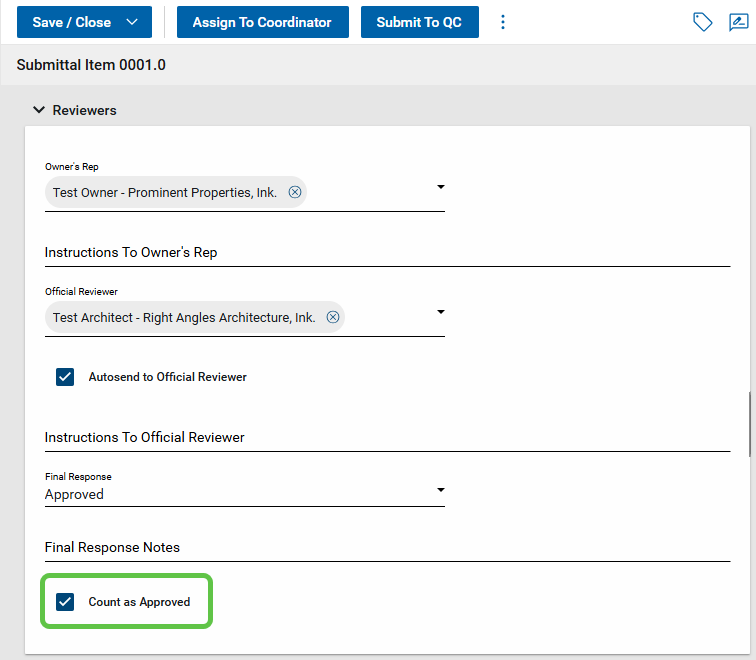
The setting can be found on the Configuration > Submittal Items > Settings tab. Once configured, the flag is automatically applied when a designated response value is added or changed on a Submittal item. The Count as Approved field is available in log views, custom reports, and the Kahua data store—making it easier than ever to quickly answer, “What’s left to submit?”
Work Package Enhancements
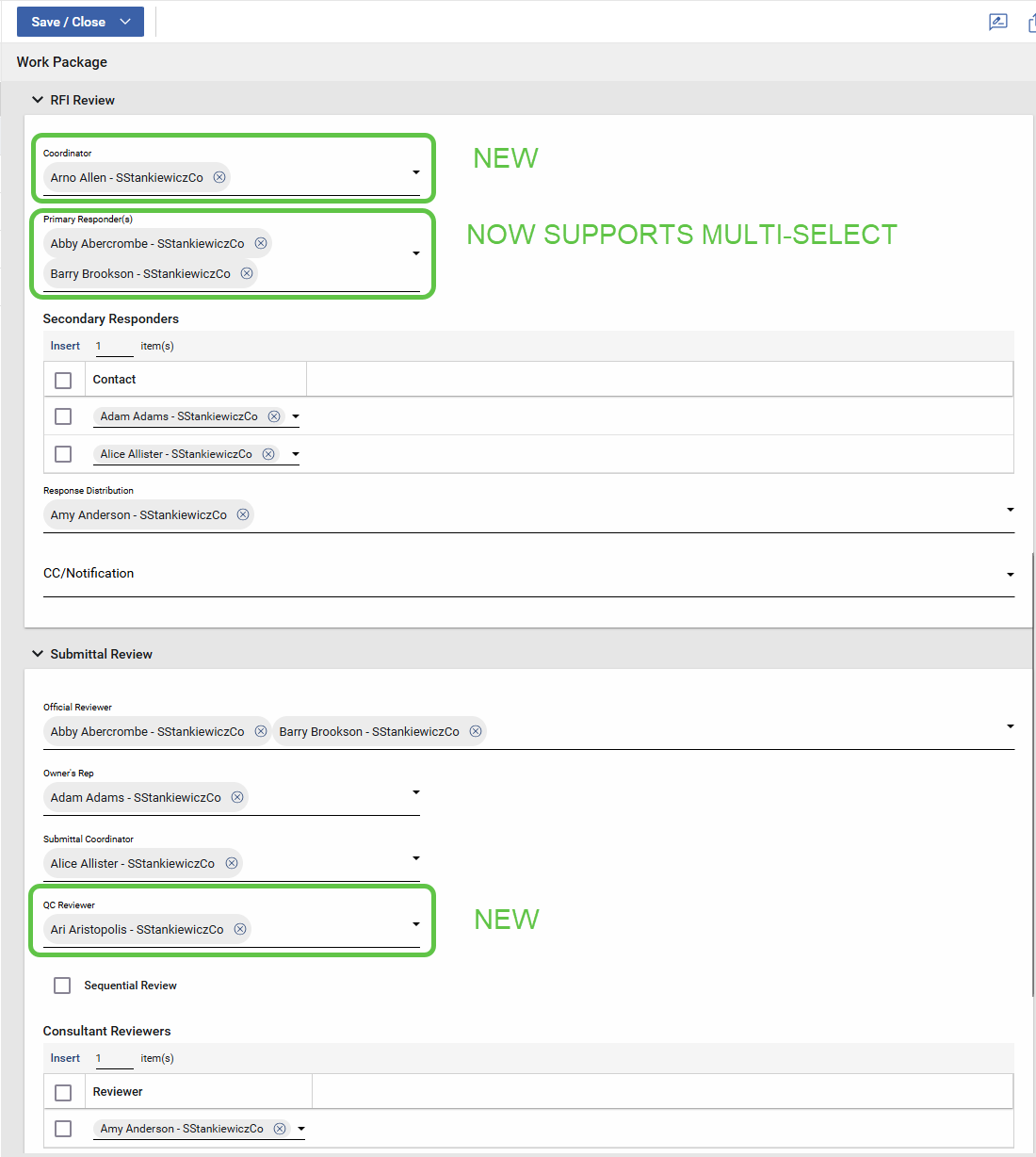
Recent enhancements to RFIs and Submittals introduced new fields and expanded existing functionality. RFIs now include a Coordinator role, and the Primary Responder field has been expanded to support multiple contacts. Submittals now include a QC Reviewer field and associated workflow.
With this release, Kahua’s Work Package app has been updated to align with these changes, ensuring full support for the new and expanded RFI and submittal fields.
Cost Management
Approvals - Decline comments now saved to document
This update applies to Kahua for Owner, Education, General Contractor, and Subcontractor using the Cost applications with approval workflows and comments enabled.
When a document approval is declined and a decline comment is added, the decline comment is now saved to the document in the same manner as manually entered comments. Previously the decline comment was only sent to the original submitter and was not visible to others.
-
Decline comments are stored as standard document comments.
-
Manual document comments entered before declining are preserved separately.
-
Notification behavior remains unchanged.
This ensures decline reasons are retained with the document for visibility and audit purposes.
Approvals - Delegated User now appears in Cost apps
This update applies to Kahua for Owner, Education, General Contractor, and Subcontractor using the Cost applications with approval workflows.
Approval history now shows who actually performed an approval when a task was delegated. Previously, delegated approvals could appear with missing or blank user information.
This improves audit clarity for delegated approval actions.
Budget Adjustments & Changes - Bypass Cost Guards
This update applies to Kahua for Owner, Education, General Contractor, and Subcontractor projects with Cost Guards enabled.
Budget Adjustments and Budget Changes now support an optional Bypass Cost Guards setting to resolve scenarios where fully committed budgets prevent transferring budget or commitments between activity codes.
Previously, you could become blocked when cost guards prevented adjustments to both the contract and budget. This typically happens when budgets and contracts have a defined allowance/contingency and you progressively transfer the value to other contract items.
This update provides a controlled way to temporarily bypass cost guards on a document to complete the transfer:
-
New Bypass Cost Guards check box added on:
-
Budget Adjustments
-
Budget Changes
-
-
This option allows budget to be moved even when commitments are fully consumed.
-
Cost guards remain enforced for all other documents.
-
Access to this option is controlled by a new permission: Allow Bypassing Cost Guards.
This feature enables budget and commitment realignment while maintaining overall cost control and audit visibility.
Important The Budget Adjustment / Budget Change should not be approved until the related commitment (typically a change order) has been created and is ready for the review and approval process.
You can prepare the Budget Adjustment / Budget Change and the related commitment as a draft at the same time. When you are ready to complete the adjustment, you can then approve the Budget Adjustment / Change and immediately approve the related commitment item.
By managing the items in this sequence, you avoid having other document actions unexpectedly trigger the guard or inadvertently consume the space in the budget created by the Budget Adjustment / Budget Change.
Cashflow Forecasting - Custom columns
The following applies to the Kahua-supplied Cashflow Forecasting app.
Cashflow Forecasting now includes a variety of system-provided custom columns for the cashflow forecast document.
The following columns are available:
-
Custom Data - For capturing data such as the Approved Capital budget for a given year or any other custom data required. This can be manually edited, or copied from the Current or Next Fiscal Year. It can be optionally locked per cashflow forecast document via a new option under Cashflow Forecast Document/ Settings / Lock <custom data column name> Column.
-
Three customizable Fiscal Year summary columns - For summarizing a subset of displayed fiscal years.
-
Previous Periods column - Displaying data appearing before the first displayed year in the cashflow, or when the user chooses to Consolidate all Previous Years into one column. You can hide the column on the Manage Grid, but the data is still present.
-
Future Periods column - for capturing projected data beyond the end date of the forecast. You can hide the column on the Manage Grid, but the data is still present.
To configure these custom columns, navigate to Configuration > Cashflow Forecasting > Cashflow > Forecast Types. Select an existing Type or create a new one, and scroll to the Custom Columns area at the bottom.
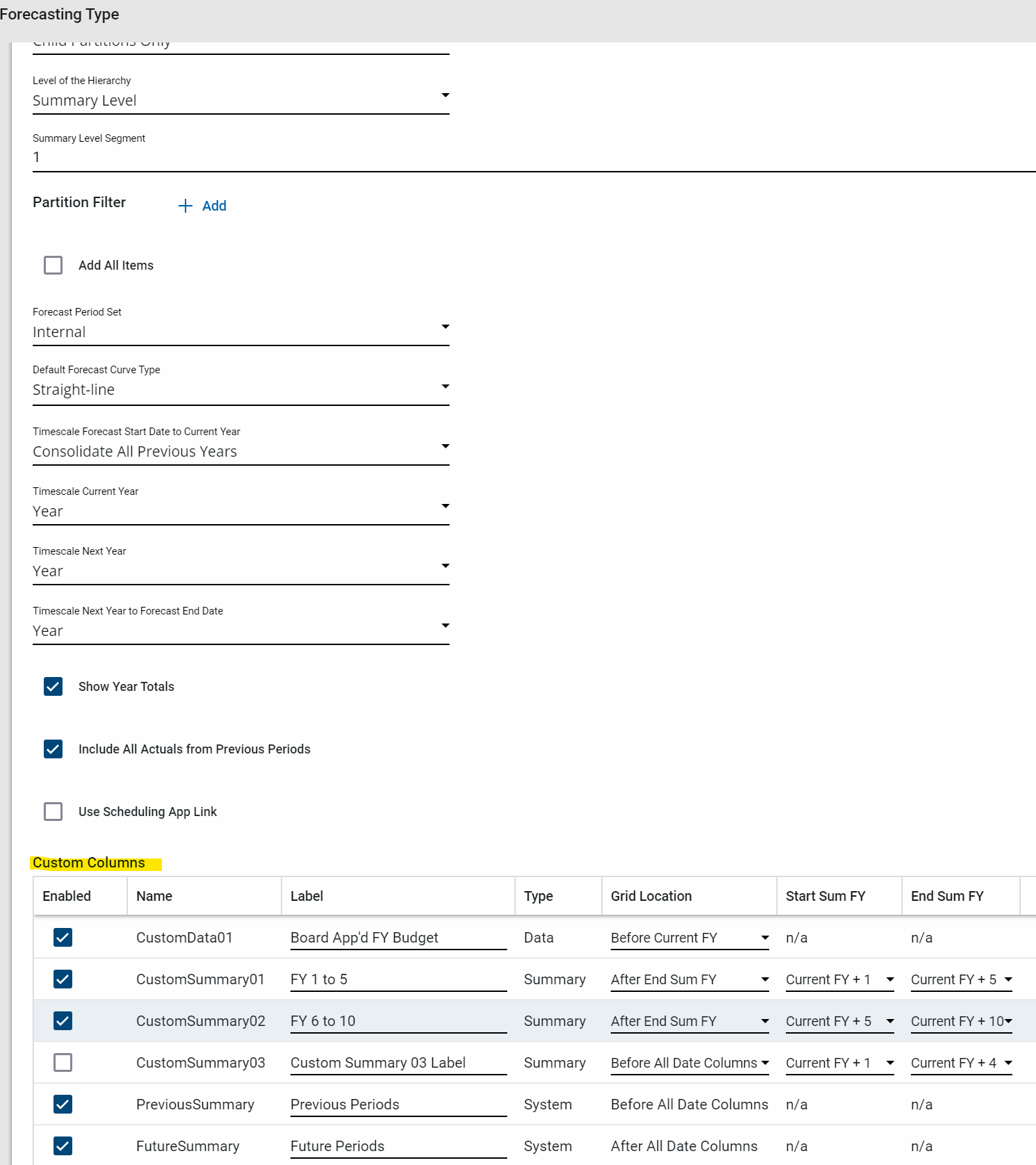
| Grid option | Description |
|---|---|
| Enabled | Controls display of the column in the Cashflow Forecast Type. |
| Name | Internal name of the column. This is the name of the column in the data store, API, etc. |
| Label | Display label used in the Manage Cashflow grid. |
| Type | Internal system type for each custom column. |
| Grid Location | Controls where the column is displayed in the Manage Cashflow Grid. For Summary Columns, can choose to display before or after the Start Sum FY or End Sum FY. |
| Start Sum FY | Start of the Fiscal Year(s) to summarize. Applicable to Summary Type custom columns only. |
| End Sum FY | End of the Fiscal Year(s) to summarize. Applicable to Summary Type custom columns only. |
Cashflow Forecasting - Allow item start and end dates outside of the Cashflow start window
The following applies to the Kahua-supplied Cashflow Forecasting app.
Prior to the 2026.1 release, the only data included in the cashflow forecast was contained in forecast date window. With the 2026.1 release, the start and end dates for a cashflow forecast are more like a sliding window across the available Financial Periods available in configuration.
Revised End Date logic - With the addition of the Future Period columns, all forecasts going beyond the last date displayed on the cashflow are calculated based on the item start date / end date and the curve, but put into the new Future Period column.
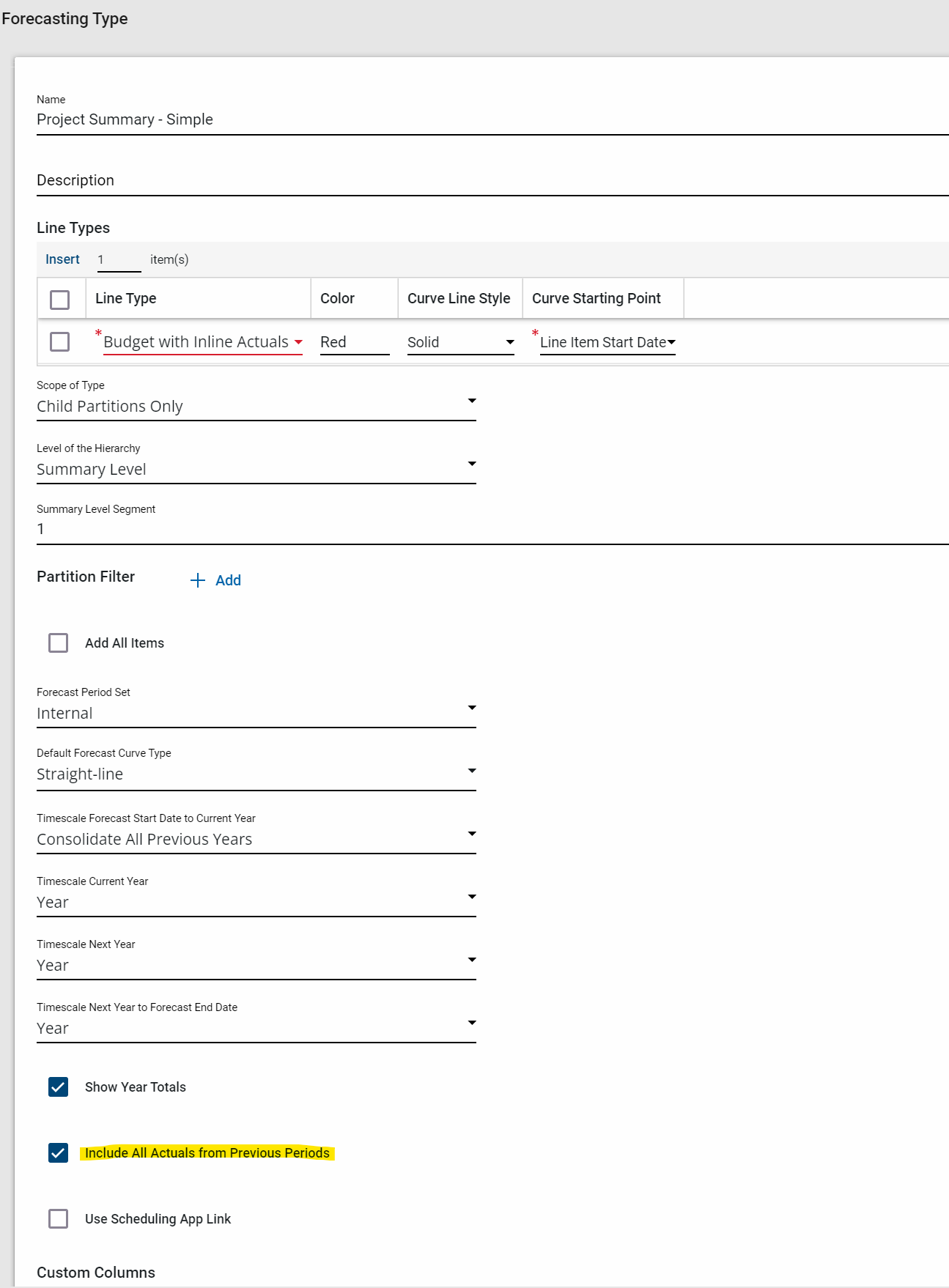
Revised Start Date logic - The logic for what Actuals to include prior to the start date of the cashflow forecast or the item start date is as follows:
-
For backwards compatibility, the default logic for Actuals is retained. Only Actuals within the overall cashflow window, and after the item start date, are included. The use case for this option is when the content is restricted to a given time period.
-
For ensuring all historic Actual data is included, a new option has been added to the Cashflow Forecast Type Configuration - Include All Actuals from Previous period.
When this option is selected, Actuals with dates before any displayed dates (but after the first Financial Period) are added into the new Previous Periods column.
Cashflow Forecasting - Additional summary row options
The following applies to the Kahua-supplied Cashflow Forecasting app.
The Cashflow Forecasting app allows for a flexible display of projects, parent projects, and child WBS items at various levels of summarization. With all of these summarization options, its possible for a cashflow to either show too many summary rows for a program or project, or miss out showing an overall summary for all the data in the cashflow.
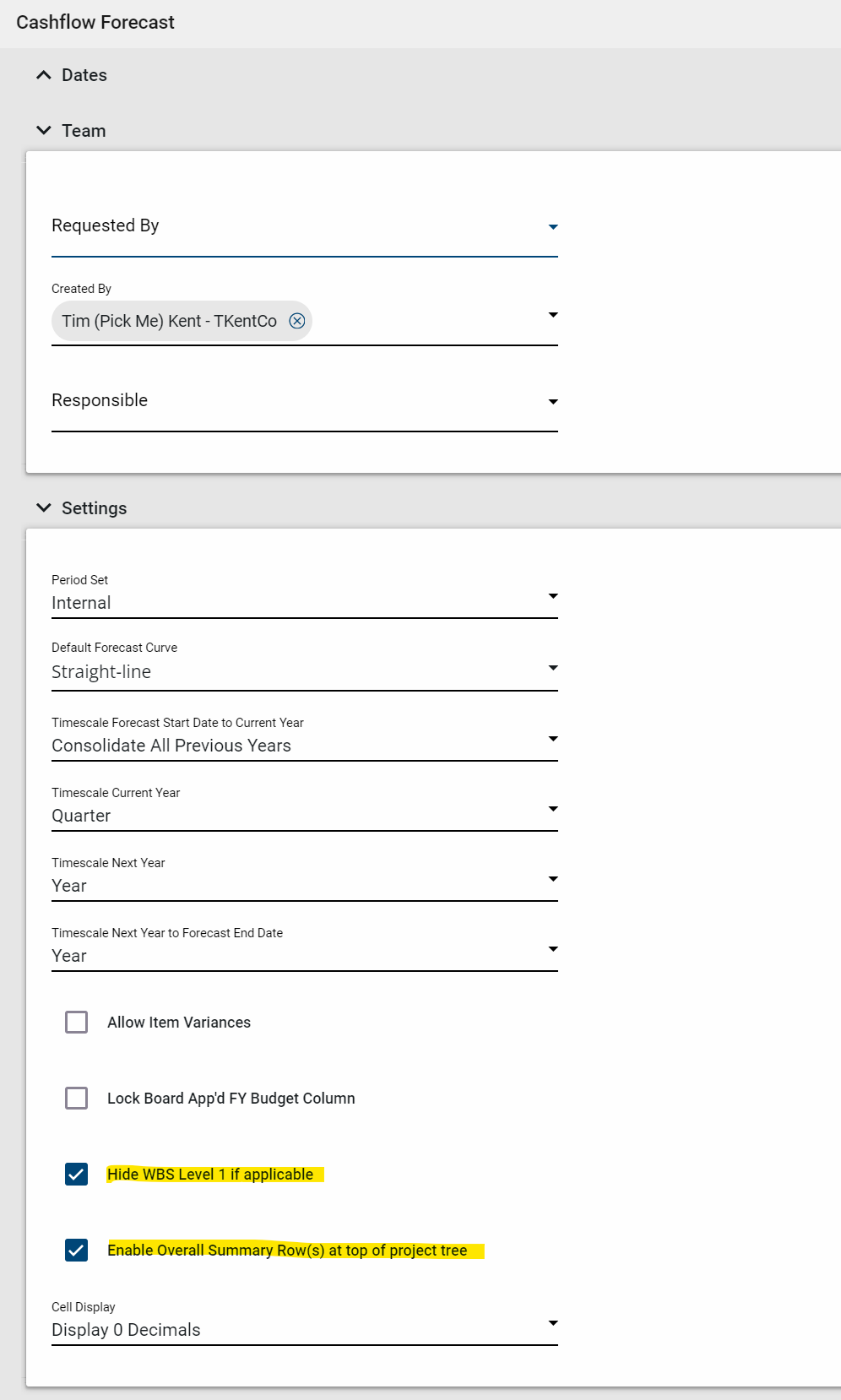
Two new summary rows options are now available on each cashflow document, accessible under Cashflow Document/ Setting:
-
Hide WBS Level 1 if applicable - The recommended implementation is to have the top level WBS represent the entire project.
When WBS level 2 (or higher) is selected, the cashflow displays WBS Level 1 and the project summary row, which is redundant.
When this option is checked, the system hides the WBS Level 1 row for all leaf level projects, removing the redundancy.
Note If a project has nested child projects, the parent project's WBS Level 1 row is displayed, representing the contribution of that parent project's data to the cashflow.
-
Enable Overall Summary Row(s) at the top of the project tree - Depending on different options and settings, an overall summary of the cashflow may not be presented.
When this option is selected, the system adds the parent program summary row(s) to the top of the cashflow grid.
Cashflow Forecasting - Control displayed decimals, optionally show in thousands / millions
The following applies to the Kahua-supplied Cashflow Forecasting app.
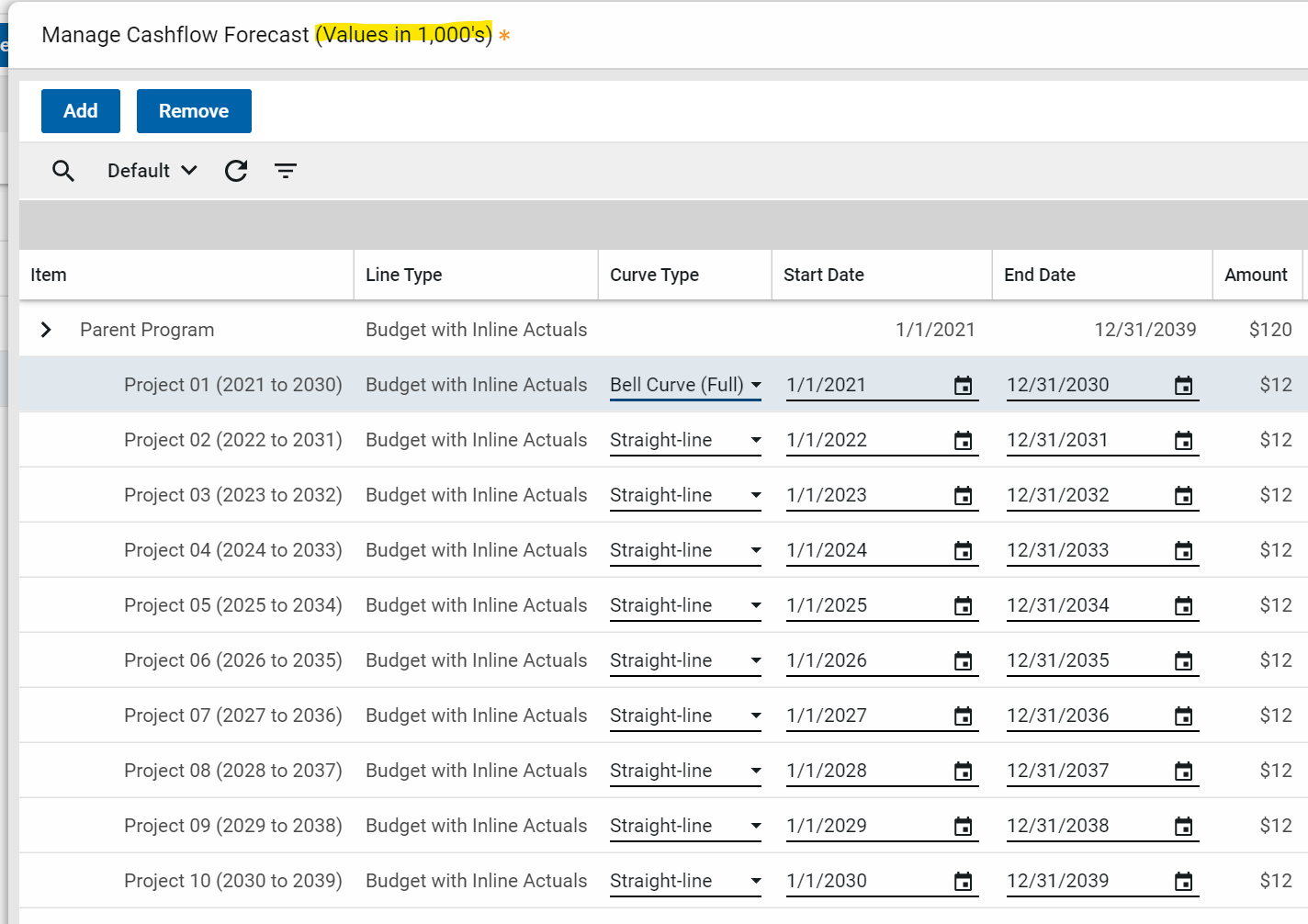
The Cashflow Forecasting app can now control the Cell Display of decimals and the units (thousands, or millions) the cashflow grid's data is displayed.
On the cashflow document, under the Settings, select one of the following options:
-
Currency's Decimals: display the number of decimals of the currency
-
Display 0 Decimals: removes all decimals
Example $12,456.78 displays as $12,457
-
Display in 1,000's: divide all displayed numbers by a 1,000.
Example $12,456.78 displays as $12
-
Display in 1,000,000's: divide all displayed numbers by a 1,000,000
Example $12,456.78 displays as $0
Note If you select one of the Display in . . . options, editable cells will switch to the full currency while the cell is being edited.
Also note that rounding gaps will be visible, as the underlying data values are still used in the summary calculations.
When using an option that divides the values, that will be noted at the top of the page.
Cashflow Forecasting - Show Project Number
The following applies to the Kahua-supplied Cashflow Forecasting app.
The project number is now included in project rows in the cashflow forecasting grid and when using Add or Remove projects.
Note The project number will only appear on Manage Grid for cashflow documents created after the 2026.1 release.
Contract Links in Cost Apps
This update applies to Kahua for Owner, Education, General Contractor, and Subcontractor using the Expense and Funding applications.
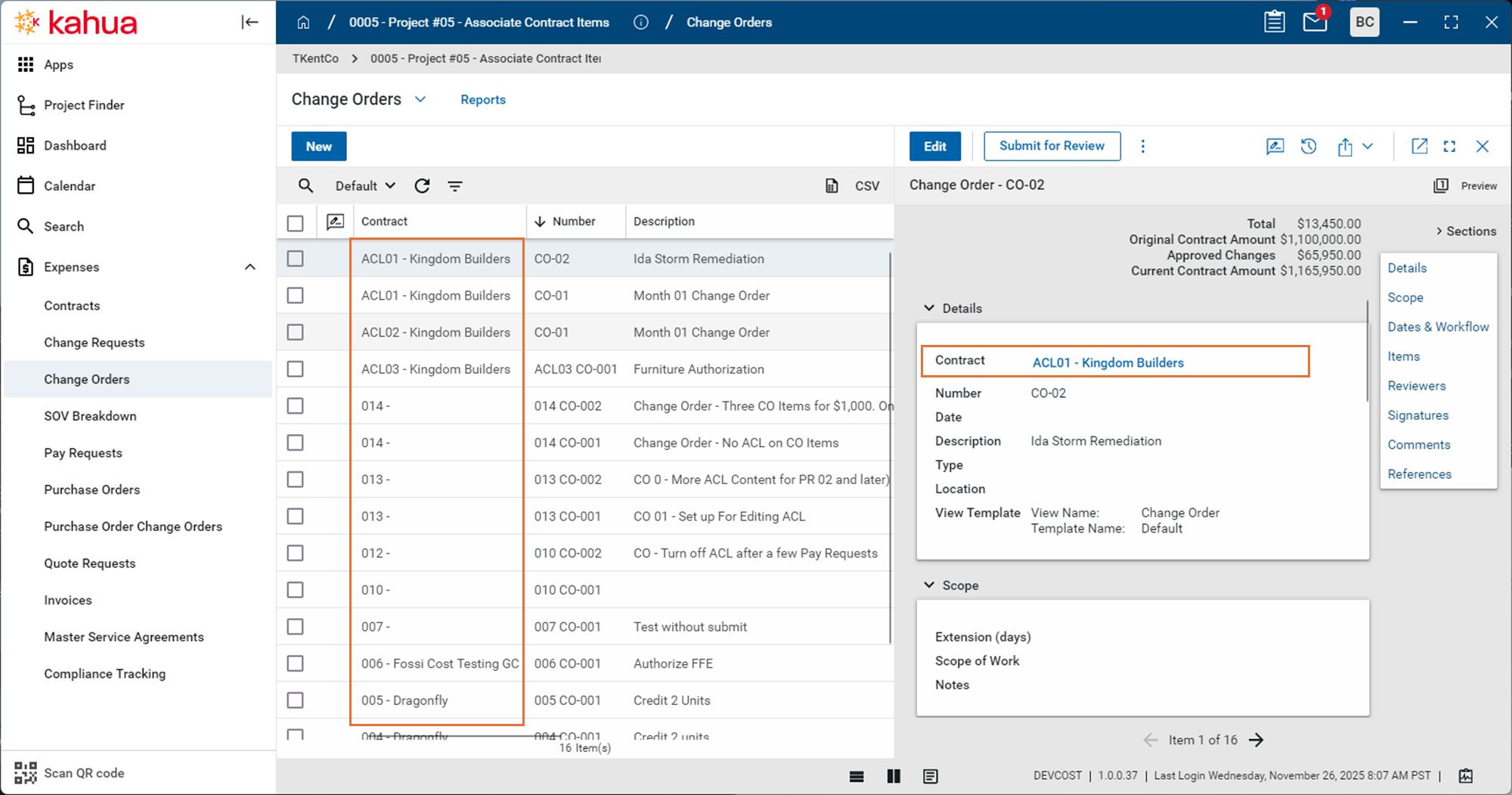
To reduce navigation confusion, contract and purchase order columns in the logs are no longer clickable.
Previously, you could unintentionally navigate away from the current app by clicking these links instead of selecting the record.
We have made the following changes:
-
Contract / PO columns now display plain text instead of links.
-
The Detail pane provides the hyperlink to the related document.
-
Record selection behavior in logs is unchanged.
This change improves usability while preserving access to parent records.
Multi-Project Document Item Views - Parent CUI Classification
This update applies to Kahua for Owner, Education, General Contractor, and Subcontractor domains using Multi-Project Documents (MPD) in the Cost applications.
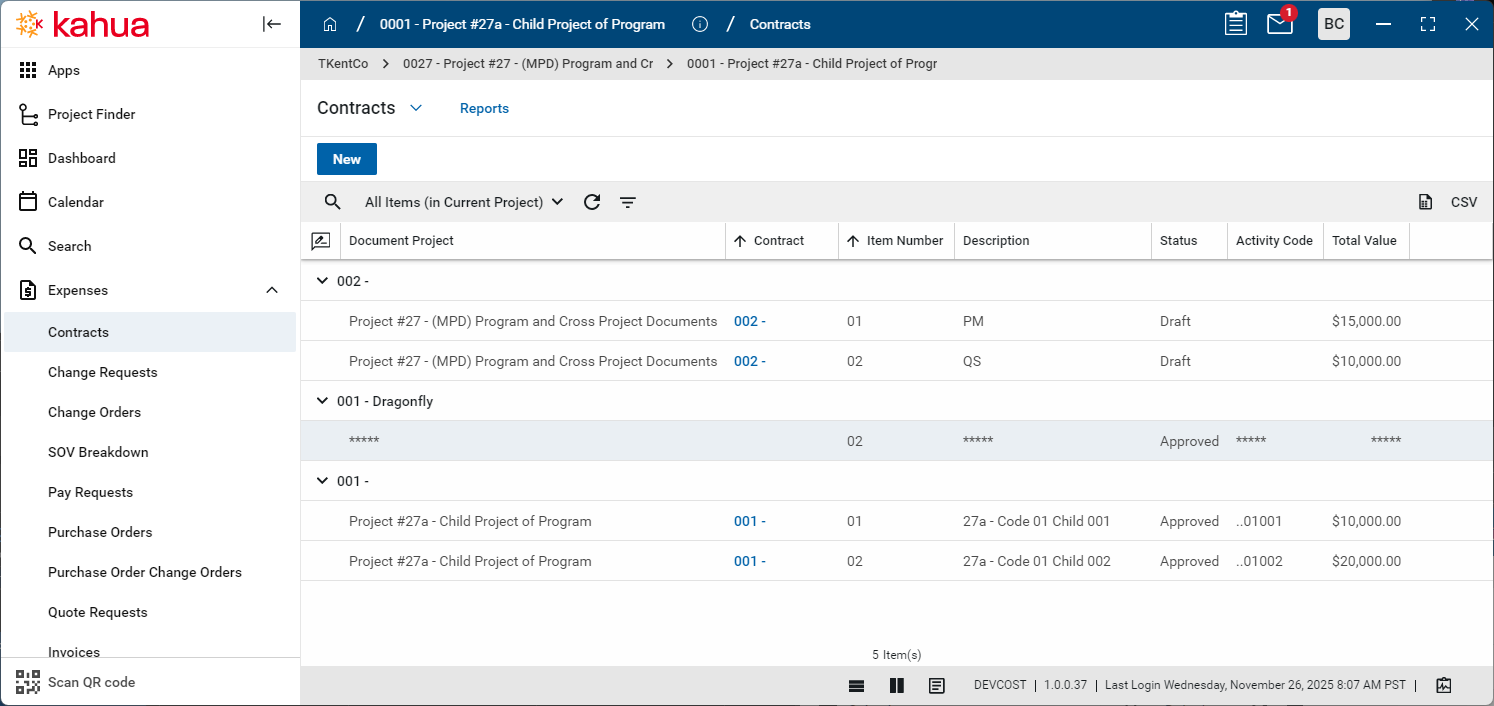
Item-level views for MPD records now enforce the CUI classification of the parent document, including when items are assigned to child projects.
Previously, domains using the MPD feature could not enable CUI on documents. This restriction has been removed and both features can now be used together.
What’s changed:
-
MPD item views obey the CUI status of the parent document.
-
Items belonging to Restricted documents are obfuscated for users without access.
-
Behavior is consistent across default views, item-specific views, and custom-defined views.
This update affects item views, where items are visible without opening the parent document.
Pay Request - Refresh from Previous available when unlocked
This update applies to Kahua for Owner, Education, General Contractor and Subcontractors using the Kahua-supplied Pay Request apps.
Refresh from Previous pay requests is now available when pay requests are unlocked for Admin users. This simplifies the process of pulling forward critical progress changes to subsequent pay requests, particularly if subsequent pay requests are locked.
Note There is no change to the existing Refresh from Previous business logic. This update just adds the button to unlocked pay requests.
Pay Request - Refresh supports changing Associated Contract Line on Non SOV Contracts
This update applies to Kahua for Owner, Education, General Contractor and Subcontractors using the Kahua-supplied Contract, Change Order and Pay Request apps.
Note This update affects only standard (non-SOV Breakdown) contracts using Associated Contract Lines (ACL), also known as Consolidating Cost Items.
Previously, Kahua allowed the editing of the associated contract lines (ACL) on change order items, but the revised ACL value was not pulled through to the related pay requests. Beginning with the 2026.1 release, revisions to a change order item's ACL value will be pulled through. This will happen automatically for new pay requests, and on-demand when Refresh from Contract is selected. This new functionality will make it easier to manage contracts that use associated contract lines.
The intent is for subsequent pay requests to have the same content as if the new ACL value had been in place from the start. This is not always possible.
The following four types of revisions of an Associated Contract Line will now be supported:
-
Adding an Associated Contract Line to a Change Order item previously not using ACL - This is the most complicated scenario. Kahua needs to retain the original change order item on the Pay Requests for data integrity. The retained Change Order item's Schedule Amount and Progress to date is set to $0. The system automatically transfers any progress to the new associated contract line.
-
Removing an Associated Contract Line on a change order item - Kahua treats this as if the change order item never had ACL. Kahua creates a corresponding change order item on the Pay Request. However, the user needs to manually transfer any related progress from the original Associated Contract Line to the newly created Change Order item.
-
Changing from one Associated Contract Line to another associated contract line - On the Pay Request, Kahua subtracts the Change Order item amount from the original Associated Contract Line and adds the amount to the newly selected Associated Contract Line. However, the user needs to manually transfer any progress from the original contract item to the newly associated contract line.
-
Clearing the ACL on the contract check box on the contract document. - To stop using ACL on a contract, clear the Associate Change Order Lines to Contract Line check box.
On the next Pay Request, Kahua will treat Change Order items with an Associated Contract Line as the second type of revision above, i.e., removing an Associated Contract Line on a change order item.
Note To assist with cleaning up any change order items that might still have the ACL set up, any Change Order with ACL items will display the ACL column to allow editing. Kahua ignores this value on Pay Requests.
Changing the ACL on a change order items is not intended to be a frequent activity. However, it can be critical to either adjusting incorrect ACL assignments, or rethinking how to use ACL part way through a contract.
Portable Views - WBS Segment Information in Word Templates
This update applies to Kahua for Owner, Education, General Contractor, and Subcontractor domains using Word-based Portable Views.
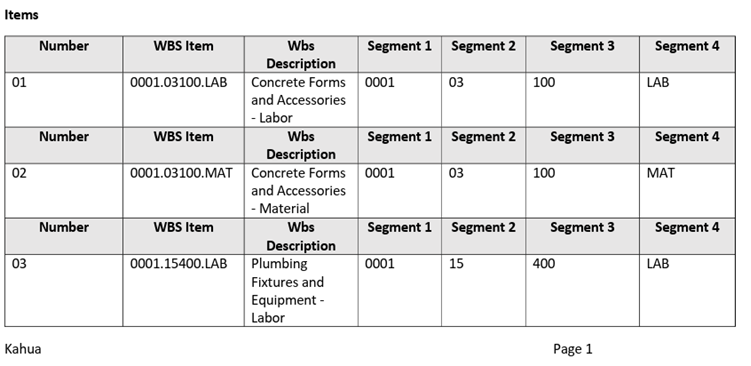
Word-based Portable Views now support accessing WBS segment values directly within templates, aligning Portable Views with existing Kahua variable and condition capabilities.
The following new WBS segment data is available for use in Word Template Portable Views:
-
Individual WBS segment values extracted from a selected WBS code.
-
Segment values can be accessed by ordinal position (1-n, preferred).
-
Segment values can be accessed by configured segment label.
-
Support for standard Portable View source options.
-
Blank output for segments not defined on higher-level WBS items.
Users with access to the Kahua Wiki can reference this page for more information on creating portable views.
Bid Management
Public Bidder Management - Add and autoconvert interested parties
We have made managing your public bidders easier for your Bid Managers. When a public bidder expresses interest in a bid package on your website, they will now be added to a new Interested Parties section on the Bid Solicitation > Bidders tab. The Bid Manager will determine whether to convert the Interested Party to a Bidder and send an invitation.
To minimize the addition of duplicate companies, Kahua will search existing companies for potential matches to the Interested Party. The Bid Manager can select a suggestion or create a new company without leaving the Bidding app.
Optionally, a new setting can save more time by automatically converting repeat public bidders who have a recognized email address, and immediately sending them an invitation to bid.
This 10-minute video overview walks through the process.
Assets
Added the ability to define and generate required Submittal Items from Assets
Customers utilizing Kahua's Asset Centric Project Management now have the ability to define the required Submittal Items needed for both Assets and Types. This functionality provides you with the ability to clearly define all required submittal needs for each type and asset, removing the need for end-users to have to manually tag the records upon creation.
A new Required Submittals section has been added to records in the Classes-Master application. This section contains a pair of item grids that allow users to define what Submittal Item records are required for each asset and type created of that class.
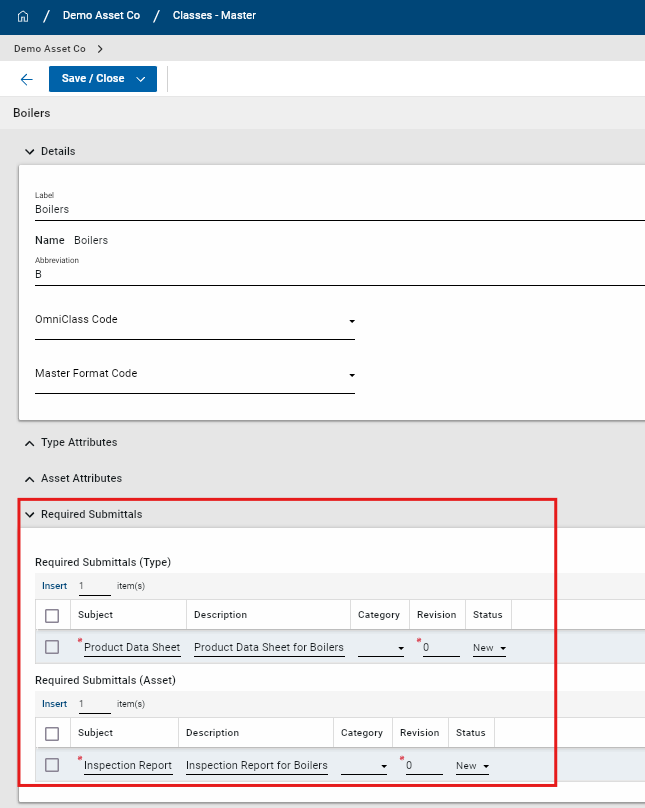
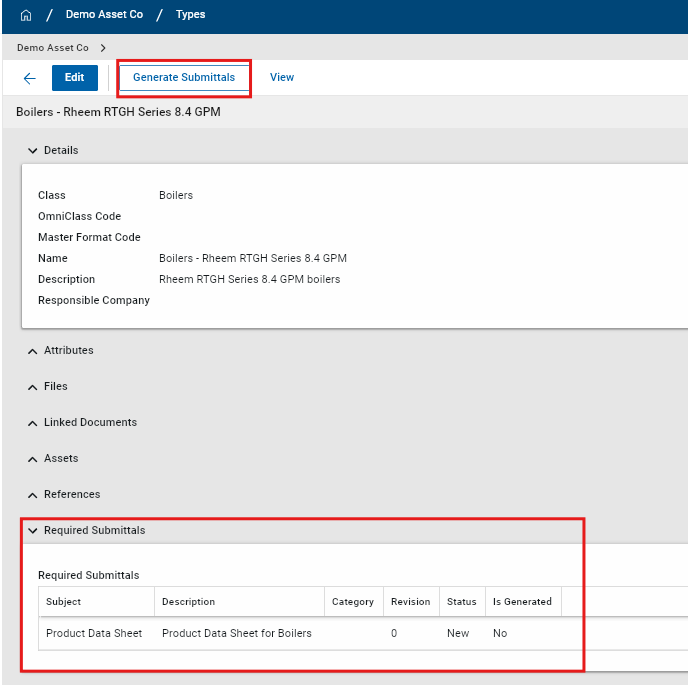
Once defined at the class-level, users are able to automatically generate the required submittal items at the individual type and asset level. When a type or asset is created, a new section appears at the bottom of the form called Required Submittals. This indicates what submittal items are required and if they have already been generated for the type or asset. Users also have the ability to add additional required submittal items at the individual type or asset level.
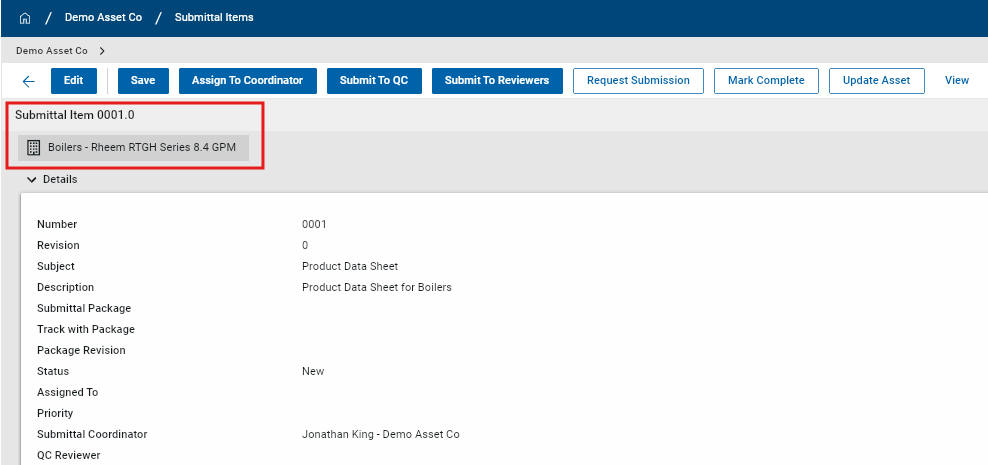
You also have a new Generate Submittals action available at the top of the Type or Asset record. When this action is selected, new submittal item records are generated in the Submittal Items application and the corresponding Type or Asset are automatically tagged. If the Generate Submittals action is initiated multiple times, only the submittal items that have not yet been generated will be created. Duplicate submittal item records are not created.
The new functionality must be enabled in Configuration > Classes-Master and is disabled by default. In the Settings tab, users toggle Enable Required Submittals to allow this functionality to be utilized.
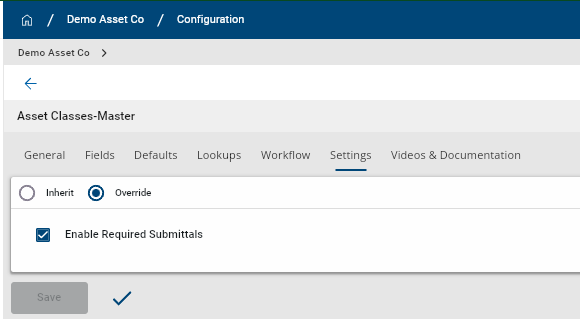
Compatible Submittal Items Application: kahua_AEC_SubmittalItem
Integrations
Outlook Plugin - Added ability to add emails and attachments to File Manager
Users are now able to add Outlook emails and email attachments into folders in the Kahua File Manager app. Supported File Manager folder types are:
-
Files
-
Media
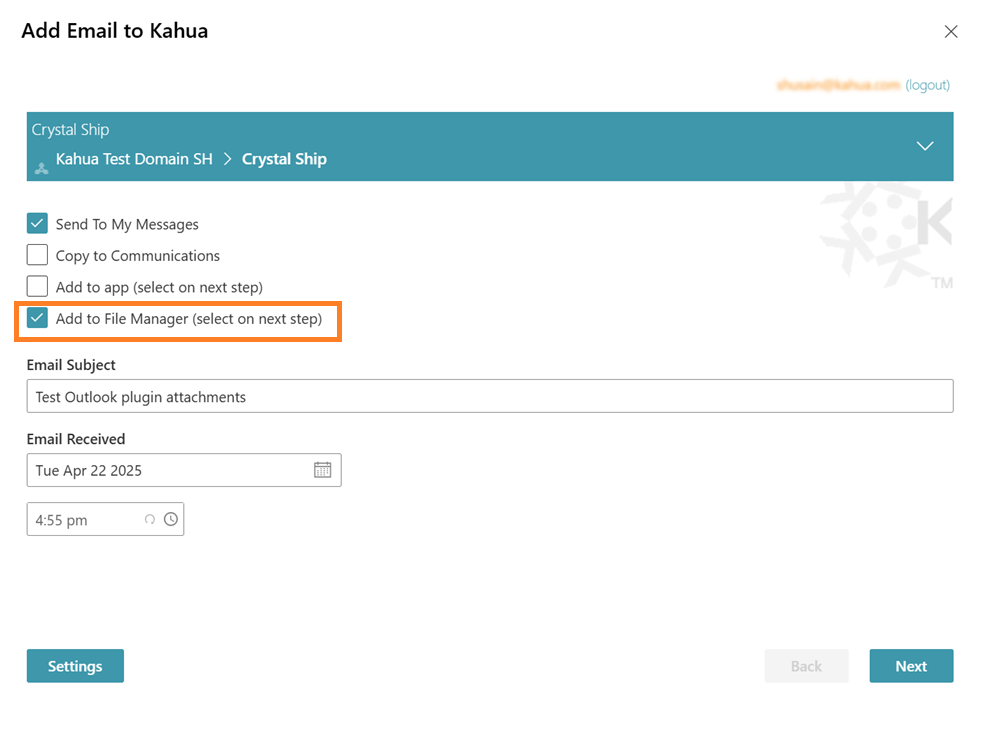
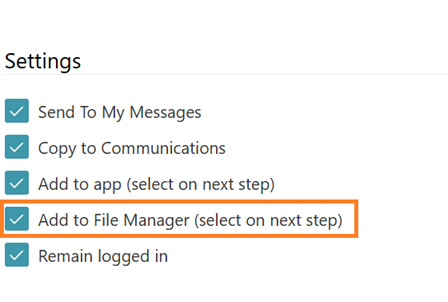
Note Adding files to Controlled folders and Pinnable folders from the Outlook plugin is not supported.
Kahua Analytics
Kahua for Asset-Centric - Added Document Tracking dashboard
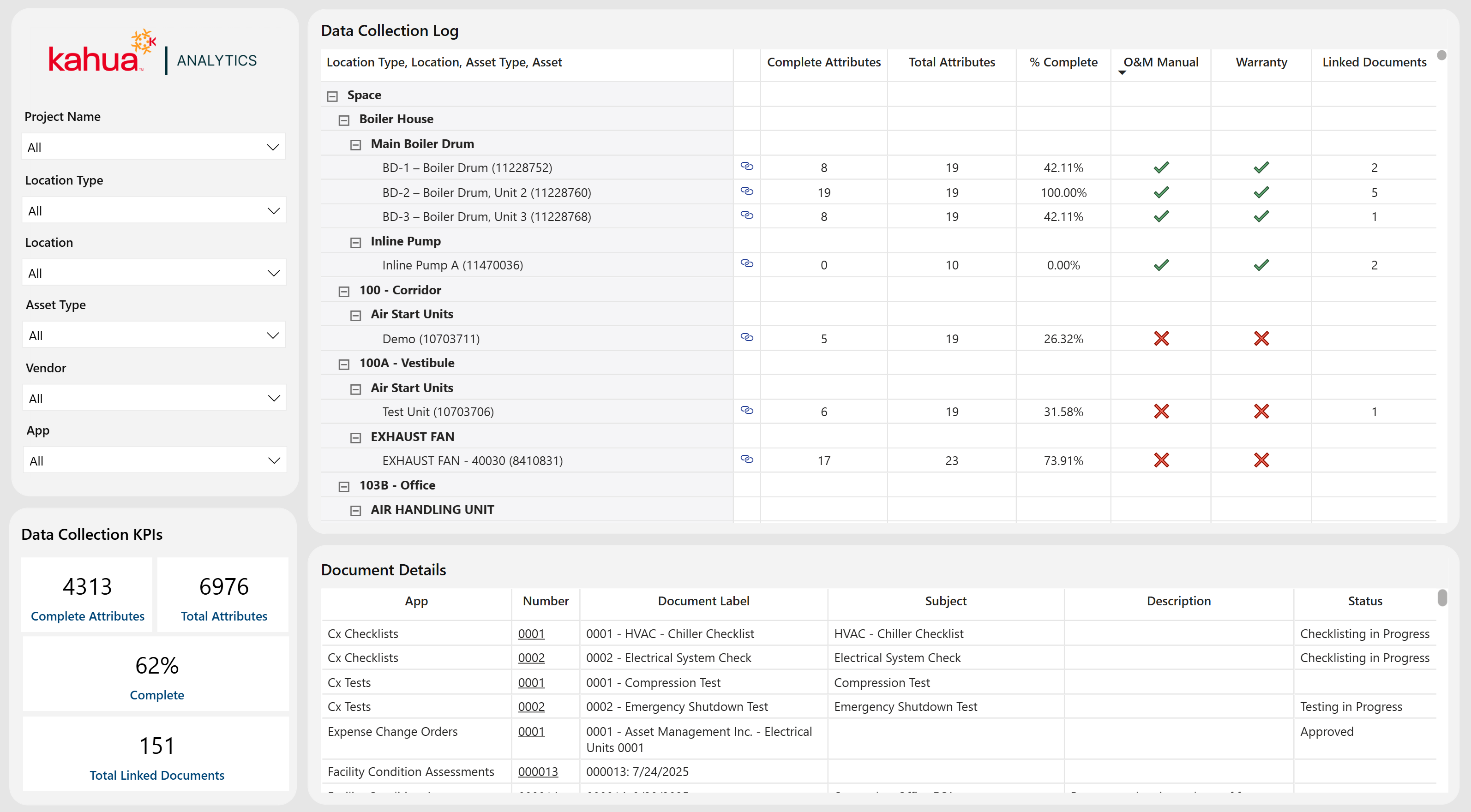
We have enhanced the Asset-Centric Analytics package with a new Document Tracking dashboard that provides actionable insight into the health of your asset portfolio by centralizing asset-related documentation and data completeness.
This dashboard links assets to their associated, tagged documents, enabling teams to quickly evaluate document coverage, completeness, and overall readiness in a single view. It includes asset-level document counts, attribute data collection status, visibility into key closeout indicators such as O&M Manual and Warranty documentation, and drill-down capabilities to review document record details tied to specific assets.
This dashboard reports on tagged documents across various applications - including Submittals, RFIs, Issues, Daily Reports, Facility Condition Assessments, and others - to provide comprehensive lifecycle coverage. Expanding the Asset-Centric Analytics offering, Document Tracking delivers deeper insight into documentation gaps, compliance progress, and handover readiness to support stronger asset portfolio management.
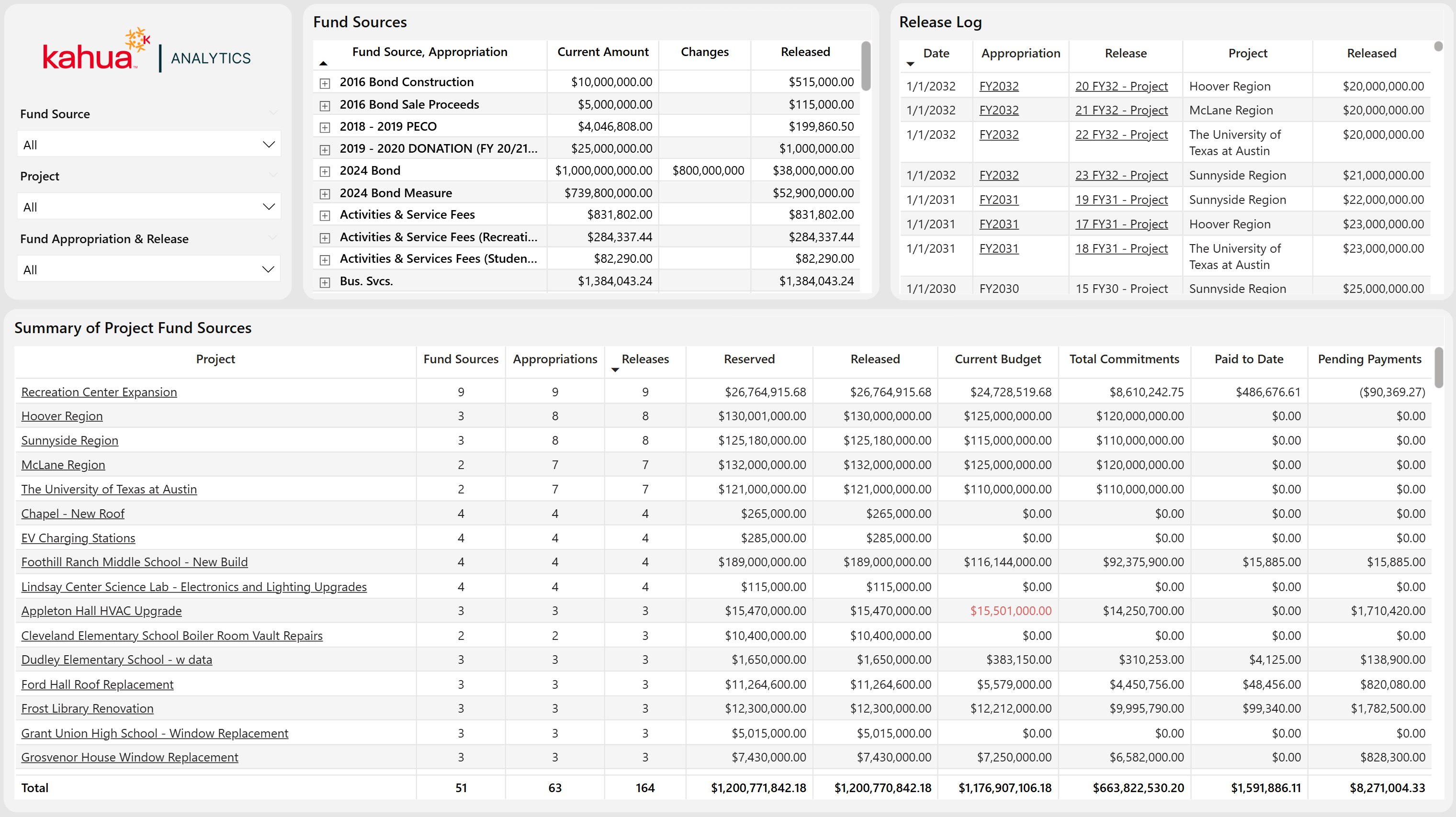
Kahua for K-12 Education - Simple Fund Source Dashboard
We are pleased to announce the introduction of a brand new Fund Source dashboard to the Kahua for K-12 Education package. This dashboard enhances visibility into the Fund Source application across your domain. This dashboard is detailed, yet easy to digest for a process that can be as complex as Sources of Funds. In addition to this new dashboard, the Kahua for K-12 Education package can now provide users with a time series view of their Sources of Funds data without the need to use Cashflow Forecasting.
Fund Sources
This dashboard displays high level totals of overall fund sources in the top table visual.
The bottom table gives users a granular view into a project's fund source information compared to their budgets, expenses, and actuals. This can help remedy projects with a lack of funding as well as the reallocation of funds for projects with too much funding.
Using the built-in filtering capabilities of Kahua Analytics, a user can select a fund source, filtering the rest of the dashboard to view the projects that are funded from the selected fund source. This simple filtering capability gives immediate clarity of the Sources of Funds application across a user's domain.
Kahua for K-12 Education - Updates to Cashflow SOF
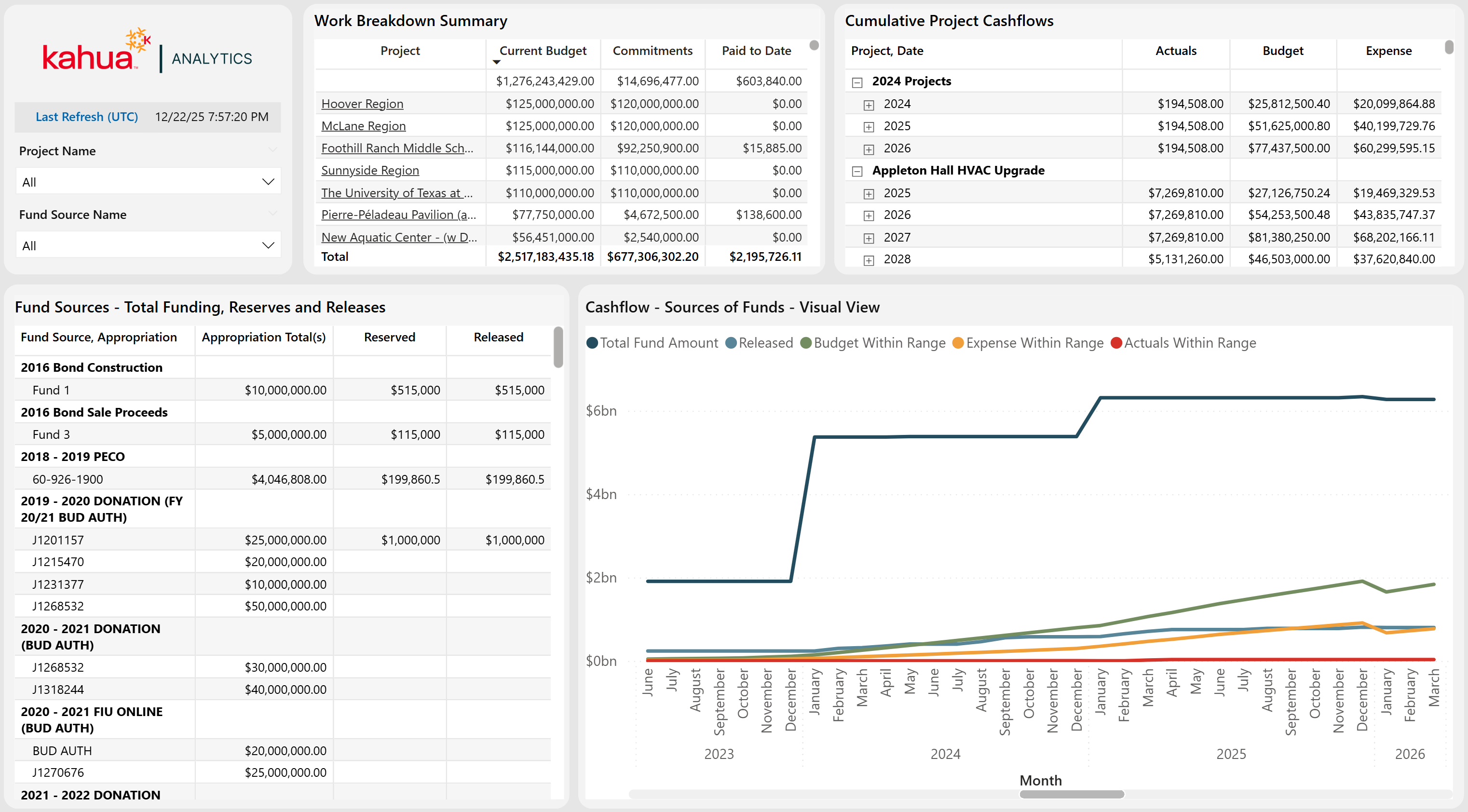
Cashflow/Sources of Funds
We are excited to announce updates to the Cashflow / Sources of Funds suite of dashboards! These updates are mainly data model-centric, improving refresh times and data model efficiency, but there are a few updates that will enhance the way these dashboards function.
Timeseries Functionality
Another prominent enhancement from these data model changes is the ability to view Cashflow Forecasting or Sources of Funds information in these visuals even if only one of these applications is being utilized. These visuals no longer depend on the domain having both applications and can be used standalone to track Total Funding vs Releases or Cashflow Forecasting amounts.
Kahua for K-12 Education - Financial report updates
Financial Report Updates
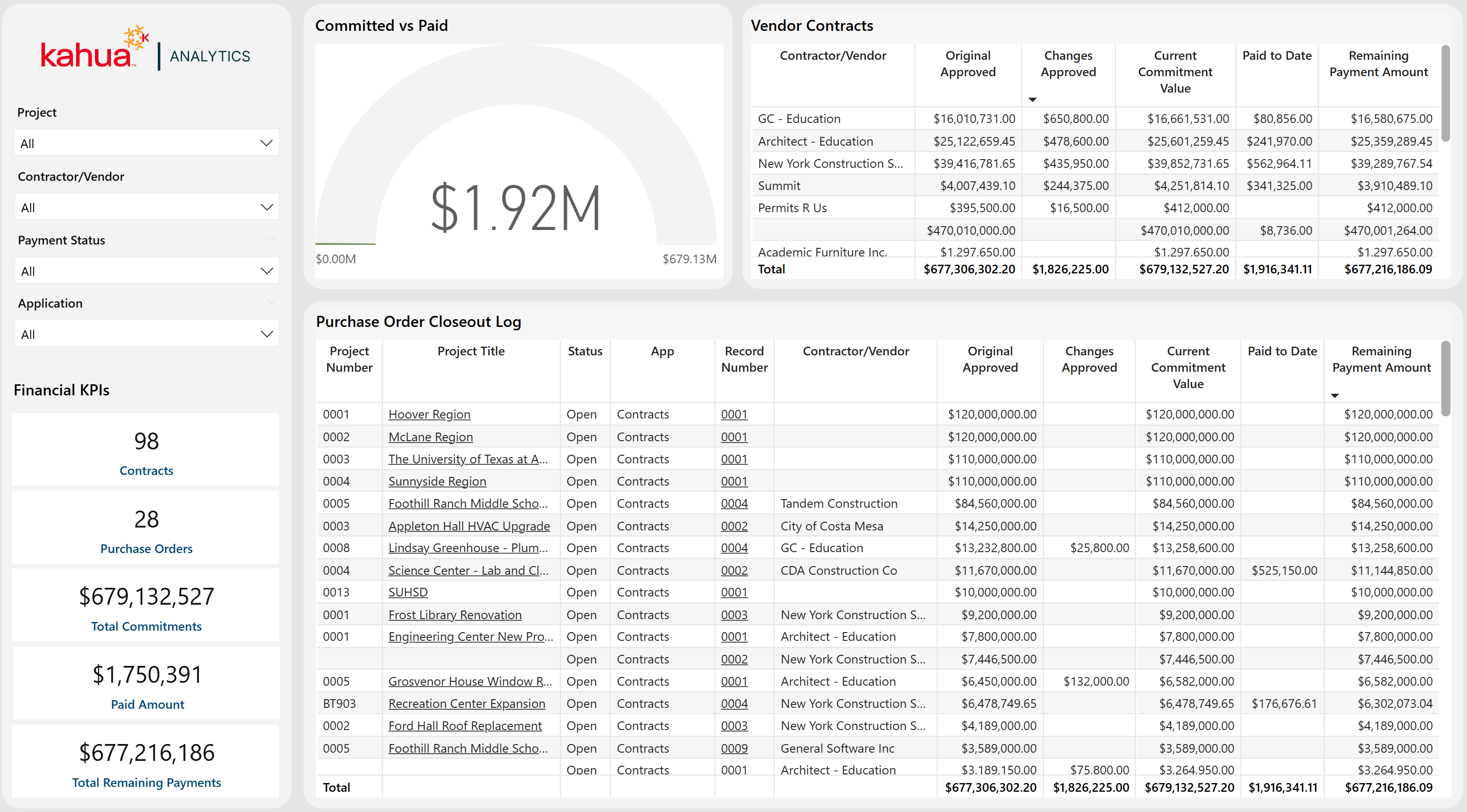
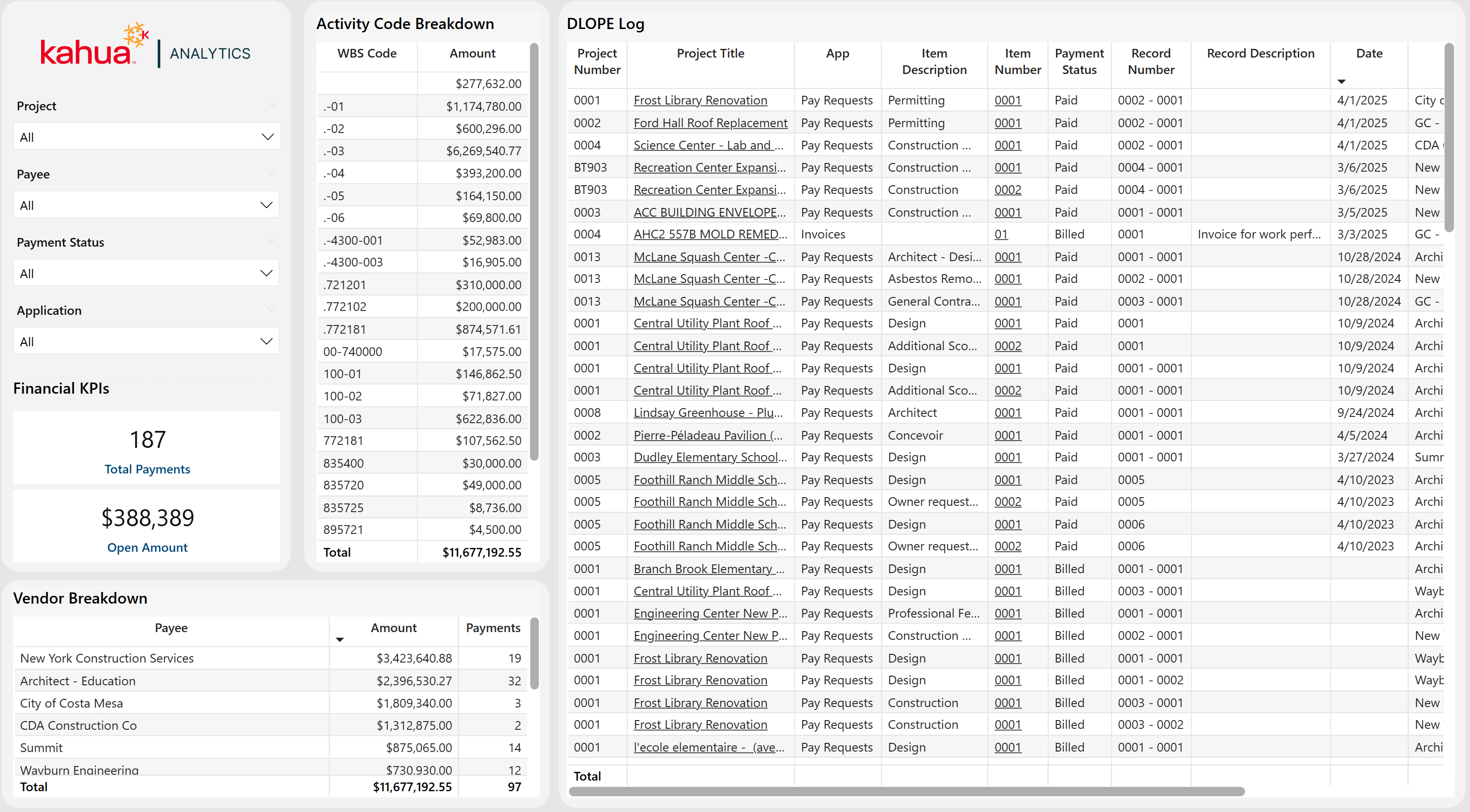
We are excited to announce updates to our "report" dashboards that come with the K-12 package. The Purchase Order Closeout Log and Detailed List of Project Expenditures dashboards have previously served as export-ready reports outlining commitments and payments respectively. The new updates outlined for 2026.1 keep that export-ready functionality while adding context such as vendor, paid to date, and payment remaining.
PO Closeout
The Committed vs Paid visual is meant as a filterable KPI based upon context that is selected across the dashboard. Whether the dashboard is at a portfolio, project, vendor, contract level, or any combination in between, this visual shows the amount paid compared to the total amount of the contract.
The Vendor Contracts visual gives additional detail to the PO Closeout Log. Instead of giving users access to a log with vendor as a column, this visual provides totals for each vendor that filters with the rest of the visual. As a user filters to a particular project (or subset of projects), the visual will show the vendors associated with that project and their contract totals.
DLOPE (Detailed List of Project Expenditures)
The updated functionality in this dashboard is to help support users that need to fill out their DLOPE report. In addition to the export-ready functionality, users can click into the new WBS Code visuals, displaying only payments made on those WBS Codes. For users that have detailed WBS Code structures, this dashboard provides high level and granular looks depending on how the user filters.
Kahua for K-12 Education - Fund Rule Dashboard
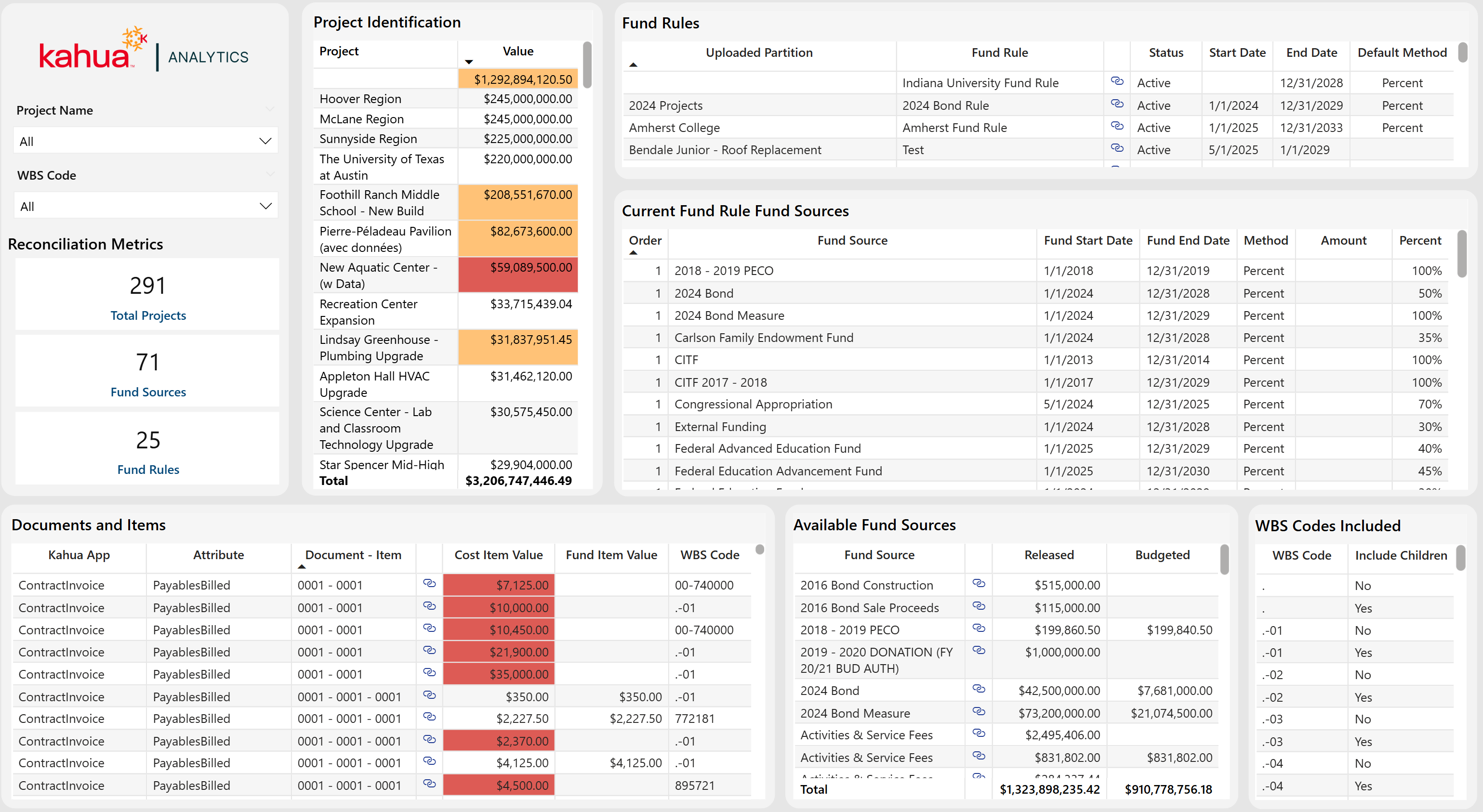
This existing dashboard has been updated to incorporate fund rule logic, providing a simplified, yet detailed layout of all aspects of the Sources of Funds app by breaking down how much funding each cost document has. Users can quickly scan the table to identify projects with fund item records that do not have sufficient funding, enabling faster review and resolution. To make the reconciliation process easier, Kahua Analytics utilizes links directly to your fund source, funding, and expense applications. This makes the process of updating the records with lacking information seamless.
Project Reconciliation View
The Project Identification table allows users to scroll through projects in one consolidated view to pinpoint budgets, budget changes, commitments, commitment changes, and payments that do not have funding via the Sources of Funds app.
Drill-Down Filtering
By clicking into a project cell, users can instantly filter the dashboard to reveal the documents/items that are lacking funding. In addition to filtering the dashboard to identify problem-records, this filters every aspect of the dashboard including active fund rules, fund sources currently being enacted by fund sources, and all fund sources that the project can pull from.
Reconciliation
After identifying the records, this is where the actual reconciliation occurs. Because there is no "one-solution" to fixing all records without funding, this is where the context of the fund rule and fund source filtering comes into play.
Kahua for Owners - Action Items Dashboard
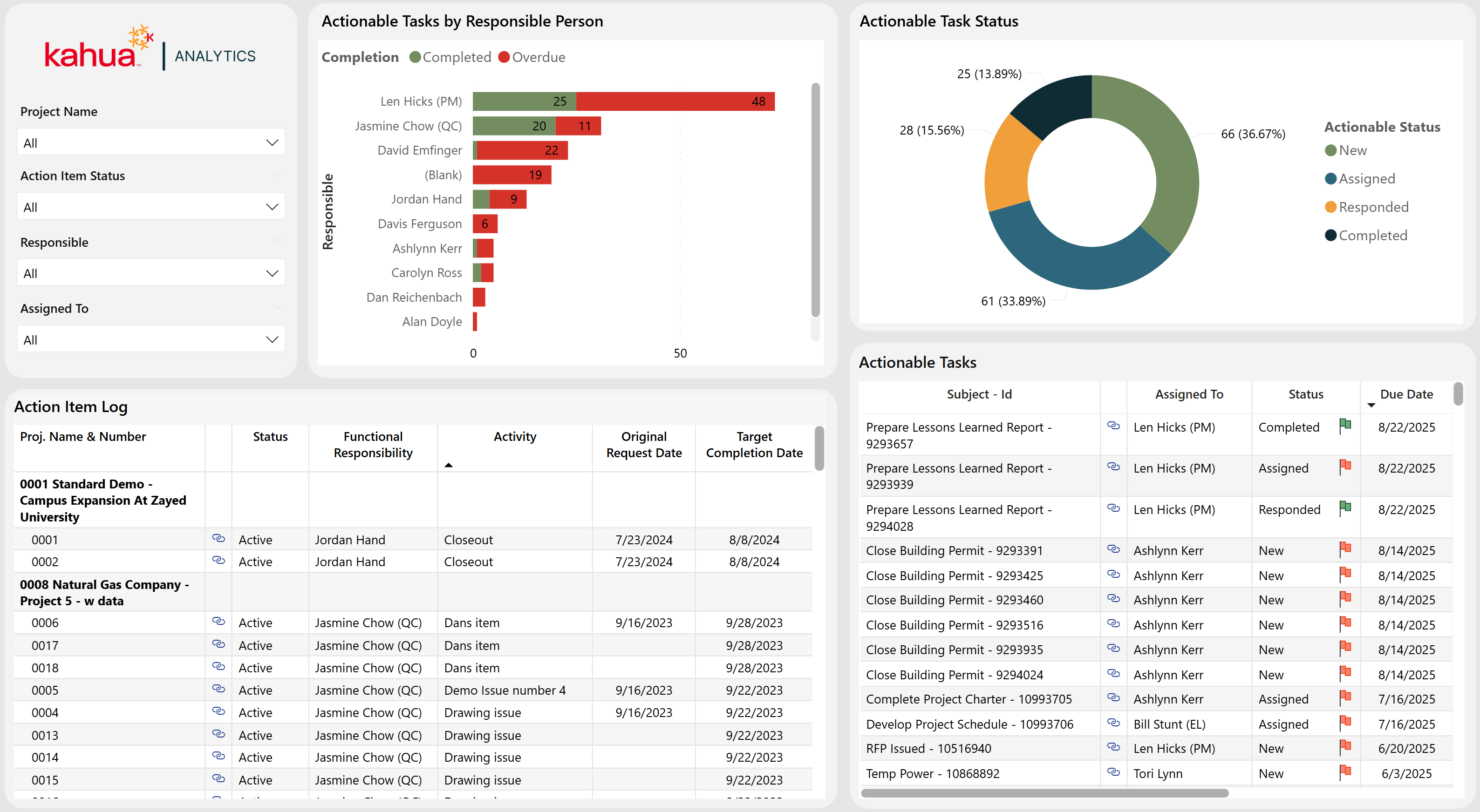
We are excited to introduce the new Action Items Dashboard to our Kahua Analytics for Owner package. This dashboard increases visibility into the Action Items application at the domain and project levels, helping track ownership, due dates, and statuses.
Following the format and methodology of the Kahua Analytics document management dashboards, the layout includes high-level visuals to highlight key insights, paired with a detailed log view that provides record-level information. The two main visuals in the Action Items dashboard display action item count by responsible contact and status. This allows users to see and drill into records that are due for closeout.
In addition to the high-level visuals, the dashboard provides a user with an Action Item Log paired with an Actionable Task Log. These two log views allow a user to select a subset of records, displaying all actionable tasks associated with those action items. Using Kahua Analytics' link functionality, users can view high level information and drill into the records that may need attention.
Kahua for Owners - Milestone Dashboard Enhancements for Cost, Doc Management, and Variances
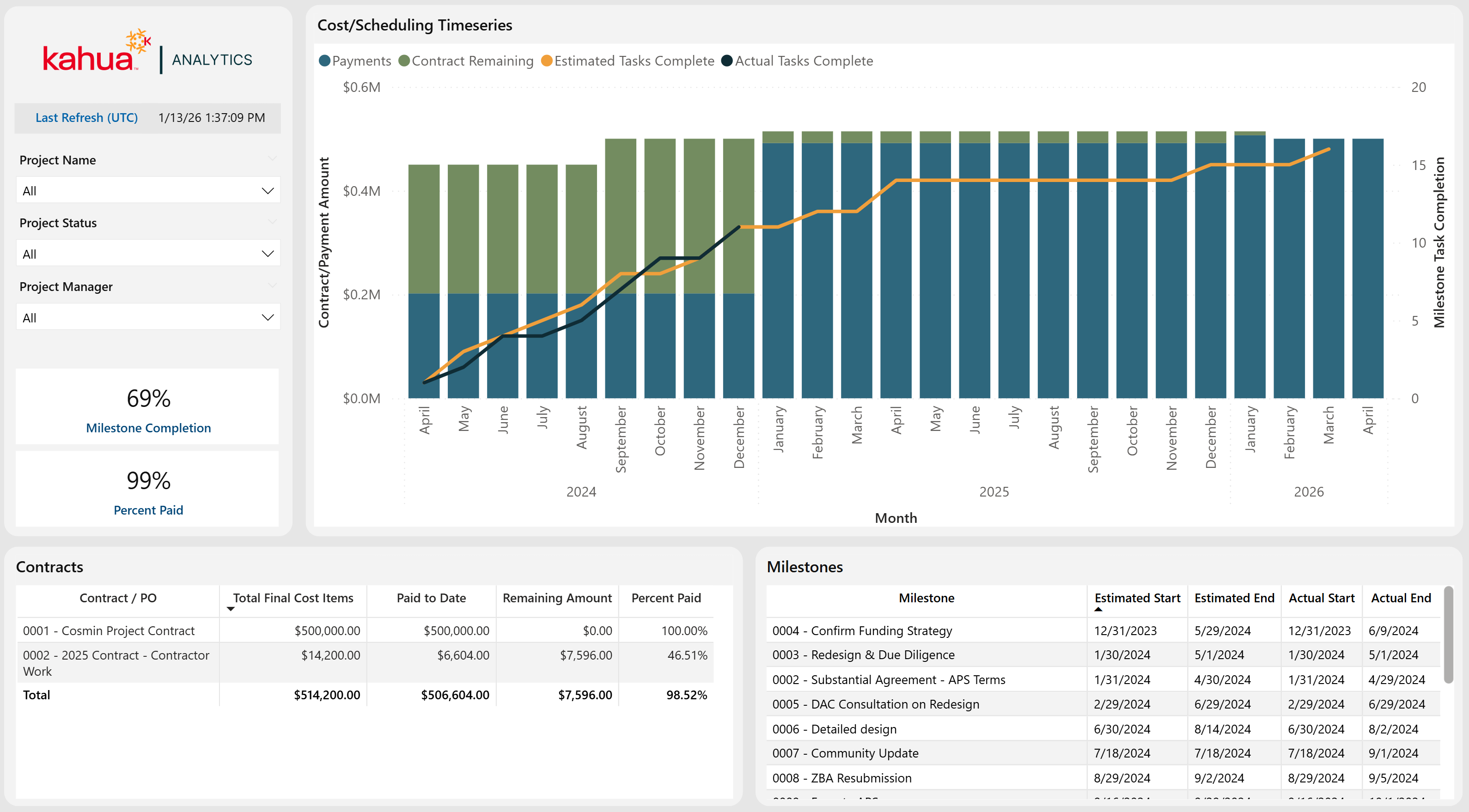
We are excited to announce a new Out of the Box Cost & Scheduling dashboard that brings cost and schedule performance together in a single view. This dashboard combines financial and milestone data to help users understand how project spending aligns with schedule progress over time.
Cost tracking is displayed in the primary timeseries visual, showing:
-
Commitments against budgets
-
Payments against commitments
-
Change Orders
Users can also review the documents that make up the timeseries visual in the log views below.
Scheduling performance is overlaid in the same timeseries visual tracking milestone task completion. By comparing estimated vs actual completion dates, a user can see how changes and payments may be affecting their schedule and vice versa.
Kahua for Owners - Vendor Scorecard Dashboard
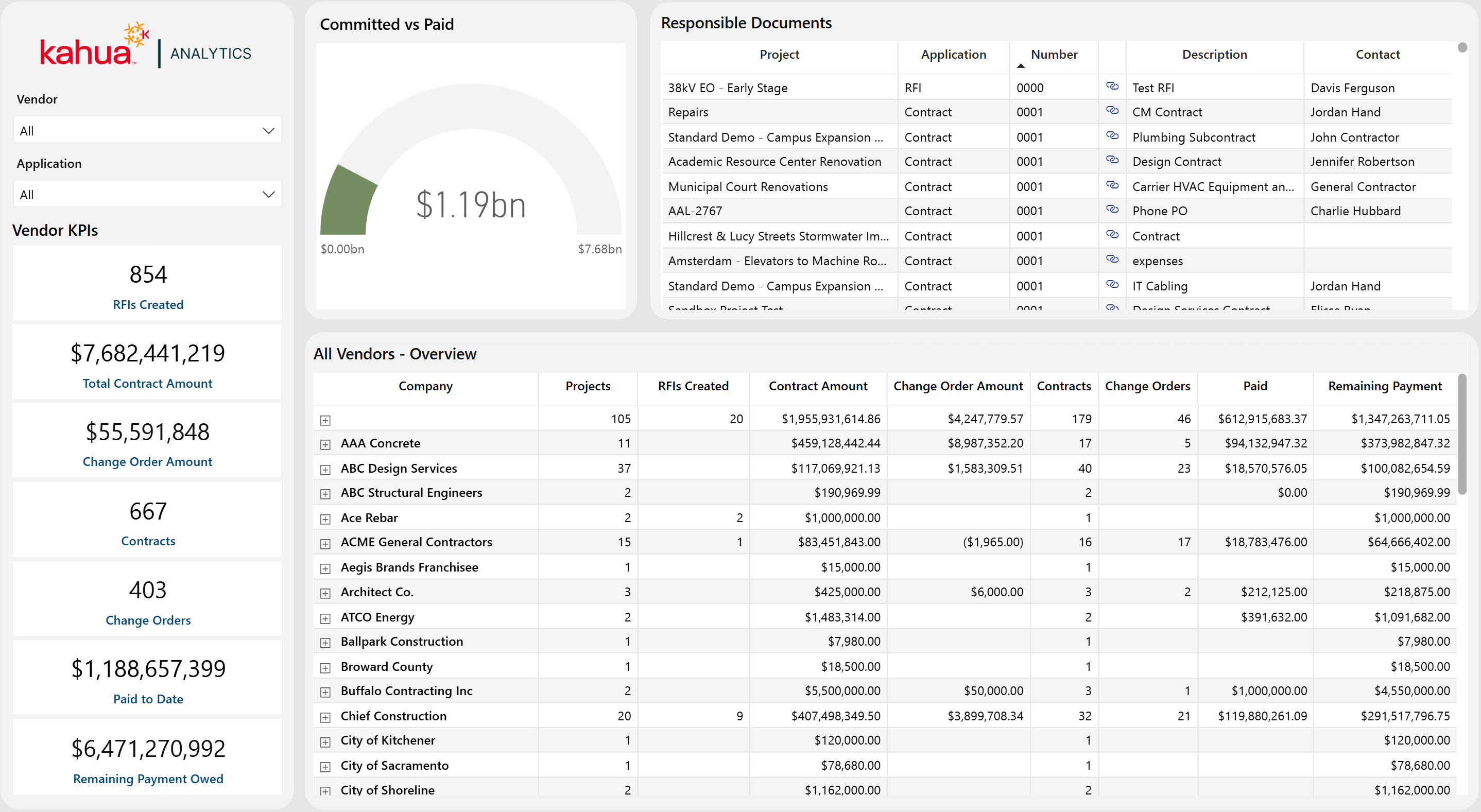
We’re excited to introduce a new Out of the Box Vendor & Contract Overview dashboard designed to provide portfolio-level visibility into vendor activity, project count, change orders, and payments.
This dashboard highlights key vendor KPIs, including project count, total contract amount, change order amount, number of contracts and change orders, payments, and remaining payment owed. A committed versus paid visual summarizes overall financial progress, helping users quickly understand how payments are tracking against committed contract values.
In addition to the high-level metrics, this dashboard includes a Responsible Documents log that displays documents by project, application, and vendor that owns that document, with direct links to the underlying records. The All-Vendors Overview log provides a detailed breakdown by vendor, including project counts, contract amounts, change orders, payments, and remaining balances.
With vendor and application filtering, plus built-in Kahua Analytics link functionality, users can easily drill from summary metrics into supporting records, making it easier to track vendor performance, monitor financial exposure, and follow up on outstanding payments.
Kahua Host Updates
All Kahua hosts have been updated with various enhancements and bug fixes. The Windows host will automatically update upon first launch after the release.
Download the appropriate app for your device:
Release Note Changes
| Date | Revision | Section | Change Description |
|---|---|---|---|
| January 12, 2026 | 0 | All sections | Initial publication |
| January 13, 2026 | 1 | Cost Management | Added "Cashflow Forecasting - Show Project Number" |
| January 15, 2026 | 2 | Document Management | Added "Meetings - Updated time zone used for imports and exports" |
| January 15, 2026 | 2 | Cost Management |
Added "Pay Request - Refresh from Previous available when unlocked" Added clarifications to "Budget Adjustments & Changes - Bypass Cost Guards" and "Cashflow Forecasting - Show Project Number" |
| January 20, 2026 | 3 | Kahua Analytics | Added section |
| January 20, 2026 | 3 | Document Management | Removed "Punch Lists - Added setting to allow any Responsible Company member to complete items" |
| January 26, 2026 | 4 | Document Management | In "Punch Lists - Added detailed report with pin image", report name changed to Punch Lists - Added detailed report with pin image |
| February 2, 2026 | 5 | General | Added "Added new user setting to select view behavior when a child task is present" |
| February 9, 2026 | 6 | Kahua Analytics |
Added the following sections:
|
| February 13, 2026 | 7 | Kahua Analytics |
Added the following sections:
|
| February 23, 2026 | 8 | Kahua Analytics |
Added "Kahua for Asset-Centric - Added Document Tracking dashboard" |