Performance Testing
If a Kahua representative has sent you to this page, you are being asked to complete a couple of tests to help Kahua understand how quickly data moves between your computer and Kahua’s servers. You will be using web-based tools to capture this information. The instructions below use the website https://www.azurespeed.com to complete the testing.
The first test measures latency from your IP location to Azure datacenters worldwide. The second test measures the download speed from Azure Storage Service across different regions worldwide.
To complete this testing, you will need a tool to take screenshots of the test results, such as the built-in Windows Snipping Tool, and a way to transmit the results to the Kahua representative who requested them, such as entering the data into a Word document and emailing the document to the requestor.
 Latency Test
This test measures latency from your IP location to Azure datacenters worldwide. It is useful to perform this test more than once, such as during peak times of your workday when you are experiencing latency, and quieter times, such as the very beginning or end of your workday when you may not be. When you perform the test, please note the date and time and whether or not you are currently experiencing any latency.
To perform the latency test, complete the following steps:
-
Open this webpage - https://www.azurespeed.com/Azure/Latency. This website that measures the time it takes to send data from your IP address location to Azure datacenters worldwide. At the top of the page, you will select the regions to measure latency from, and the results will appear below those selections.
-
Unless specifically requested otherwise, make the following two selections:
-
Choose Select all for the region most appropriate for your physical location (Asia Pacific, Europe, US, Middle East, Canada, South America, Mexico, or Africa). For example, users in Asia will choose Select all for Asia Pacific.
-
In addition to the selection above, select East US 2 in the US section.
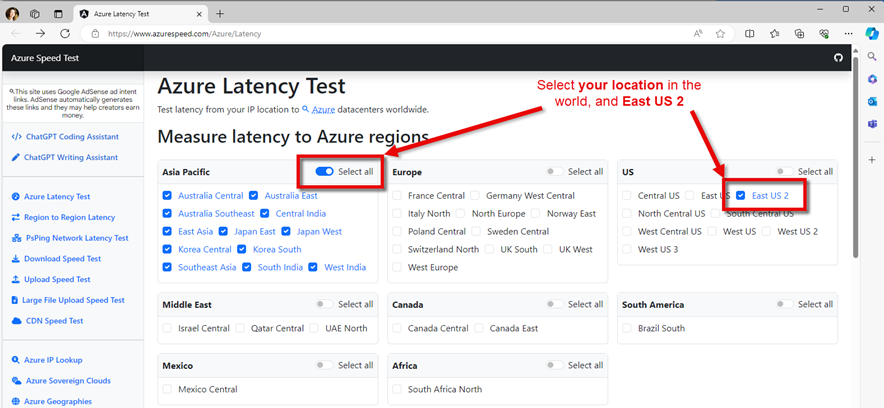
-
-
Once selected, results will begin to appear in graph and table form below your selections. Allow the test to run for approximately five minutes. It is important that the test run for a reasonable period of time in order to provide useful data.
-
After five minutes, take a screenshot of the table section labeled Azure Latency Test Results, ensuring that all rows and all four columns (Geography, Region, Location, and Average Latency) appear in the image.
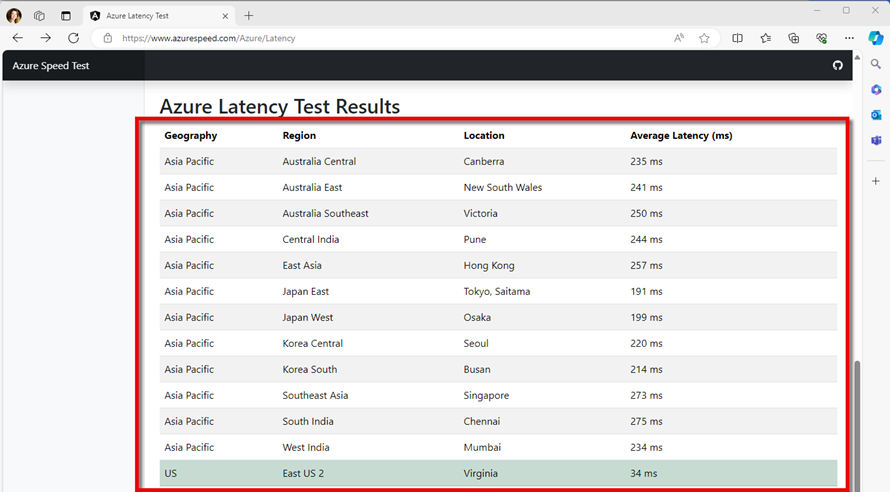
You can use any screenshot tool available to you. If you don’t have a preferred screenshot tool, you can use the Windows built-in snipping tool. To use the built-in tool, enter “Snipping Tool” in the Windows Search bar to locate and open the application. Select the image icon
 , the type of image (any are fine but Rectangle may be the easiest to work with), and click New
  . Select the appropriate area of the screen and capture the screenshot.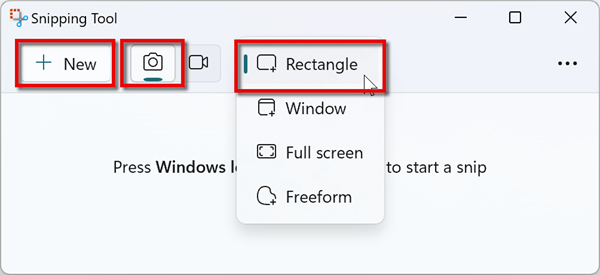
For more information on how to use the built-in Windows Snipping Tool, refer to this page on the Microsoft Support site.
-
Copy and paste the screenshot into a Word document or use another method of transmitting the information. Along with the screenshot, please note the following information:
-
Date and time taken
-
If you were experiencing latency at that time
-
-
Generally speaking, it is helpful to capture results twice: once when you are experiencing latency, and another time when you are not. Once you’ve captured the data, send it to the person who requested it.
Download Speed Test
The second test provides information on download speeds for large files. It is useful to perform this test more than once, such as during peak times of your workday when you are experiencing latency, and quieter times, such as the very beginning or end of your workday when you may not be. When you perform the test, please note the date and time and whether or not you are currently experiencing any latency.
To perform the download speeds test, complete the following steps.
-
Open this webpage - https://www.azurespeed.com/Azure/Download. Note that you can also select Download Speed Test from the left navigation bar after you complete the latency test in the previous section.
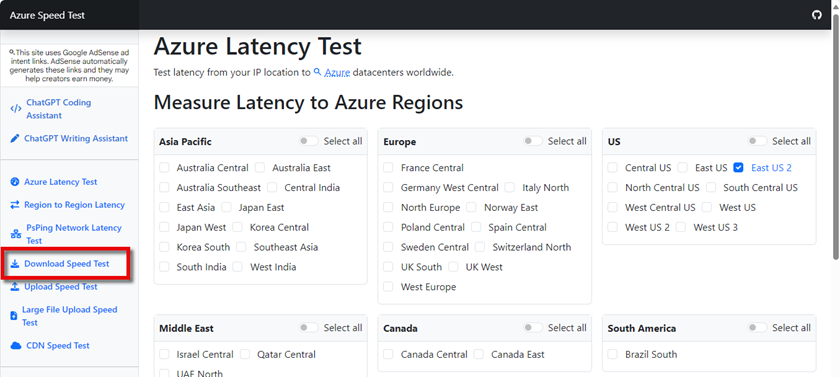
-
If you open the Download Speed Test directly from the left navigation bar after completing the latency test, the region selections will remain. If not, repeat the selections from the previous test, unless otherwise directed:
-
Choose Select all for the region (Asia Pacific, Europe, US, Middle East, Canada, South America, Mexico, or Africa) most appropriate for your physical location. For example, users in Asia will choose Select all for Asia Pacific.
-
In addition to the selection above, select East US 2 in the US section.
-
-
A list of the regions will appear below your selections, with a column for each that contains the Test File.
-
You will complete this test twice, once for the specific location closest to you and once for East US 2 region.
-
Select the region closest to you.
Example If you are in Singapore, select the row for Asia Pacific > Southeast Asia > Singapore. -
Open your screenshot tool. If you don’t have a preferred tool, follow the previous instructions to open the built-in Windows Snipping Tool.
-
Click on Download Test File.
-
Use your screenshot tool to capture an image of the download in progress.
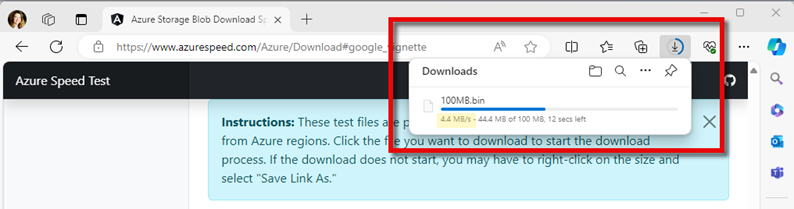
-
Copy and paste the screenshot into a Word document or use another method of transmitting the information. Along with the screenshot, please note the following information:
-
Date and time that the screenshot was taken
-
Location used for the test
-
If you were experiencing latency at that time
-
-
Generally speaking, it is helpful to capture results twice: once when you are experiencing latency, and at a second non-peak time, such as the very beginning or end of your work day. Once you’ve captured the data, send it to the person who requested it.