Understanding the hierarchical structure of Kahua
There are some key concepts you'll need to understand to work with and navigate Kahua.
Your Kahua domain is essentially your company's site on the Kahua platform. Within your domain, all your projects are organized in a hierarchical partitioned structure. Configurations and security settings that you manage at the higher levels inherit down to lower levels. That inheritance can be overridden at the lower levels, with different configurations or settings established, which are then inherited by partitions or projects below that level.
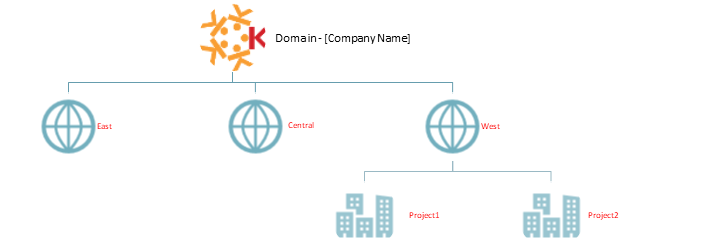
Kahua allows you to structure your domain to best fit your organizational structure. For example, if your company is organized by geographical region, you can set up different regional partitions in Kahua to organize and categorize your projects. Or, if your company is organized by the industries you serve, you can set up partitions by industry and then customize configurations and settings to match your business needs for those industries. Kahua is very flexible and can be configured to match your organization's needs.
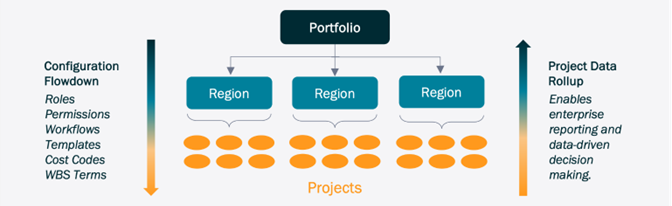
Below is a diagram of an organization grouped by geographical regions:
The partition or project that you are currently working in will appear in the Kahua header. It is important to review the header to ensure that you are in the correct project or partition when you are working in Kahua.
Here are some important definitions you should understand before creating your project structure:
Domain - Your company's site within Kahua. All your projects are within this domain, and all your company's users are users within this domain.
Root Domain - This refers to the highest level of the hierarchy. When you have navigated to this level in the hierarchy, your domain name will appear in the Kahua header. Some configuration settings only appear when you are at this level.
Partition - A partition is a division within your domain. You can create multiple partitions at multiple levels within your domain.
Partitions are used to compartmentalize your company’s projects in Kahua. Note that partitions can also be used to ensure users only receive permission to view or manage projects within a certain ‘partition’ – partitions may represent regions, project types, or any other category that makes the most sense for your organization.
You can manage configurations, settings, and group memberships at the partition level, so that they inherit down to the projects under that partition.
Project - a project is a single entity in the hierarchy and is typically nested within a partition.