Markups using the Bluebeam integration
Kahua's integration with Bluebeam allows you to open stored files in markup mode and add markups to the file from the Bluebeam Revu desktop application.
Important things to know about this integration include the following:
-
You can use either the Kahua markup tool on a file, or Bluebeam. You cannot use both on the same file.
-
The Bluebeam markup option is available for files stored in File Manager and on the References section of a record.
-
The integration uses Bluebeam Revu on your desktop. When you enter markup mode and select the Bluebeam markup option, a file with the .bfx extension is created locally and opens in Bluebeam Revu. When you have completed your markups, you can save the file and the markups then appear on the file when it is viewed in Kahua. Collaborative markups are not supported.
-
In File Manager, adding Bluebeam markups to a file does not create a new version of the file. The version information remains the same.
How to . .
 Mark up a Kahua file using Bluebeam
To open a Kahua file in Bluebeam and save markups back to Kahua, complete the following steps:
-
Review the header to ensure that you are in the correct project or partition.
-
Navigate to the file you want to add markups to (for example, in File Manager or in a record’s References section).
-
Open the file and select Markup to enter markup mode.
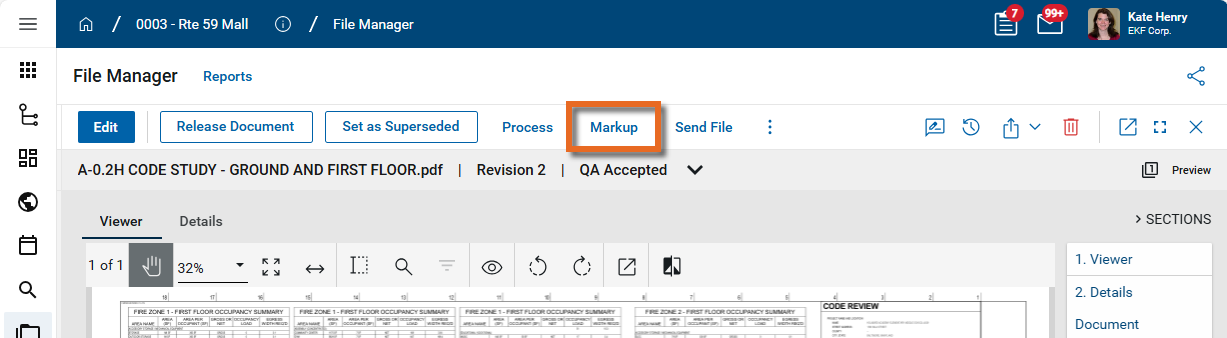
-
In the markup toolbar, click the Bluebeam icon
 . You may need to select the More icon
  to access it if the icon is hidden for space reasons.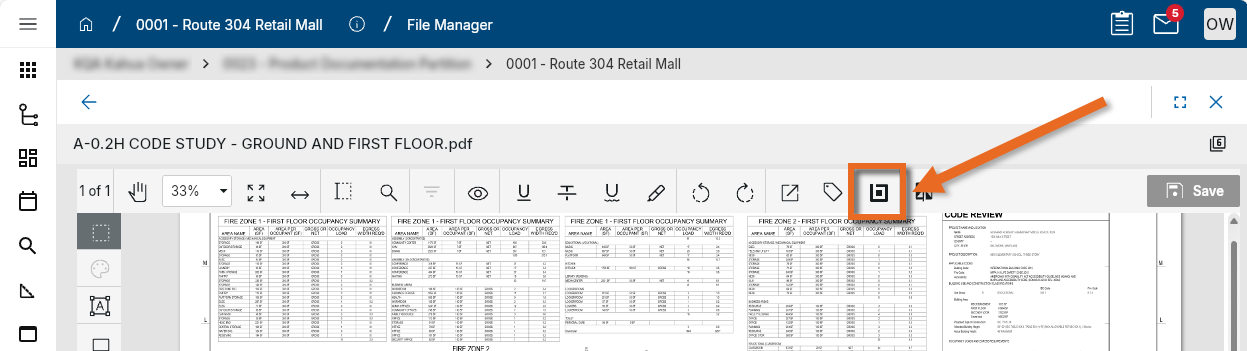
-
A file with a .bfx extension is generated. When prompted, open the downloaded file. Kahua launches Bluebeam Revu and opens the file.
-
In Bluebeam, add your markups as needed.
-
In Bluebeam, select File > Save. The file is saved back to Kahua.
-
Return to Kahua and reload the file to view the updated markups.
Update Bluebeam markups on a file
To continue updating markups on a file that has already been marked up in Bluebeam, complete the following steps:
-
Review the header to ensure that you are in the correct project or partition.
-
Open the file in Kahua and enter Markup mode.
-
Click the Bluebeam icon to download and open the file in Bluebeam Revu.
-
Make changes in Bluebeam, then select File > Save to save the updates back to Kahua.
Note Bluebeam markup metadata (such as comments associated with a markup) is preserved and remains available the next time the file is opened in Bluebeam.