Working with Noa Assistant
Noa is not automatically enabled for your domain. To enable Noa, your organization is required to complete the Kahua AI opt-in agreement. Contact your Kahua account representative for more information.
Noa Assistant is Kahua's conversational AI experience. You can use Noa to find information across Kahua, navigate to projects and records, summarize records and tasks, ask questions about how Kahua works, and perform other supported activities using natural language.
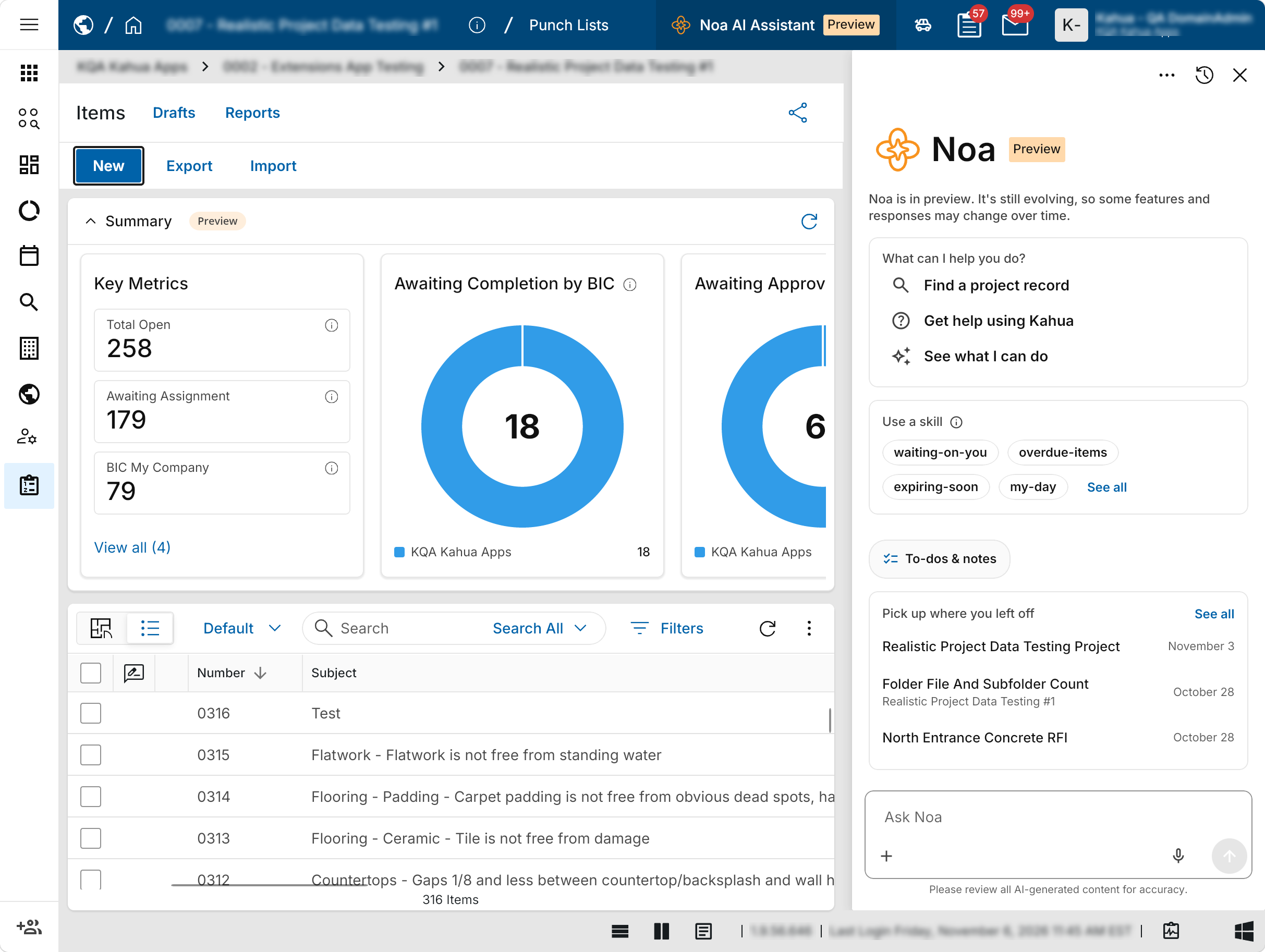
Noa opens in a persistent panel on the right side of Kahua. The panel remains available as you move between applications, projects, search results, and other areas of the platform.
Key elements to know about this feature include the following:
-
To use Noa, Kahua AI must be enabled for your domain and you must be a member of a group with Kahua AI User permissions.
-
You can ask Noa questions in natural language instead of navigating through individual applications or constructing searches manually.
-
Noa can search projects, records, tasks, messages, and other supported Kahua information that you have permission to access.
-
You can continue a conversation with follow-up questions to refine search results or ask for more information about an item.
-
You can add Kahua content, such as records, files, folders, and drawings, as context for a conversation. You can also upload a file from your computer.
-
Noa includes Kahua-defined Assistant Skills that provide predefined workflows for common activities. Custom Assistant Skills are planned for a future release.
-
Your previous Noa conversations are available from the chat history for up to 30 days.
How to . . .
 Enable Kahua AI in your domain
Kahua AI must be enabled in your domain before your users can access Noa. To enable Kahua AI in your domain, complete the following steps:
-
Navigate to Apps > Administration > Domain Settings > Kahua AI.
-
Select Enable and agree to the confirmation message.
Kahua AI is now enabled in your domain and available to users with Kahua AI User permissions.
Assign Kahua AI User permissions to a group
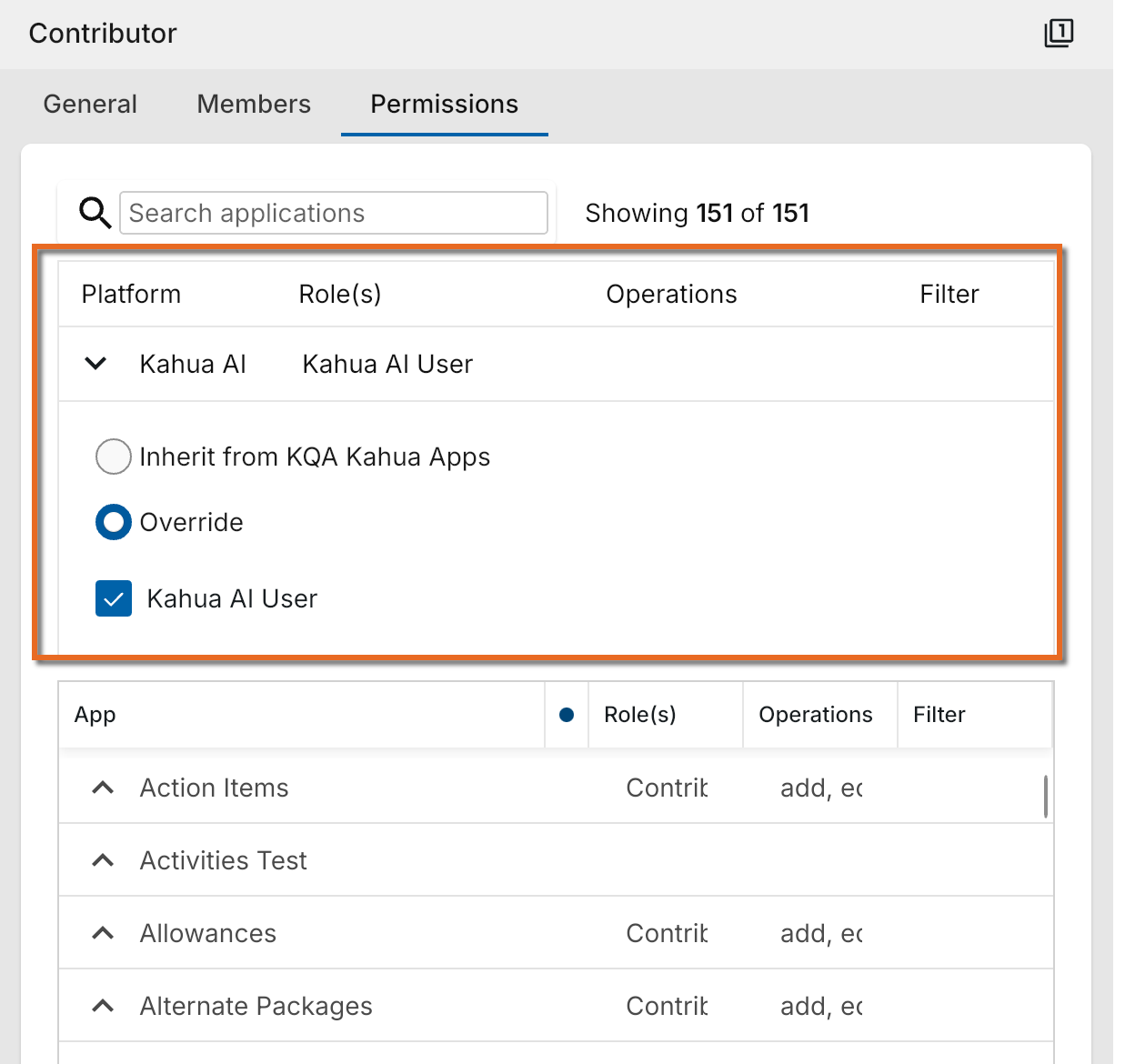
To access Noa, users must be a member of a group with Kahua AI User permissions. For general information on managing permissions, refer to Setting up groups under User Management.
To add Kahua AI User permissions to a group, complete the following steps:
-
Navigate to the Groups application (Apps > Administration > User Management > Groups).
-
Select the group you want to edit. The detail page opens.
-
Select the Permissions tab. Click Edit at the bottom of the page.
-
Select Kahau AI User.
-
Click Save when you are done.
Users who are a member of this group now have access to the Noa Assistant.
Open and use Noa Assistant
To start a conversation with Noa, complete the following steps:
-
Select the Noa AI Assistant button in the upper-right area of Kahua.
-
The Noa Assistant panel opens on the right side of the page.
-
Enter a question or request in the message field.
You can also use dictation to enter a request using voice-to-text.
-
Review the response from Noa.
-
Continue the conversation with follow-up questions as needed.
The Noa panel remains available as you navigate to other areas of Kahua, allowing you to continue the same conversation while working.
Actions you can complete in Noa Assistant include the following:
Search projects and navigate in Kahua
You can use Noa to search for information about projects and portfolios or to navigate directly to a project or partition.
Examples of requests include:
-
Ask how many projects meet criteria such as a planned completion date.
-
Ask Noa to find a specific project or partition.
-
Ask Noa to navigate directly to a project.
If more than one project or destination matches your request, Noa may ask you to select the appropriate result before continuing.
Noa can also navigate to supported Kahua destinations such as applications, records, files, folders, tasks, messages, and configuration pages.
Find records and request a summary
You can search for Kahua records by describing the information you want to find. A request can include multiple criteria, such as record status, date, or a person associated with the record.
To find and work with a record, complete the following steps:
-
Open Noa Assistant.
-
Describe the records you want to find.
For example, you can ask Noa to find open RFIs from a particular month with a specific person as the primary responder.
-
Review the matching records returned by Noa.
-
If necessary, enter a follow-up request to refine the results.
-
Select the appropriate record to place that record in context for the conversation.
-
Ask Noa a question about the record or request a summary.
Noa can use supported record information such as fields, linked records, comments, attachments, grids, references, and change history when answering questions about the record.
Record Q&A is read-only and works with one selected record at a time.
When searching from a project or partition, Noa can search that location and accessible child projects or partitions.
Find and summarize tasks
You can ask Noa to find tasks using information such as subject, application, project, assignee, or other supported criteria.
After Noa returns matching tasks, you can ask it to summarize an individual task or the returned tasks.
You can also use follow-up requests to narrow or prioritize the results, such as asking for overdue tasks or the most recent task related to a particular type of work.
Find messages
You can ask Noa to search for Kahua messages using conversational criteria.
For example, you can ask Noa to find messages related to a particular subject, such as field observations, or messages sent by a particular person.
Matching results can include a link that opens the message directly in Kahua.
Ask questions about Kahua
Noa can answer questions about Kahua concepts and provide guidance on how to complete supported activities in Kahua.
For example, you can:
-
Ask about the difference between two construction or Kahua concepts.
-
Ask how to complete an activity, such as creating a submittal.
-
Ask how different Kahua record types or processes are used.
-
Ask follow-up questions to move from understanding a concept to completing the related work in Kahua.
Noa uses Kahua's published help content when responding to Kahua how-to questions and can provide guidance that takes supported configuration information, required fields, and workflows into account.
Noa can also reference published content in the Knowledge Center, allowing your organization to provide additional information such as policies, procedures, process guides, training materials, and best practices.
Responses respect the permissions and partition scope that apply to the information being used.
Add context to a Noa conversation
You can add information to a Noa conversation to help focus its responses on the content relevant to your work.
To add context, complete the following steps:
-
Open Noa Assistant.
-
Select the + button in the message area.
-
Select one of the available options:
-
Upload a file from your computer.
-
Add context from Kahua, such as a drawing, folder, file, or record.
-
-
Enter your question or request.
When an individual file is used as context, you can ask Noa questions about the contents of that file. File-based answers are grounded in the available file content and can link to the source.
Return to a previous Noa conversation
You can return to a previous conversation instead of starting over when you want to continue earlier work.
-
From the Noa starting screen, use Pick up where you left off to resume recent work.
-
Select History to view previous conversations.
Chat history is available for up to 30 days.
Run an Assistant Skill
Assistant Skills are predefined workflows that provide a focused starting point for common activities.
To run a skill, complete the following steps:
-
Open Noa Assistant.
-
Select Run a skill.
-
Select the appropriate skill from the available list.
-
Provide any information requested by Noa.
-
Review the results and continue the conversation as needed.
For example, a skill can provide a quick way to identify overdue items within a project.
Kahua-defined skills are available for supported activities. Custom Assistant Skills, which will allow organizations to define their own workflows and incorporate their own content, are planned for a future release.
Understand additional Noa Assistant capabilities
Additional Noa Assistant capabilities include the following:
-
Smart Record Creation - In supported workflows, provide information such as a PDF, image, or spreadsheet and ask Noa to prepare a draft record for review in Kahua.
-
Record Updates - Ask Noa to prepare changes to supported Kahua records using the information and context you provide. Review and complete the changes in Kahua.
-
Report Authoring - Describe the records, projects, filters, or information you need and ask Noa to help generate a report. Noa can also assist with building reports in the Report Wizard.
-
Portable View Generation - Provide a Word template and ask Noa to help populate it with appropriate Kahua fields, or ask Noa to begin a Portable View using the application and information you specify.
Understand AI-enhanced app capabilities
In addition to Noa Assistant, Kahua includes AI-enhanced capabilities within supported applications. These capabilities include the following:
-
Drawings Title Block Extraction - Extract title block information from drawing sheets and use the information to populate drawing records.
-
Automated Spec Splitting - Split a specification into sections and create corresponding specification section records.
-
Auto-tagging Assets in Drawings - Analyze drawings and suggest tags that can be connected to existing assets or used to help populate the asset registry.
-
Submittal Register from Specs - Identify submittal information in selected specification sections and create proposed submittal item records.
-
Asset Nameplate Scanning - Read information from asset nameplate photos or mobile captures and use the information to populate supported asset attributes.