Kahua Analytics Healthcare Owner Package
Kahua's Healthcare Owner Analytics package is a focused suite of dashboards designed to give healthcare owner organizations portfolio-level visibility into project demand, financial performance, schedule progress, vendor activity, payment activity, audit readiness, and risk exposure.
Detailed descriptions of each dashboard can be found below:
 Project Pipeline
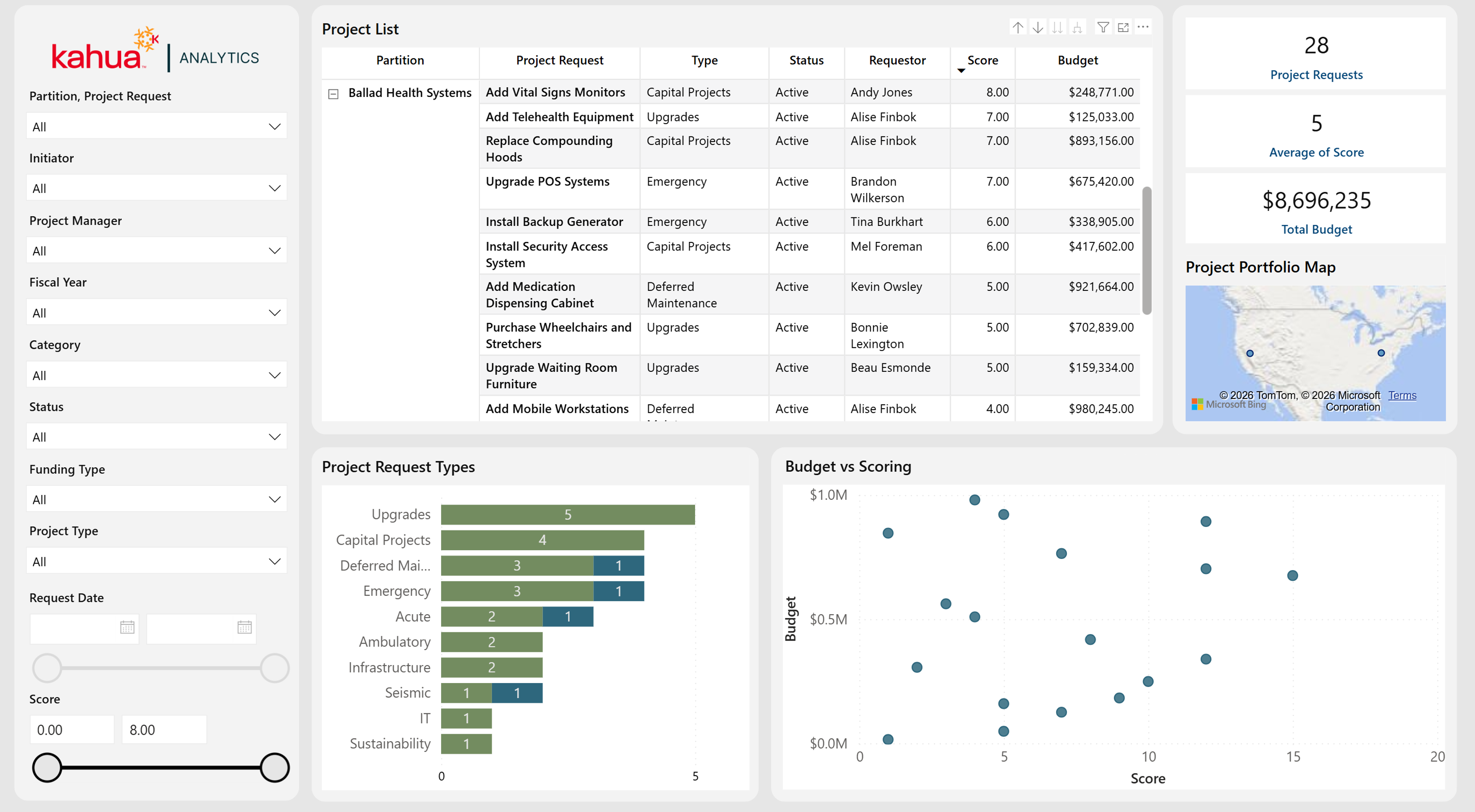
The Project Pipeline Dashboard provides a high-level view of proposed work before requests become active projects. It allows healthcare owners to compare demand, requested funding, prioritization scores, request status, and geographic distribution across the pipeline.
Description
This dashboard brings project-request scoring, requested budget, status, ownership, and location into one interactive pipeline view.
Problem
Healthcare owners often receive more capital requests than they can fund or staff, making it difficult to compare priorities consistently and understand the total demand entering the program.
Benefit
By presenting budget and scoring information together, the dashboard helps owners prioritize requests, identify high-value proposals, understand geographic demand, and make better-informed decisions about which requests should advance.
The following apps are necessary to utilize this dashboard:
-
Project Requests
-
Portfolio Manager
-
Contacts
-
Companies
-
People
Out of the Box Dashboard Interface
Project General Portfolio
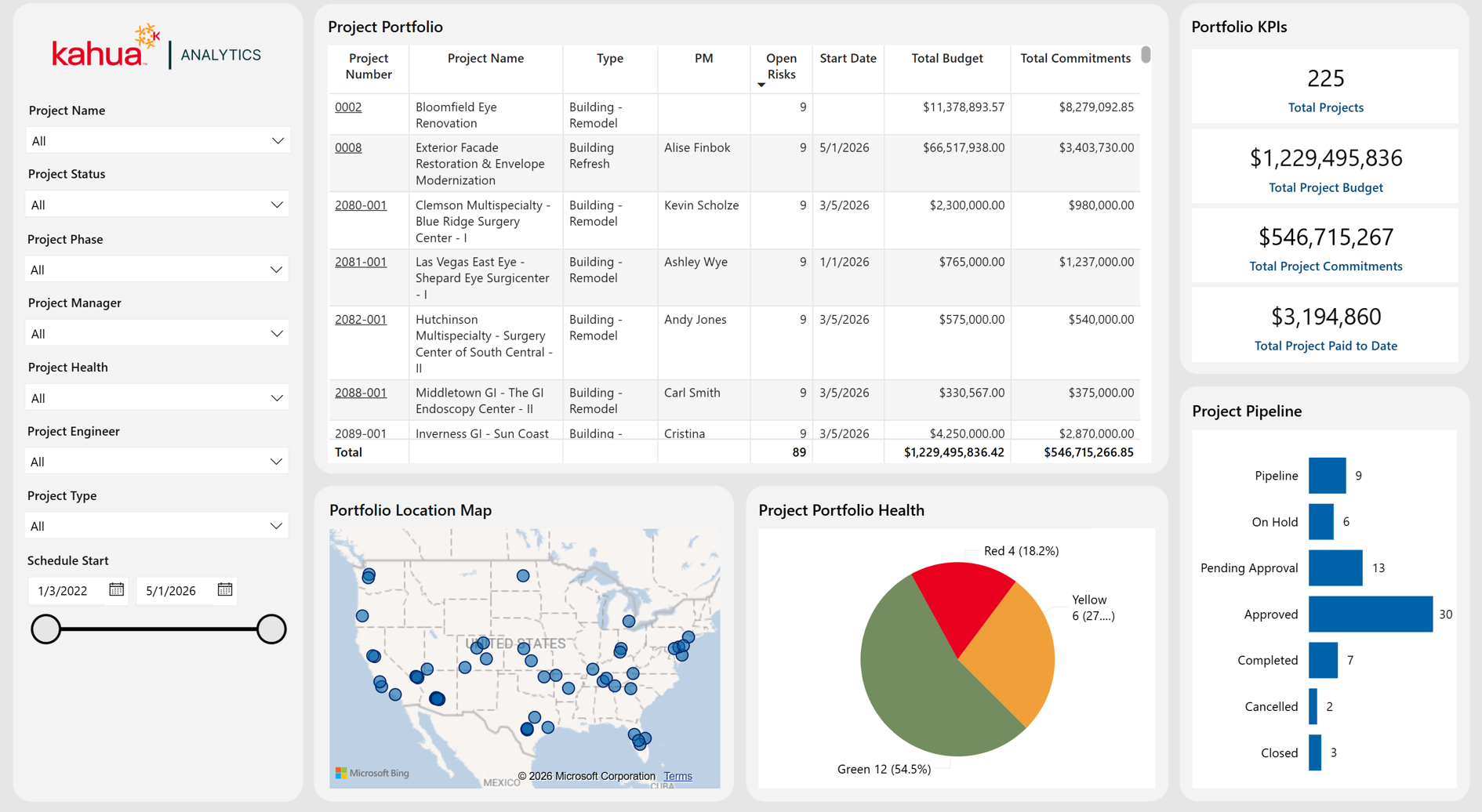
The Project General Portfolio Dashboard is a landing page that gives healthcare owners a broad view of the active project portfolio. It shows overall project health, status, financial position, risk, ownership, and geographic distribution while allowing users to focus on selected parts of the program.
Description
This dashboard aggregates core project information - budgets, commitments, payments, health, risk, and location - into a single, interactive interface.
Problem
Owners managing large healthcare capital programs can struggle to identify which projects are off track, over budget, or carrying elevated risk when project information is spread across multiple applications.
Benefit
By centralizing essential portfolio information and providing flexible filters, the dashboard speeds up portfolio reviews and helps leaders focus attention on projects that require intervention.
The following apps are necessary to utilize this dashboard:
-
Portfolio Manager
-
Addresses
-
Work Breakdown
-
Properties
-
Risk Register
-
Contacts
-
Companies
-
People
Out of the Box Dashboard Interface
Project Financial Portfolio
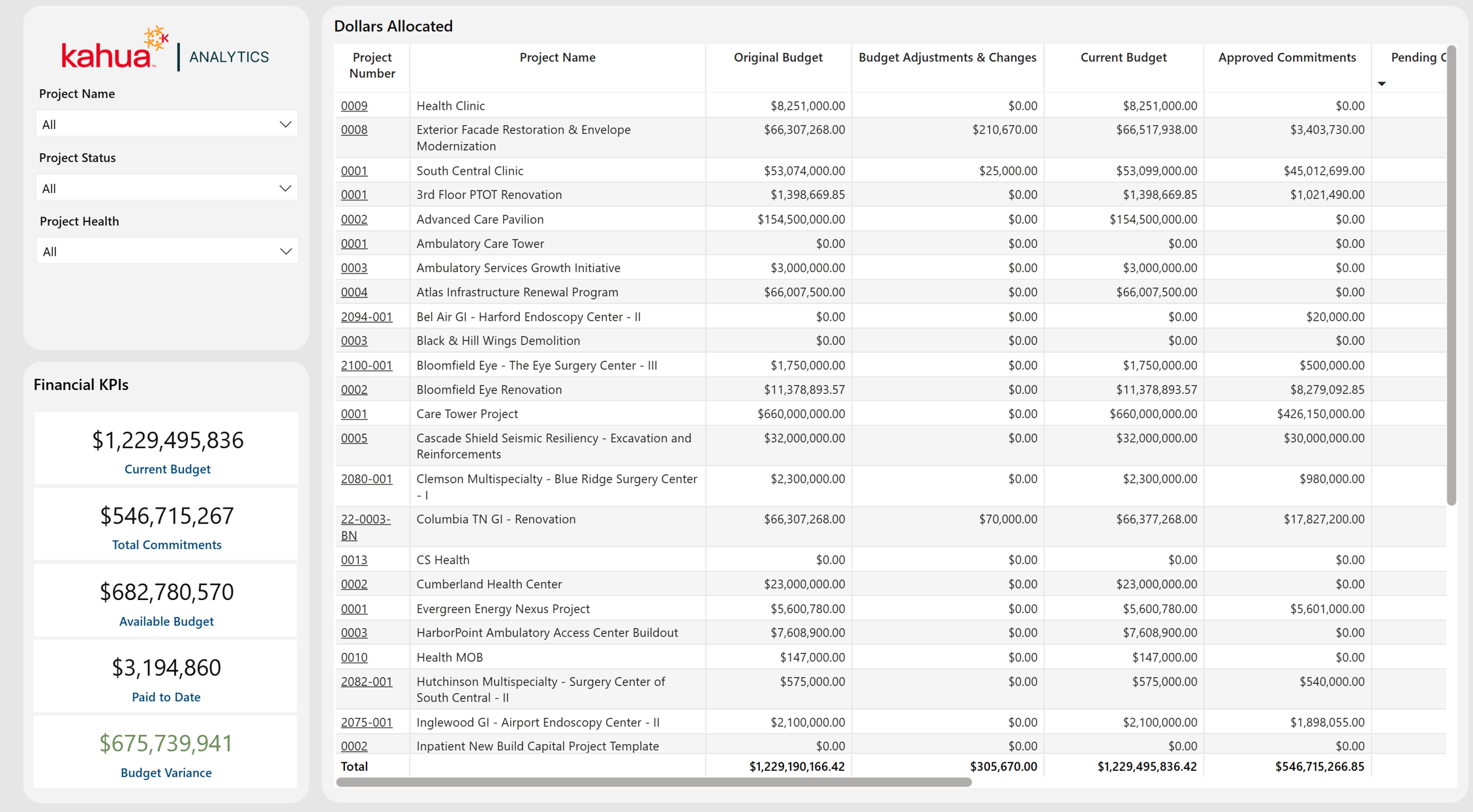
The Project Financial Portfolio Dashboard presents a portfolio-level view of budget, commitments, payments, forecasts, and remaining funds. It helps healthcare owners compare financial performance across projects and quickly identify projects with emerging budget pressure or unusual variances.
Description
This dashboard consolidates project budget, commitment, payment, forecast, and variance measures into a portfolio-level financial view.
Problem
Healthcare owners need to understand financial exposure across many projects, but budget, commitment, and payment activity can be difficult to compare consistently at the portfolio level.
Benefit
The dashboard gives owners a consistent view of available funds and emerging variances, helping them identify financial pressure early and direct attention to projects that may require corrective action.
The following apps are necessary to utilize this dashboard:
-
Portfolio Manager
-
Work Breakdown
Out of the Box Dashboard Interface
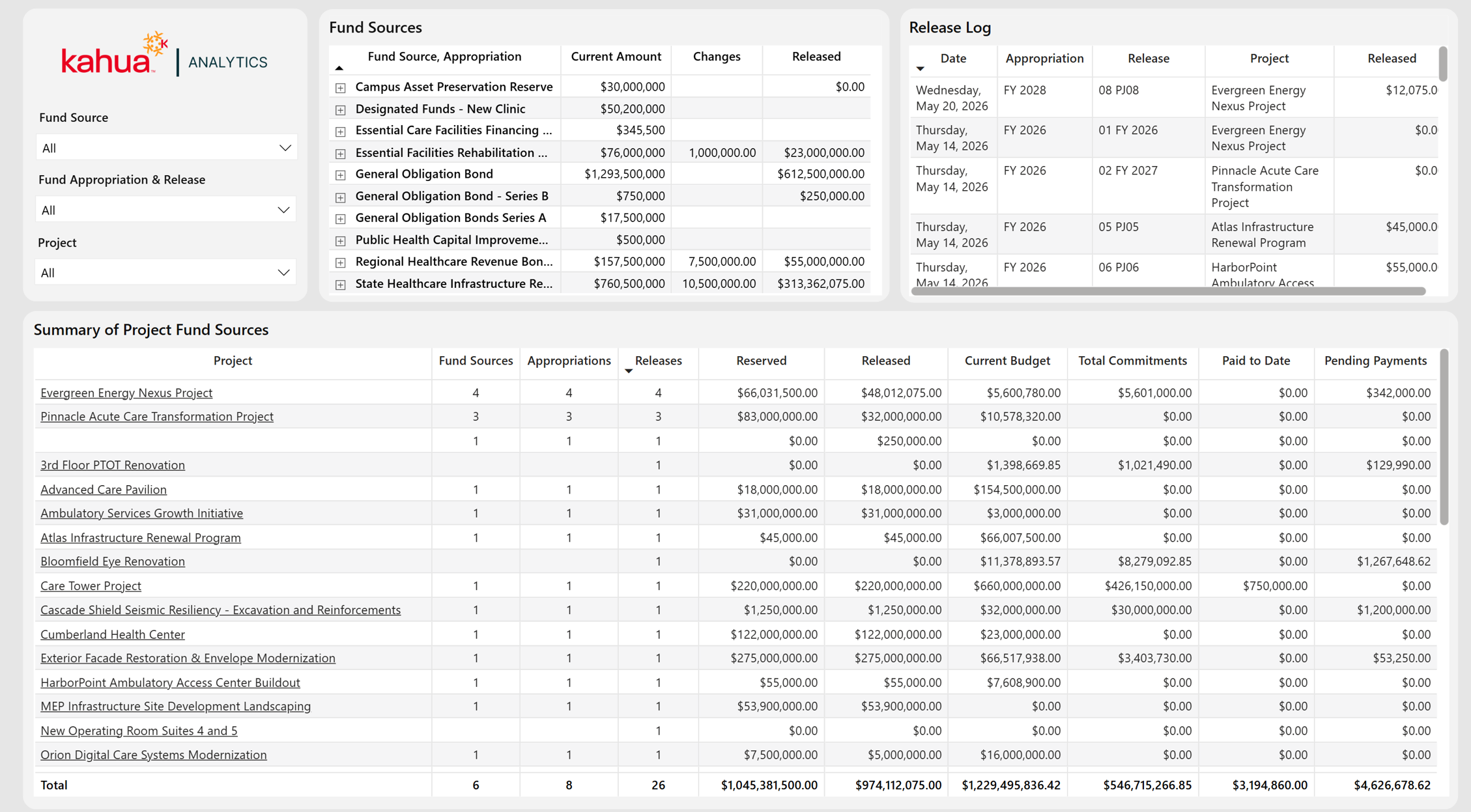
Fund Sources
The Fund Sources Dashboard shows how capital-program funding is distributed, appropriated, reserved, changed, and released across projects. It allows healthcare owners to compare available funding with project budgets and financial obligations and to understand where funding gaps or timing concerns may exist.
Description
This dashboard connects funding sources and release activity to the projects and financial obligations they support.
Problem
Healthcare capital programs may use multiple funding sources with different appropriation and release timing, making it difficult to determine whether projects have sufficient accessible funding for current and planned obligations.
Benefit
By bringing funding and project-financial information together, the dashboard improves funding transparency, supports allocation decisions, and helps owners identify potential gaps before they affect project delivery.
The following apps are necessary to utilize this dashboard:
-
Sources of Funds
-
Portfolio Manager
-
Work Breakdown
Out of the Box Dashboard Interface
Project Schedule Details
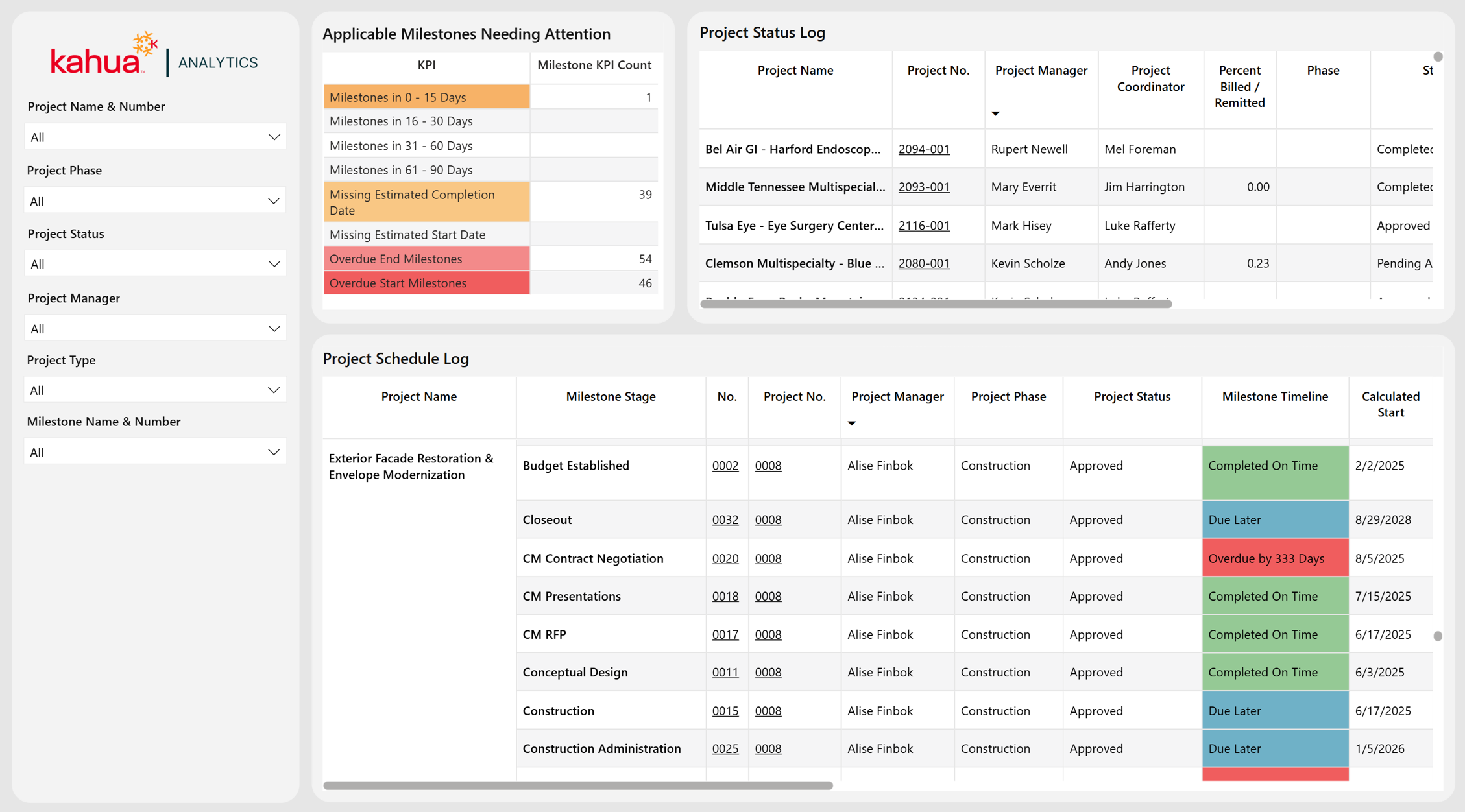
The Project Schedule Details Dashboard gives healthcare owners a consolidated view of project status, schedule performance, and milestone exceptions. It shows when work is expected to occur, how dates have changed, and which milestones are missing information, overdue, or approaching a deadline.
Description
This dashboard combines project status with detailed milestone dates and highlights milestones that are missing dates, overdue, or approaching a deadline.
Problem
Healthcare projects have tightly coordinated shutdowns, activations, inspections, and clinical dependencies, so incomplete or late milestones can create operational disruption that is not obvious in a high-level project summary.
Benefit
The dashboard makes schedule exceptions visible early and gives owners the supporting project and milestone detail needed to follow up before delays affect clinical operations or downstream work.
The following apps are necessary to utilize this dashboard:
-
Portfolio Manager
-
Milestones
-
Project Status Updates
-
Work Breakdown
Out of the Box Dashboard Interface
Milestones
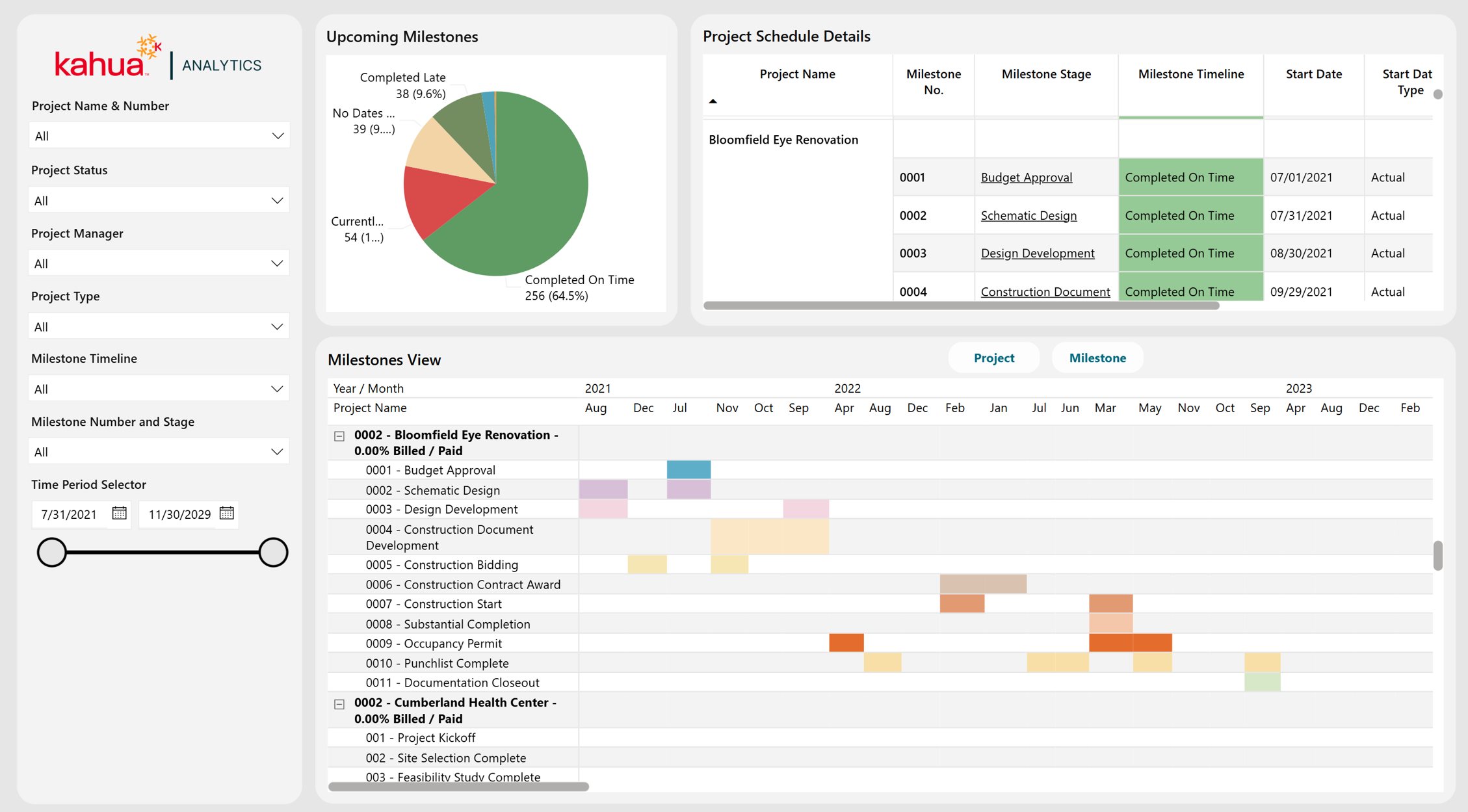
The Milestones Dashboard provides a timeline-based view of projects and milestones across the portfolio. It helps healthcare owners understand schedule sequencing, compare overlapping activity, monitor completion progress, and identify important upcoming dates.
Description
This dashboard translates project and milestone date data into portfolio timelines and supporting detail views.
Problem
Owners can have difficulty seeing overlapping project activity, upcoming deadlines, and schedule sequencing when milestone dates are reviewed one project at a time.
Benefit
The Gantt-style views make timing and overlap easier to understand, helping owners coordinate resources, anticipate upcoming milestones, and identify schedule conflicts across the healthcare capital program.
The following apps are necessary to utilize this dashboard:
-
Portfolio Manager
-
Milestones
Out of the Box Dashboard Interface
Risk Management
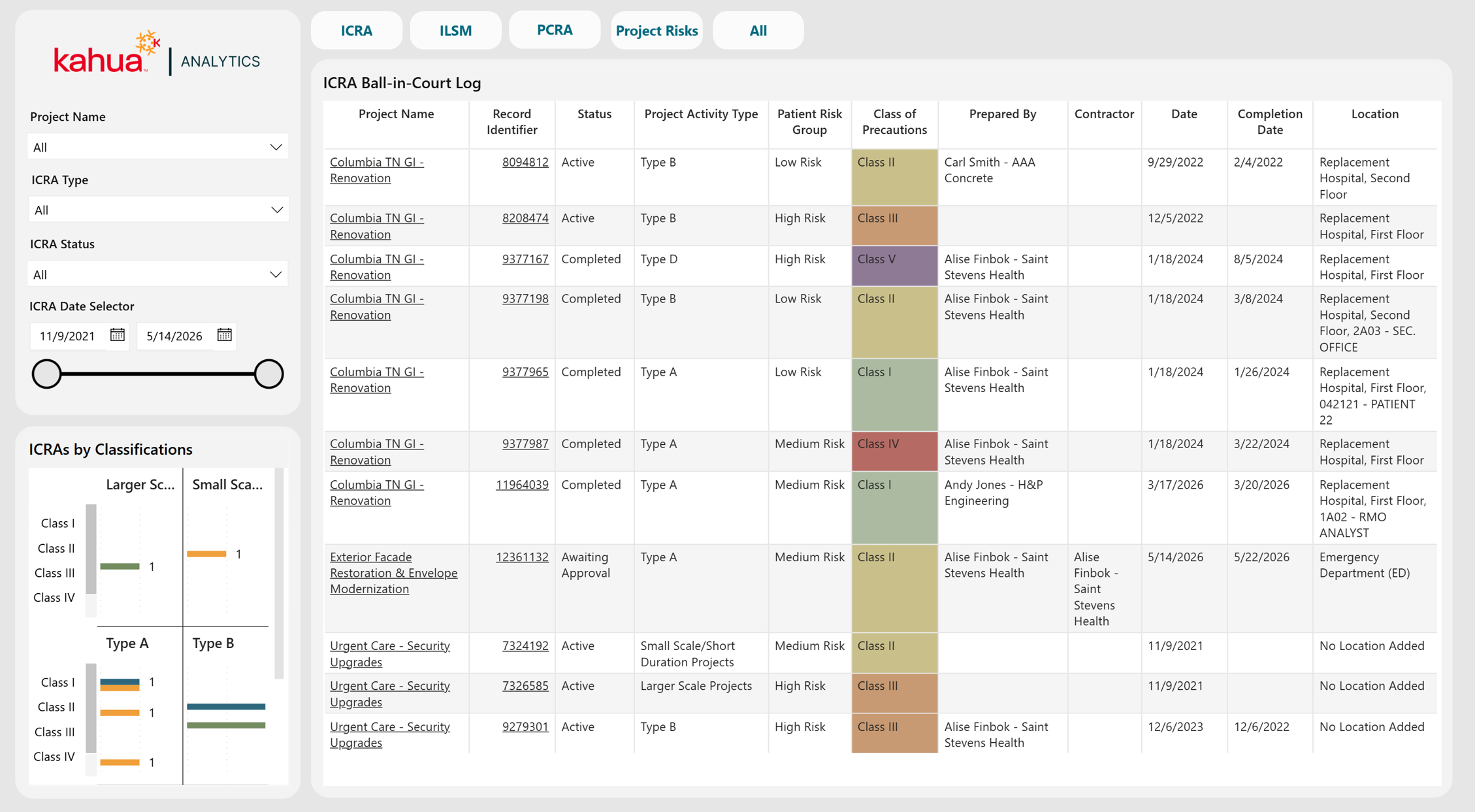
The Risk Management Dashboard provides a unified view of healthcare-specific assessments and general project risks. It allows owners to monitor open exposure, responsibility, severity, status, and trends across ICRA, ILSM, PCRA, and project-risk workflows.
Description
This dashboard combines Infection Control Risk Assessments, Interim Life Safety Measures, Pre-Construction Risk Assessments, and general project risks into a shared oversight view.
Problem
Healthcare construction introduces patient-safety, infection-control, life-safety, access, and operational risks that are often managed in separate workflows, making it hard for owners to see unresolved actions and overall exposure.
Benefit
The dashboard helps owners identify open risks, clarify who has the ball in court, monitor healthcare-specific assessment activity, and focus escalation on the most severe or time-sensitive items.
The following apps are necessary to utilize this dashboard:
-
Portfolio Manager
-
Risk Register
-
Infection Control Risk Assessment (ICRA)
-
Interim Life Safety Measures (ILSM)
-
Pre-Construction Risk Assessment (PCRA)
-
Locations
-
Contacts
-
Companies
-
People
Out of the Box Dashboard Interface
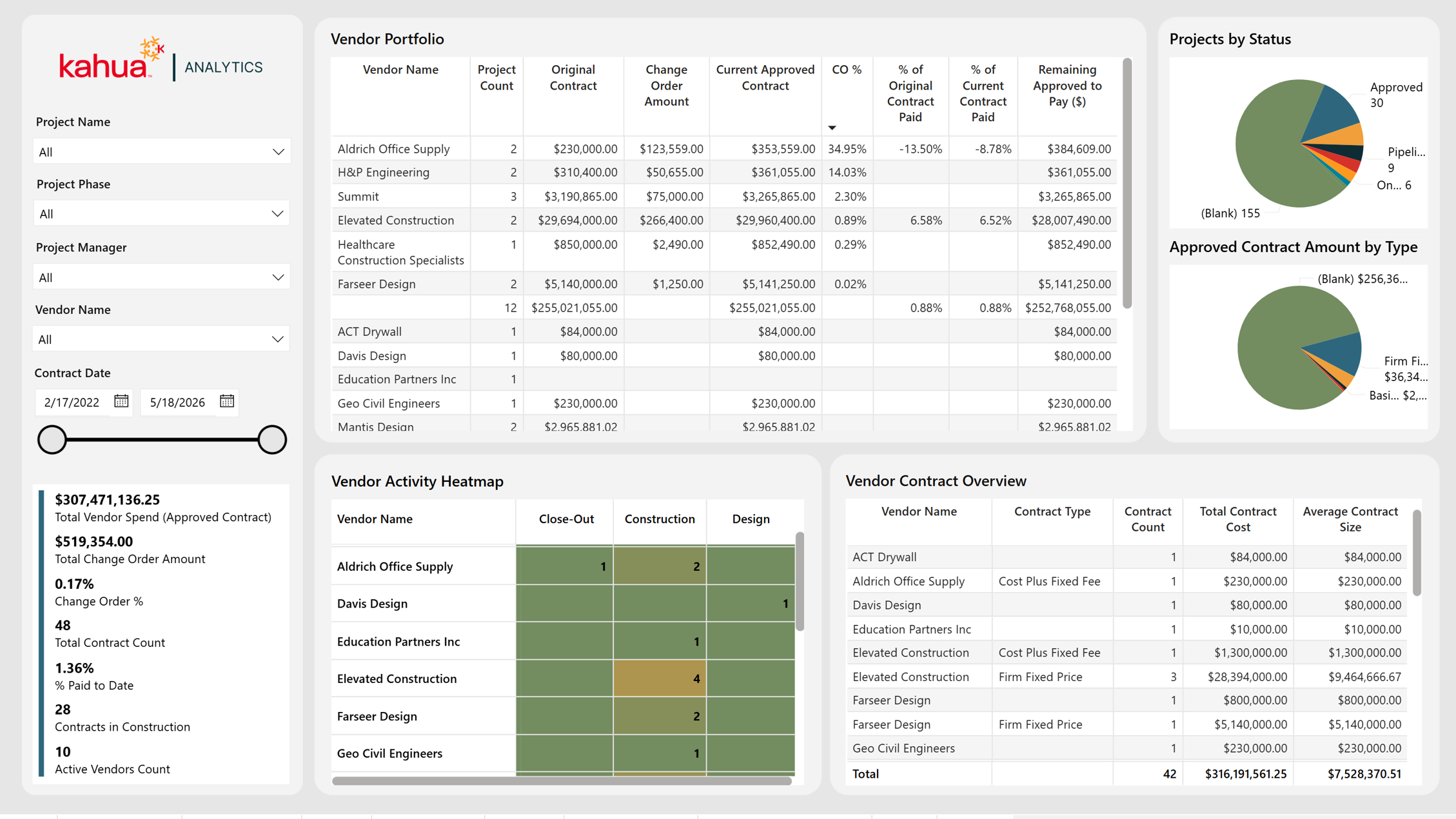
Vendor Workload Portfolio
The Vendor Workload Portfolio Dashboard shows how work and financial commitments are distributed among vendors across the project portfolio. It helps healthcare owners understand vendor concentration, current workload, contract exposure, change activity, and payment progress.
Description
This dashboard combines vendor, contract, purchase order, change, payment, and project data to show how work and financial commitments are distributed across vendors.
Problem
Healthcare owners may rely on the same design firms, contractors, and specialty vendors across many concurrent projects without a clear portfolio view of workload, concentration, or remaining financial exposure.
Benefit
The dashboard helps owners identify heavily allocated vendors, evaluate commitment and payment levels, and make more informed sourcing and capacity decisions before vendor constraints affect delivery.
The following apps are necessary to utilize this dashboard:
Contracts OR Purchase Orders
Change Orders OR Purchase Order Change Orders
Pay Requests OR Invoices
-
Portfolio Manager
-
Contacts
-
Companies
-
Contracts
-
Purchase Orders
-
Contract Change Orders
-
Purchase Order Change Orders
-
Pay Requests
-
Invoices
-
Work Breakdown
Out of the Box Dashboard Interface
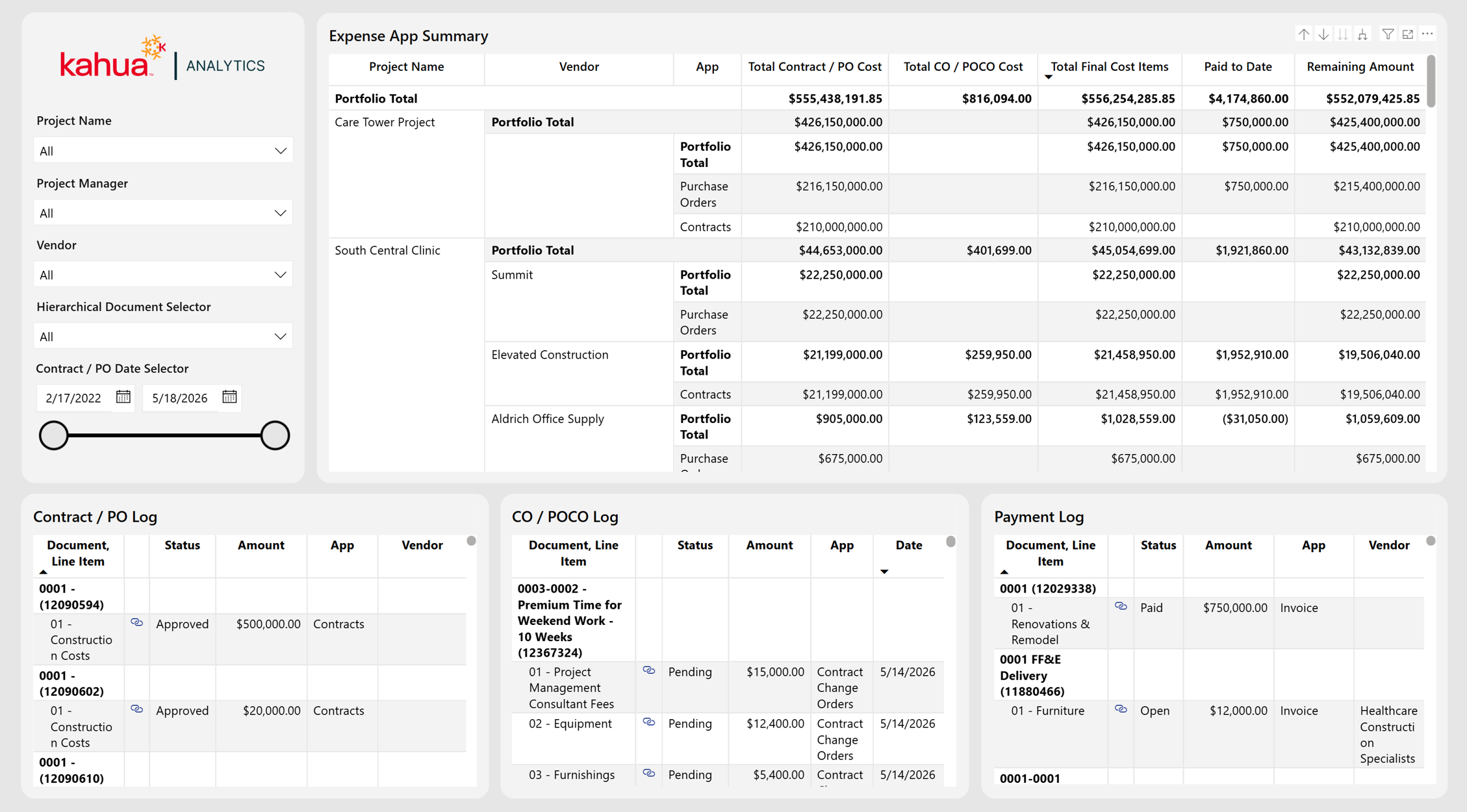
Expense Activity and Vendor Hierarchy
The Expense Activity and Vendor Hierarchy Dashboard connects project and vendor financial activity across commitments, changes, and payments. It allows healthcare owners to move from a summarized expense position to the underlying financial documents and understand how each transaction contributes to the total.
Description
This dashboard organizes the full expense hierarchy - original commitments, commitment changes, and related payments - into summary and document-level views.
Problem
Owners often need to trace a project's financial position from a portfolio total to the vendor, commitment, change, and payment documents that produced it, which is time-consuming when those records are reviewed separately.
Benefit
The dashboard shortens financial research by connecting summary values to supporting documents and direct Kahua links, improving transparency and making reconciliation and follow-up more efficient.
The following apps are necessary to utilize this dashboard:
Contracts OR Purchase Orders
Change Orders OR Purchase Order Change Orders
Pay Requests OR Invoices
-
Portfolio Manager
-
Contracts
-
Purchase Orders
-
Contract Change Orders
-
Purchase Order Change Orders
-
Pay Requests
-
Invoices
-
General Invoices
-
Work Breakdown
-
Contacts
-
Companies
Out of the Box Dashboard Interface
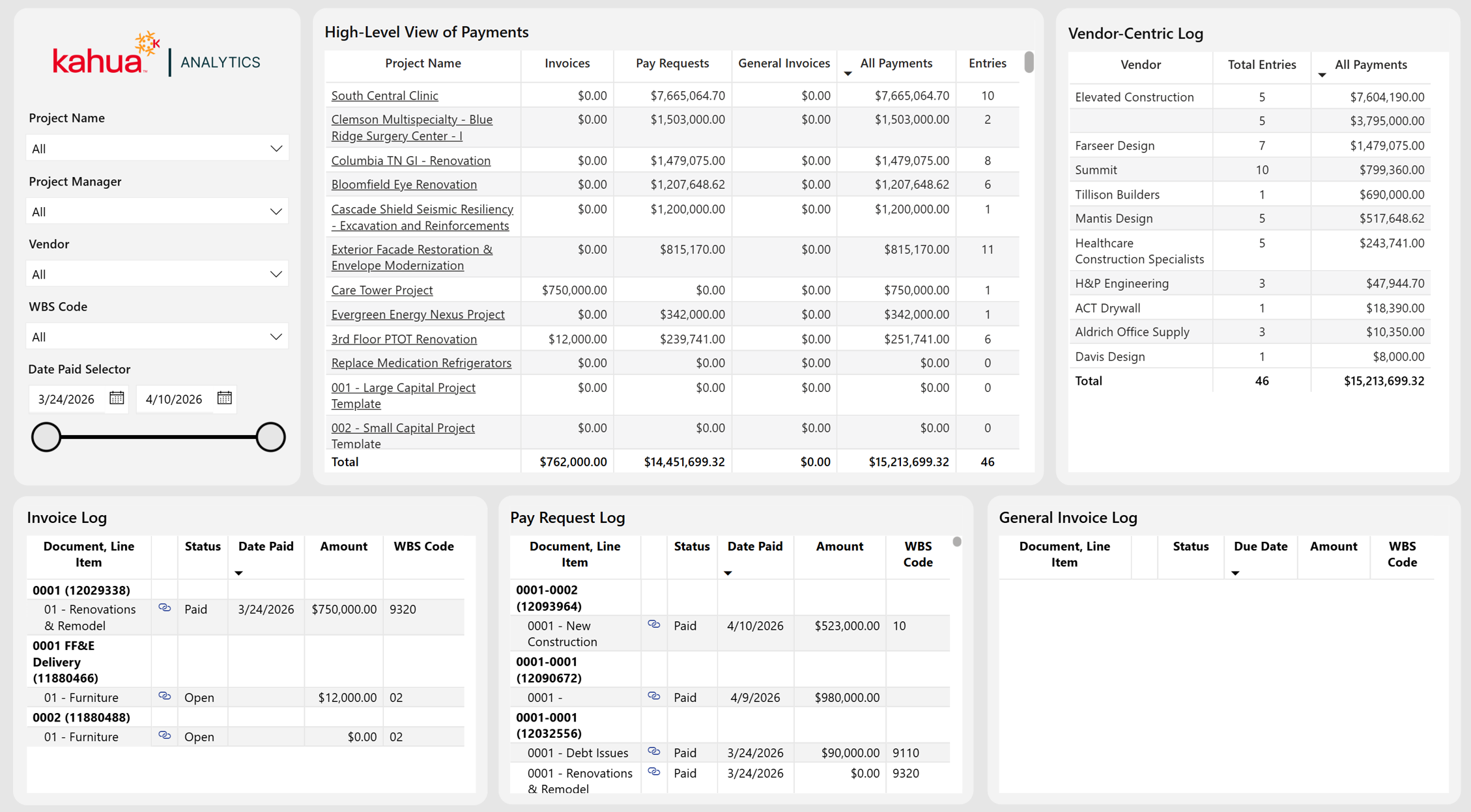
Payments
The Payments Dashboard provides a consolidated view of payment activity across projects, vendors, and payment types. It helps healthcare owners understand total cash activity, compare vendor payments, monitor payment status, and access the records supporting reported amounts.
Description
This dashboard combines invoices, pay requests, and general invoices into a consistent payment summary and supporting transaction logs.
Problem
Payment activity can be fragmented across different document types, making it difficult for healthcare owners to understand total outflow, compare vendors, and locate the records behind a reported amount.
Benefit
The dashboard gives owners a consolidated view of cash activity while preserving direct access to document-level detail, enabling faster payment review, reconciliation, and vendor follow-up.
The following apps are necessary to utilize this dashboard:
-
Portfolio Manager
-
Pay Requests
-
Invoices
-
General Invoices
-
Work Breakdown
-
Contacts
-
Companies
Out of the Box Dashboard Interface
JCAHO Audit
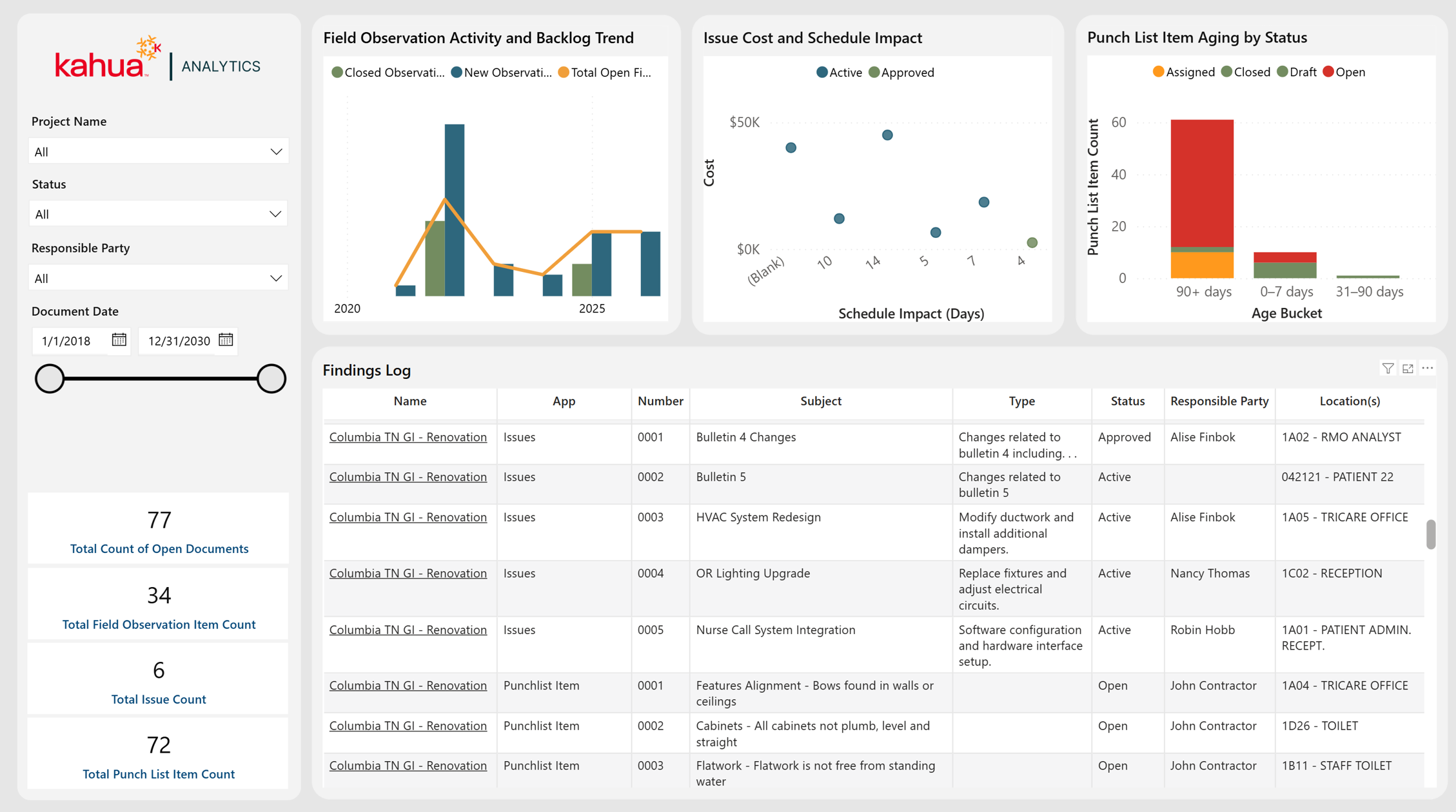
The JCAHO Audit Dashboard provides an audit-focused view of findings and corrective-action activity across issues, punch lists, and field observations. It helps healthcare owners monitor open items, responsibility, aging, backlog, location, and potential project impact in preparation for Joint Commission review.
Description
This dashboard consolidates compliance-related findings and corrective-action activity from field and document-management workflows into a single audit-focused view.
Problem
Audit-relevant findings may be distributed across issues, punch lists, and field observations, making it difficult to demonstrate ownership, aging, status, and closure during survey preparation.
Benefit
By centralizing findings and highlighting aging, backlog, responsibility, and impact, the dashboard helps healthcare owners prepare for audits, prioritize corrective actions, and reduce the risk of unresolved compliance items.
The following apps are necessary to utilize this dashboard:
-
Portfolio Manager
-
Issues
-
Punch Lists
-
Field Observations
-
Locations
-
Contacts
-
Companies
-
People
Out of the Box Dashboard Interface