Accessing and Configuring Videos & Documentation
Kahua has incorporated several out-of-the-box videos to assist users with common activities in applications. These videos can be accessed by opening the application menu and selecting Videos & Documentation. The application menu can be opened by right-clicking on the open application on the left toolbar or left-clicking on the ellipses that appears when hovering over the name of the open application.
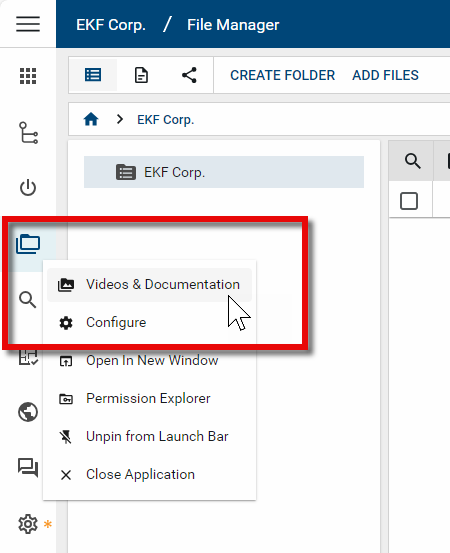
To manage which videos or guides are visible to users in this space, Kahua allows you to post custom collateral for your users to refer to within each application. These videos and PDFs can be tied to an application in the Configuration app, within the Videos & Documentation tab of the application’s detail pane.
There are several requirements that domain administrators should be aware of prior to uploading a video or PDF to an application:
-
Videos and documentation may be uploaded at the ‘root’ of a domain, or at a particular partition. Like other configuration features, Videos & Documentation follows the inheritance model, meaning uploading videos and documentation at a partition will mean that this collateral is also now in turn visible at all partitions and projects deeper in your project hierarchy (unless overridden).
-
Kahua’s default videos can be disabled if your company has custom collateral you would prefer users to use instead of the standard videos or documentation. See below for instructions on disabling videos and documentation.
-
Videos can be hosted in Brightcove, Vimeo, Wistia, or YouTube. For Vimeo, Wistia, and YouTube videos, Kahua references the ID of the video. For Brightcove videos, the URL is used.
-
To upload a PDF guide, the PDF must be publicly hosted (i.e., accessible through a public URL). It is a best practice to link to the PDF itself, which means ensuring that the url used ends in ".pdf".
How to . . .
 Add, edit, or remove application-specific videos and documentation
To manage videos and documents associated with an application, complete the following steps:
-
Review the header to ensure that you are in the correct project or partition.
-
Navigate to the Configuration app.
-
Select the appropriate application.
-
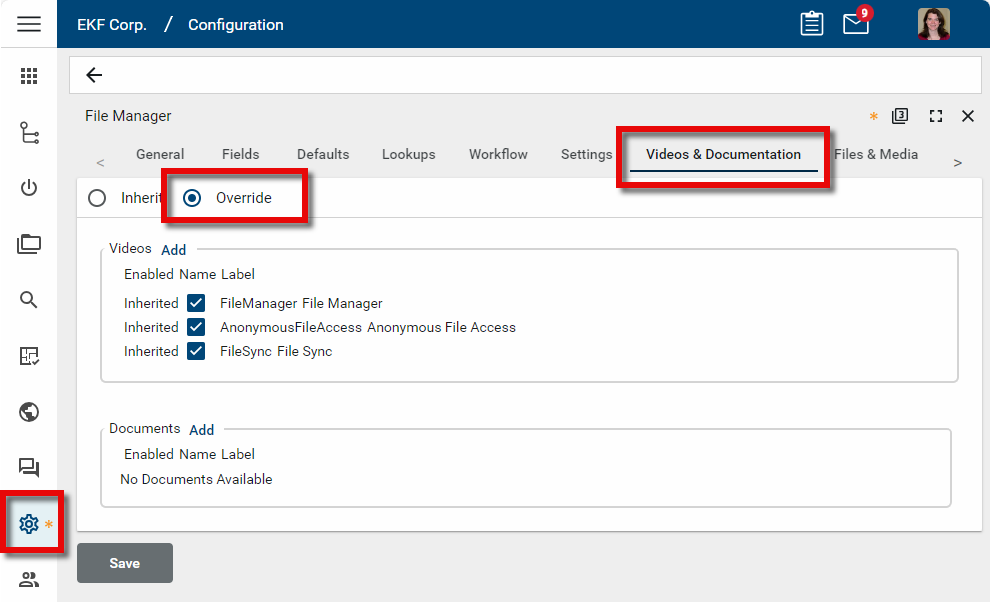
Open the Videos & Documentation tab and select Override.
-
Any pre-loaded Kahua videos or videos you previously added to this application will be listed under the Videos section, and any previously loaded PDFs will appear under the Documents section.
-
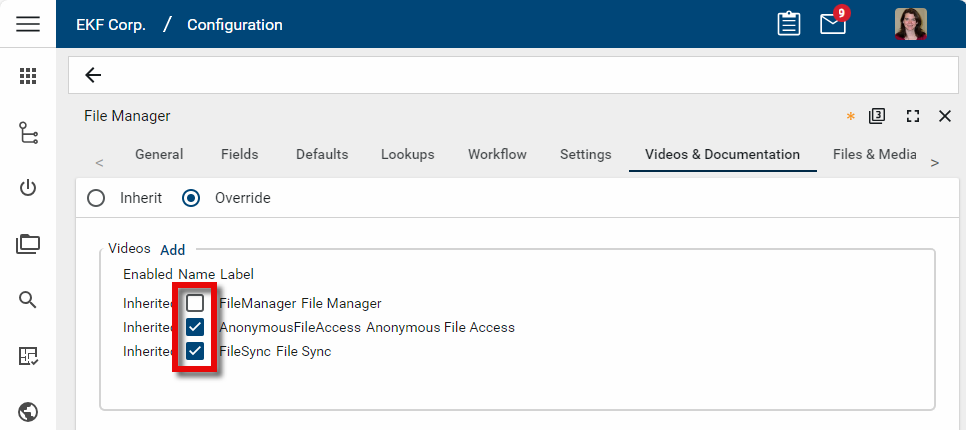
Clear the check box next to any pre-loaded videos or documents you do not want to appear to users in the app's Videos & Documentation list. This will remove the video or document from that partition and any partitions below it, assuming no lower partitions are set to override. Be sure to click Save to save your changes.
-
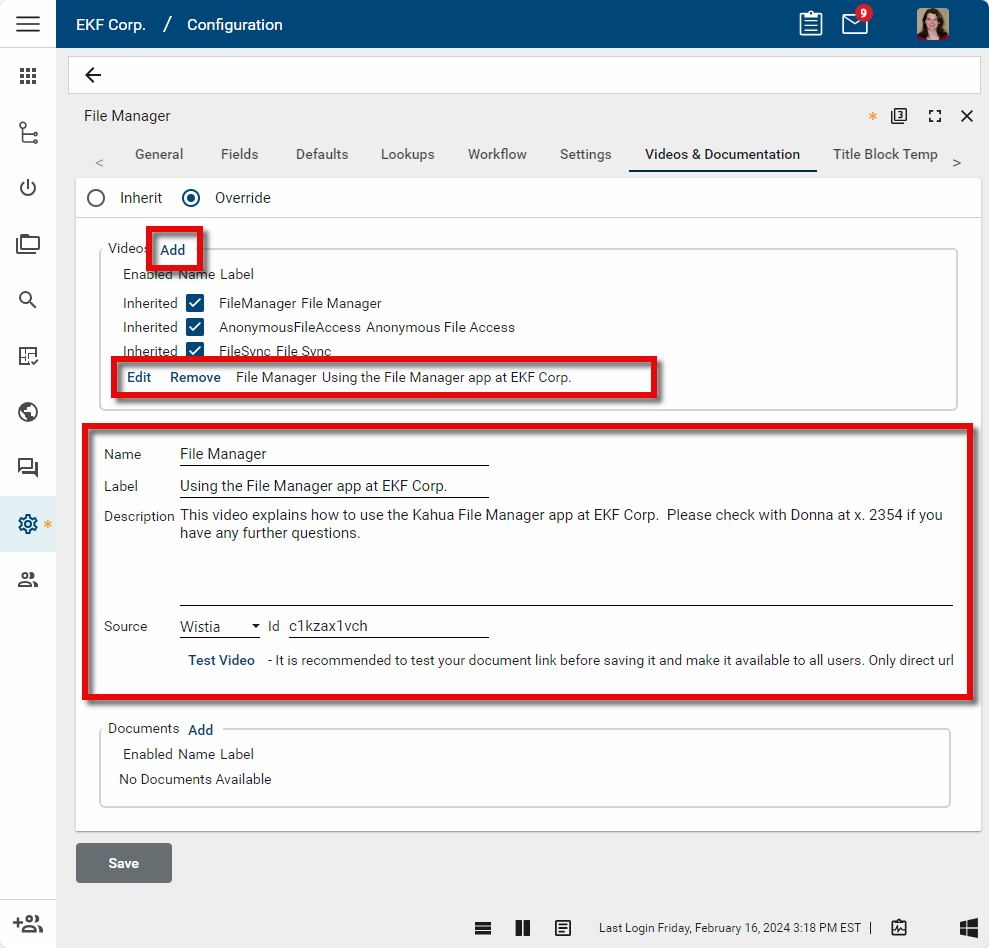
To add a video or document, click Add to the right of the header for each section. A new line will appear below the current list of videos or documents, and a form will open at the bottom of the pane.
-
Enter the following information:
-
Name - A name for the content. This value does not appear to the end user.
-
Label - This will appear to the user in the Video & Documentation panel as the title of the content.
-
Description - This will appear to the user in the Video & Documentation panel under the Label.
-
Source (Video only) - Select where the video is hosted (i.e., Brightcove, Vimeo, Wistia, or YouTube).
-
ID (Video only) - Select the id of the video. For best results, include only the id, not the entire URL.
-
PDF URL (Documents only) - Enter the full URL for the PDF. PDFs must be hosted on a publicly available webpage. PDFs that reside inside Kahua are not permitted to be used as a help document due to the enforced permissions and access controls.
-
Test Video or Test Document- Click here to test your link. The Video & Documentation panel will appear. If the video or document does not appear correctly, fix the link before saving your changes.
-
-
Click Add again to enter another video or document. To modify a previously added video or document, click Edit next to its name on the list of videos or documents. Click Remove to remove it from the list.
-
Click Save to save your changes. The next time your users log in to Kahua, they will see the updated list in the Videos & Documentation panel.