Searching the Community
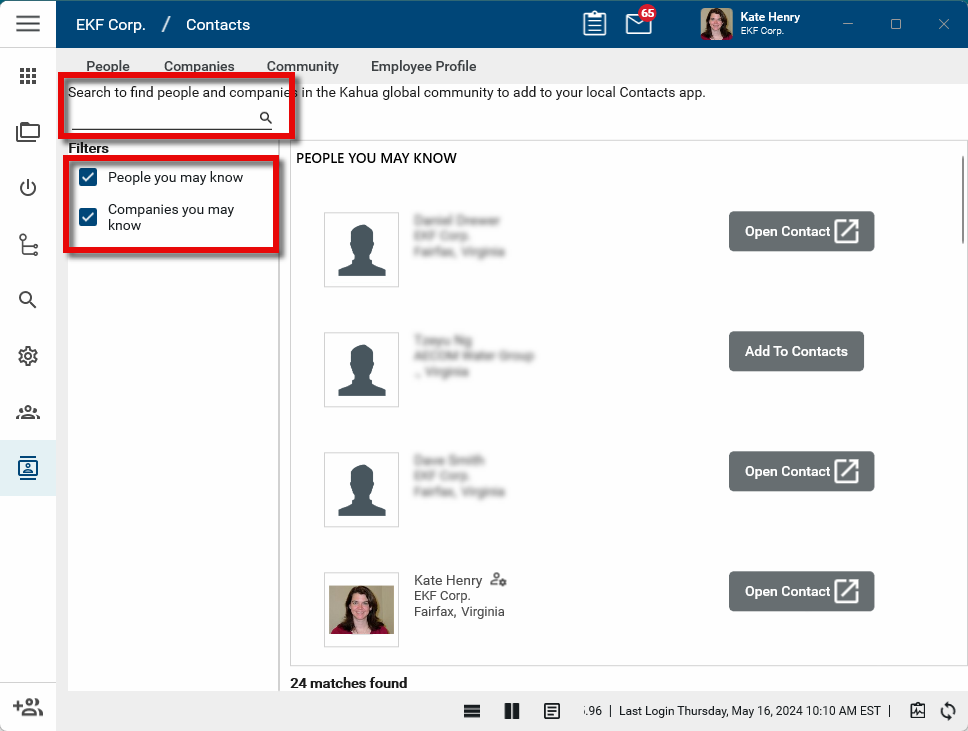
This page provides you with the ability to search the list of all the companies and contacts who have active Kahua accounts. Once found, users with the appropriate permissions can select Add to Contacts to add that person as a contact in your domain. Their contact and company details will be added to the People and Companies tabs.
Key elements of the Community app are as follows:
-
You can search for people by name or email address.
-
You can search for companies by name.
-
Once found, if you have the appropriate permissions, you can select Add To Contacts to add the record to your Contacts app.
-
If you select a person, the person is added to your People app and the their company record is added to your Companies app.
-
If you select a company, their company record is added to your Companies app.
-
How to . . .
 Search the Community
To search for contacts or companies in the Kahua Community, complete the following steps:
-
Navigate to the Contacts application (Apps > All Apps > Contacts).
-
Select the Community sub-app.
-
People and companies local to you will appear in the search results section.
-
Enter the name of a person or company you want to search for in the search bar. You can search for People you may know or Companies you may know or both.
-
The results will appear in the search results section. Users who are Domain Administrators for their company will have a domain admin icon
 next to their name. These users have the ability to add new users to their own company.
-
Once you have found the contact or company you are looking for, if you have the appropriate permissions, you can select the Add to Contacts button next to their name to add them to the People and Companies apps.