Data Dictionary - Get Excel Sheet with App Data
How to Get Data Dictionary for Apps via the API
Data dictionary API calls are used to request detailed information including data types, references, labels, etc. on the hierarchical data included in apps specified in the call. This information is returned as an Excel (.xlsx) file.
Endpoint
To request a data dictionary for specific apps, call the following endpoint:
GET /v1/domains/{{domain}}/projects/0/entityschema/get?:appNames&:includereferences
Where the following values are used:
-
{{domain}} - The domain key for the domain the relevant apps are installed in.
-
:appNames - query parameter that takes a comma-separated list of app names for which data is requested.
-
:includereferences - Optional query parameter that takes value of true or false depending on whether a column for reference apps is desired in the returned Excel file. Default value is false.
Including app extension names in the call may cause errors. Only base app names should be passed to the :appNames parameter in the URL. All fields from any installed extensions will be automatically included in the data dictionary for their respective base apps specified in the call.
Example
Here is an example request for a data dictionary on several specific apps:
GET https://service.kahua.com/v1/domains//projects/0/entityschema/get?appNames=kahua_Address,kahua_FundingBudget,kahua_CompanyManager,kahua_Contract,kahua_PeopleManager,kahua_Project&includereferences=trueIf you are using Postman, remember to hit the arrow beside the "Send" button and click "Send and Download" instead.
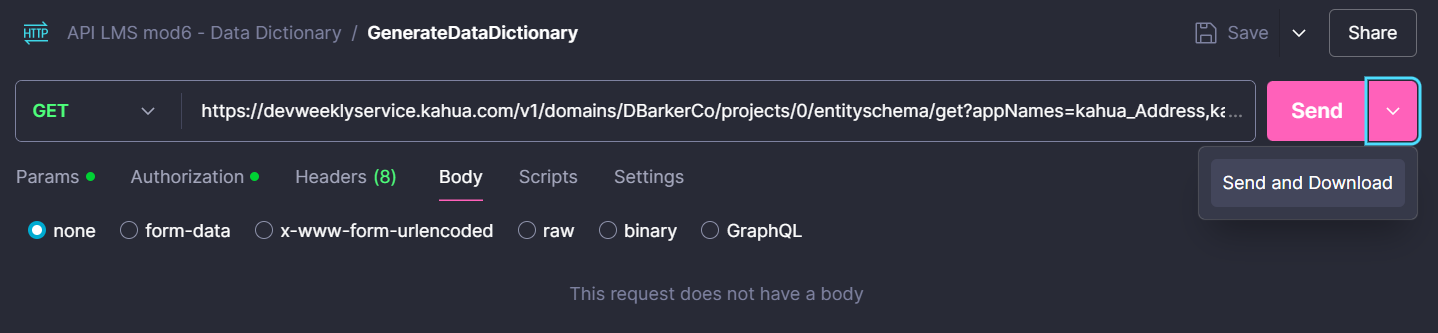
After doing this, save the response with the extension .xlsx and view in Excel.
Prior to the 2026.3 release, this endpoint generated an .xls file rather than an .xlsx file.
Error Code
Bad Request
This occurs when an app in the appNames parameter cannot be found in the domain. There will be no response body for this error.
Status Code: 400
Steps to Resolve Error
-
Check the spelling of all app names present in the appNames parameter
-
Use Installed Apps in Kahua to verify the application is installed
-
Remove app names from the appNames parameter until the error stops