Public File Links
Public file links (previously named "Anonymous File Links") allow you to send unique URL links for a single file, multiple files, or all files within a folder or sub-folders that are stored in the File Manager application to any Kahua user or non-user. The recipient of the link can then download some or all of the files locally without having to log in to Kahua to do so.
When this feature is disabled, links to files can still be sent but the recipient must be a Kahua user and they will need to log in to Kahua to open the files. They cannot be opened anonymously.
Key elements of this feature include the following:
-
When this feature is enabled, the recipient of the link does not need to be a Kahua user to download the files.
-
When this feature is disabled, links to files or can still be sent but the recipient will need to log into Kahua to open the files. They cannot be opened anonymously.
-
When a link is sent, the files are made available to the recipient to download locally. This allows for a bypass of any email file size limits that would be encountered if the user attempted to send the files directly in an email message.
Important This is not a dynamic share. The recipient can only download the files. They cannot update or contribute to the document in Kahua. If your goal is to collaborate with a third party, you can use the Kahua sharing feature. Refer to Sharing in Kahua.
-
Links can include a single file, multiple files, or the contents of a folder with or without subfolders.
-
The file download will always pull the latest version of the document as determined by Kahua version control, unless the Auto-expire all links when new version uploaded setting is enabled.
-
Domain administrators can determine at the partition or project level if links should be always available or if they should expire after a set number of days. If they are set to expire, the recipient will no longer have access to the file after that number of days.
How to . . .
 Send public file links
You can send a public file link directly from Kahua through Kahua messaging, or you can copy a public file link and send it from your own email account or other method.
To send or copy a public file link for a file, group of files, folder, or folder with sub-folders, complete the following steps:
-
Review the header to ensure that you are in the correct project or partition.
-
Navigate to the File Manager application (Apps > Document Management > File Manager).
-
To send links to files, open the folder containing the files you want to share and select one or more items for sharing.
-
On the action bar, select Send Link to open a new Kahua message with the link included. Complete the fields and click Send.
Alternatively, select Copy Link to copy the link to your clipboard. You can send the link through the medium of your choice.
-
To send a link to all the files contained within a folder, right-click on the folder and select Send Folder Link to open a new Kahua message with the link included, or select Copy Folder Link to copy the link to your clipboard to send through the medium of your choice. All files contained in the folder will be included in the link.
To include sub-folders and the files included in those sub-folders, right-click on the folder and select Send Folder Link (Include Subfolders) to open a new Kahua message with the link included, or select Copy Folder Link (Include Subfolders) to copy the link to your clipboard to send through the medium of your choice.
Open public file links
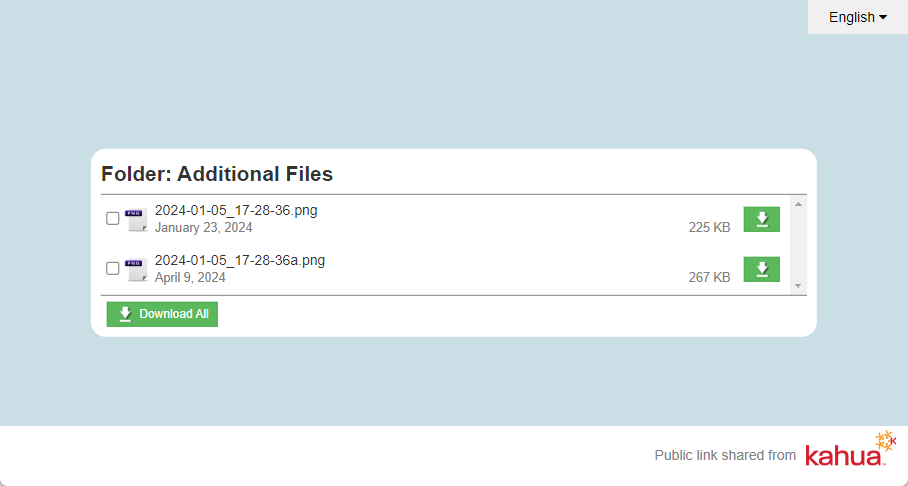
To open a public file link, click the link you received from the Kahua user. You will be taken to a page containing links to the files sent to you. You can select one, some, or all files for download. If you are a Kahua user, you will have the option to open the file in Kahua.
Enable and configure public file linking
For more information on how to enable and configure anonymous file linking, refer to Configuring Public File Links.