Discussions
Discussions are a feature available in most Kahua applications (all hub applications), allowing users with access to those applications to start a public or private conversation associated with a specific record. Discussions can be used for any purpose. These threaded conversations become a permanent part of the record in Kahua, preventing them from being lost in emails or outside chat applications.
These are some key components of the discussions feature:
-
The discussion functionality is available on the desktop host, web host, and mobile applications.
-
You can have any number of discussions associated with a single record. For example, an RFI could have one discussion that is public which includes one group of people centered around developing a solution to the question posed, and a separate discussion that is private with a different group of people centered around the potential cost impact of the solution.
-
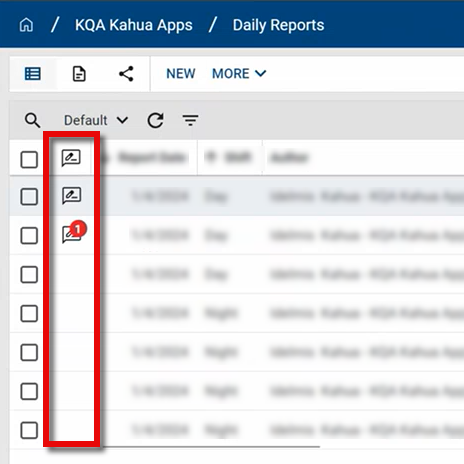
A column on the app's Default log view indicates which records are associated with one or more discussions. The number of discussions with unread posts appears on the icon
 . You can use the quickfilter Has Discussions to easily select records with discussions.
 -
If a discussion is public, it can be viewed by all Kahua users that have access to the associated record.
-
If a discussion is private, it can only be viewed by discussion participants. The author of the discussion can change the privacy status at any time.
-
Files can be uploaded and added to posts in a discussion. These files can be viewed and downloaded by all other users in the discussion.
-
Your domain administrator can disable private discussions in your domain. When private discussions are disabled, users will not have the option to make a new discussion private. Any private discussions created before the setting is updated remain private.
-
Once created, a discussion cannot be deleted. Consider setting the discussion as private and removing the other participants.
-
Individual posts can be edited or deleted by the user that created them, but a history of the original posts is retained and can be viewed by anyone with access to the discussion.
-
On the My Settings page, you can choose to be notified when you are mentioned in a discussion using the @mention feature, when someone replies to a post you made in a discussion, or when any post is made in a discussion that you are a participant in. You can choose to be notified with a Kahua message, a desktop notification, or both.
-
The discussions feature can be disabled at the domain level by your domain administrator.
How to . . .
 Understand public vs. private discussions
Public discussions can be seen by any user with access to the record associated with the discussion. Any user with access to the record associated with the discussion can comment on public discussions at any time. A discussion can be set to private by the author of the discussion, i.e., the person who created the discussion. Private discussions can be disabled at the domain level by your domain administrator.
These are some key components of private discussions:
-
Private discussions can only be viewed by discussion participants. They will not appear to users who are not part of the private discussion. Discussion participants include the author of the discussion, users directly added by the author, users who have participated in the discussion, and users previously mentioned in the discussion.
-
Private discussions are denoted by a lock icon
 on the discussions list.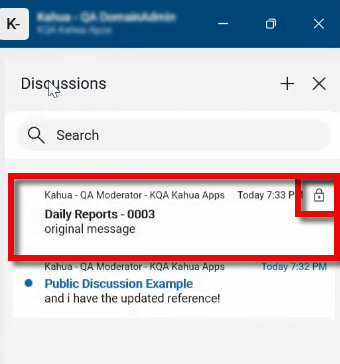
-
Current participants in a private discussion can add another user at any time through the @mention feature. You do not have to be the author of the discussion to add participants in this manner. Refer to Share a discussion.
-
Participants can be removed from private discussions at any time by the author of the discussion. Refer to Modify the discussion name, privacy status, or participant list.
-
The author of the discussion can change the privacy status at any time. A public discussion can be made private, and a private discussion can be made public. Refer to Modify the discussion name, privacy status, or participant list.
-
Your domain administrator can modify a setting in the Configuration app to only allow public discussions in your domain. Refer to Allow only public discussions.
Start a discussion
Discussions can be added to any record in applications where they are available. A record can have multiple discussions associated with it. The feature is available in all hub apps.
To start a discussion, complete the following steps:
-
Review the header to ensure that you are in the correct project or partition.
-
Open the application and the detail view of the record within that application where you want to start a discussion. Discussions are associated with individual records within an application. They cannot be started at the application level. Additionally, discussions must be started on an existing record. A discussion cannot be created when a record is still New and has not yet been saved.
-
Click the Discussions icon
 next to the record name to open the discussions panel.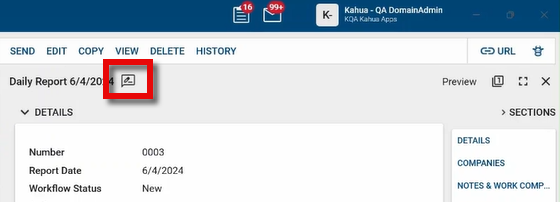
Note If the discussions icon
is not present, it may be for one of the following reasons: the record is new and has not yet been saved, you do not have the correct permissions to start a discussion, or the feature is not available in this application or in your domain. -
Any existing discussions that you have access to will appear in the panel. To start a new discussion, click the Add icon
 or, if there are not yet any discussions created for this record, click Start A Discussion on the panel.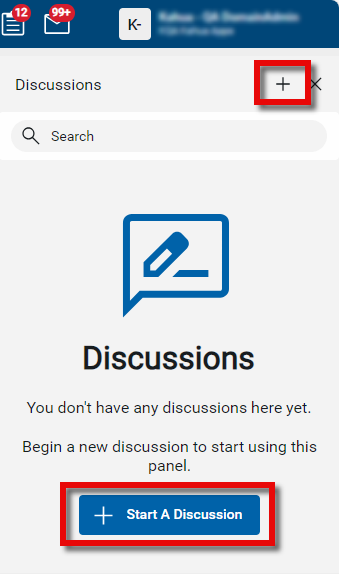
-
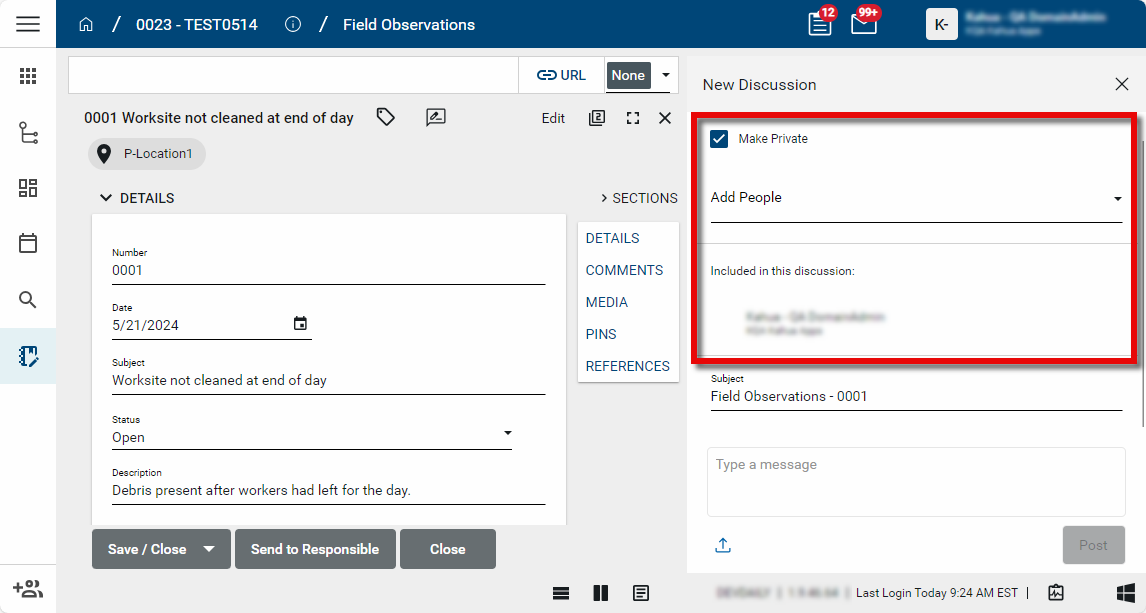
The New Discussion page opens. By default, discussions are public. If the discussion is public, anyone with access to view the associated record will be able to view the discussion.
-
To start a private discussion, select Make Private. This opens the Add People field. Select the people to include in this discussion. Only these users will be able to view or add to this discussion. This option will not be available if your domain administrator has disabled private discussions.
-
The Subject field defaults to the application name and record number but can be modified to more accurately represent the content of the discussion.
-
Enter your content in the message field.
-
You can attach one or more files to this post in the discussion. Select the upload icon
 and browse to the file you want to upload. Note that if you are using Microsoft Edge as your browser, you may be able to take advantage of the Upload from Mobile feature to access files on your mobile device. For more information, refer to https://www.microsoft.com/en-us/edge/features/mobile-upload.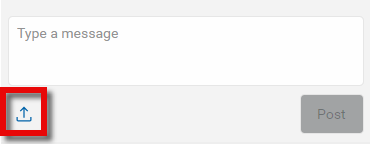
-
Click Post to post this as the first post in the discussion.
-
Once you've completed your post, click Back
 to return to the list of discussions, or click the Close icon
  to close the Discussions panel.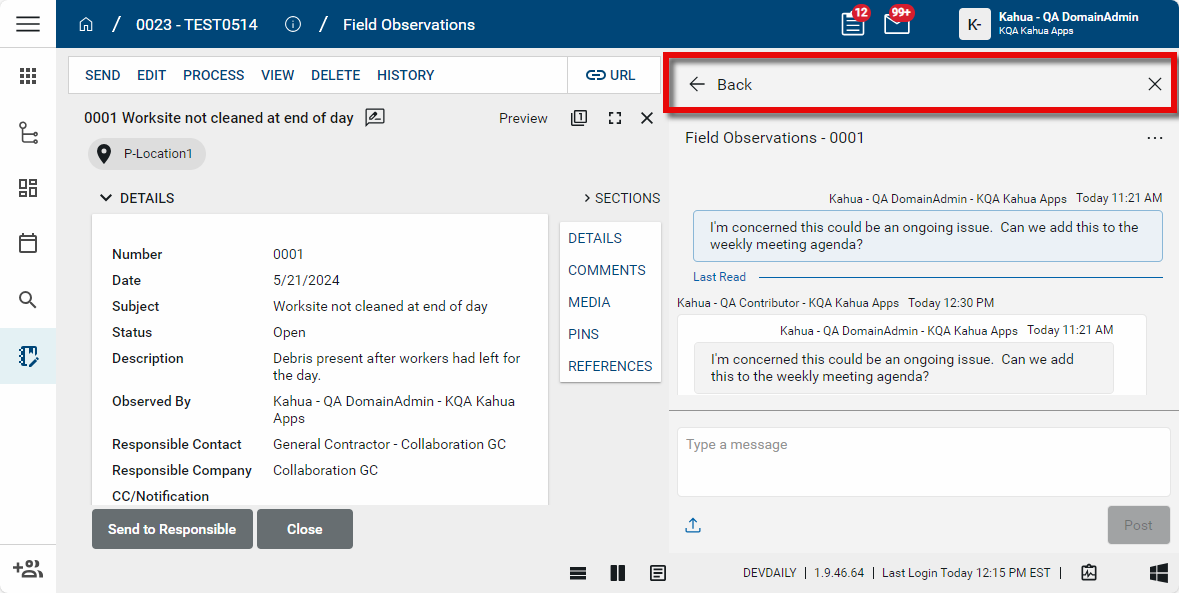
Important Once created, a discussion cannot be deleted. Consider modifying the discussion name to indicate a discussion is not to be used, or setting the discussion as private and removing the other participants. Refer to Modify the discussion name, privacy status, or participant list.
Share a discussion
A link to a discussion can be copied and shared, allowing another Kahua user to quickly open the discussion directly. Alternatively, you can use the @mention feature to add a user to the discussion.
To share a discussion, complete the following steps:
-
Navigate to the appropriate project or partition.
-
Open the application and the detail view of the record within to access the discussion. Click the Discussions icon
next to the record name to open the discussions panel. Select the discussion you want to share to open it. -
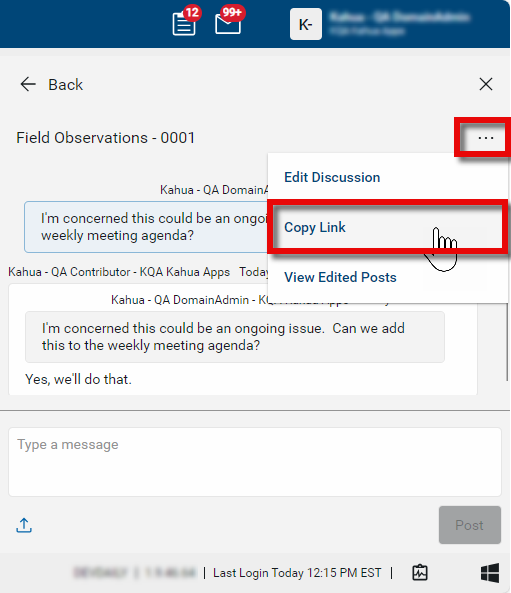
Select the ellipsis icon
 to open a list of additional actions.
 -
Select Copy Link to copy a link to the discussion to your clipboard.
-
Share the link to another Kahua user to allow them to open Kahua directly to the discussion. Only users with the appropriate access will be able to open the discussion.
Alternatively, Kahua users can be notified about both public and private discussions by using the @mention feature.
-
Navigate to the appropriate project or partition.
-
Open the application and the detail view of the record within to access the discussion. Click the Discussions icon
next to the record name to open the discussions panel. Select the discussion you want to share to open it. -
In the message field, type @ to open the @mention panel. Select Add Participant.
-
Continue to type the user's name to narrow the list and select the appropriate user.
-
Depending on the user's notification settings, the mentioned user may be notified by desktop notification or a Kahua message with a direct link to the discussion.
-
If this is a private discussion, the mentioned user is automatically added to the discussion and becomes a discussion participant. You do not have to be the author of the discussion to add someone to a private discussion in this manner. The author of the discussion can remove participants from the discussion. Refer to Modify the discussion name, privacy status, or participant list.
Participate in an existing discussion
To participate in an existing discussion, complete the following steps:
-
Navigate to the appropriate project or partition.
-
Open the application and the detail view of the record within that application where the discussion is.
-
Click the Discussions icon
next to the record name to open the discussions panel. Note that you can modify the width of the discussion panel by hovering over the left edge and adjusting its location.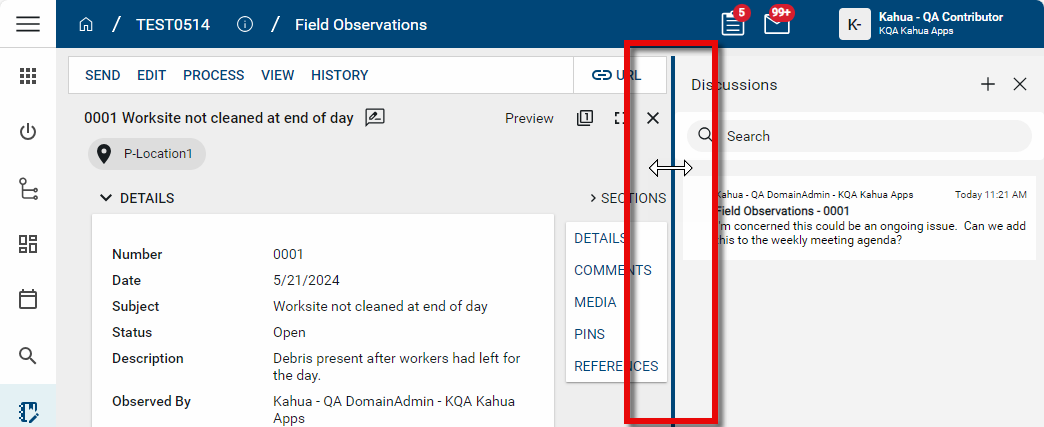
-
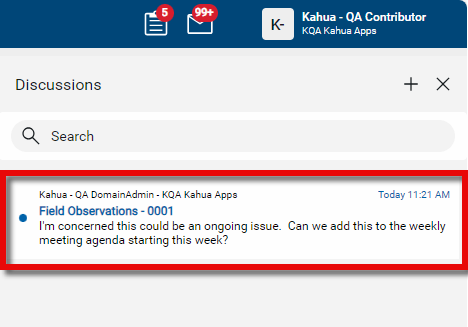
A list of existing discussions will appear. Each record in the application can have multiple discussions associated with it. Each discussion will appear with the discussion name, the last added or edited post, the name of the user who created or edited the last post, and the date and time of the last post or edit.
A new or edited post you have not yet seen will be indicated by a blue dot and bolded name. Select the appropriate discussion to review or post to.
-
To add a new post in the discussion, enter your comment in the message field.
-
Use the @mention feature to tag a user in the post. Type @ to open the @mention panel. The @mention panel contains a list of all discussion participants. Discussion participants include the author of the discussion, users directly added by the author, users who have participated in the discussion, and any user previously mentioned in the discussion. Select a discussion participant from the list, or select Add Participant to add another Kahua user to the discussion.
Depending on their notification settings, tagged users may receive a desktop notification or a Kahua message with a direct link to the discussion. Users who are not yet participants in the discussion will be added to the discussion. This applies to both public and private discussions. You do not have to be the creator of the discussion to add someone to a private discussion.
-
You can also use the @mention feature to tag all participants in the discussion. Type @ to open the @mention panel and select Everyone. Depending on their notification settings, all discussion participants may receive a desktop notification or a Kahua message with a direct link to the discussion. Discussion participants include the author of the discussion, users directly added by the author, users who have participated in the discussion, and any user previously mentioned in the discussion.
-
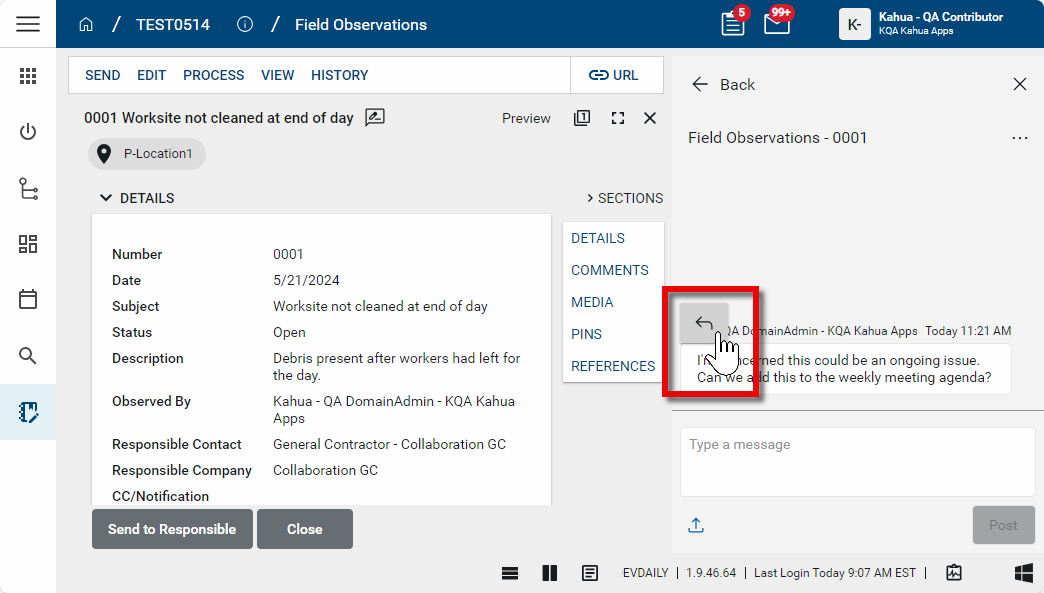
To reply directly to a post, hover over it and select the Reply icon
 .
.
-
You can attach one or more files to this post in the discussion. Select the upload icon
and browse to the file you want to upload. Note that if you are using Microsoft Edge as your browser, you may be able to take advantage of the Upload from Mobile feature to access files on your mobile device. For more information, refer to https://www.microsoft.com/en-us/edge/features/mobile-upload.
-
To view or download a file attached to an existing post, click the download icon
 and select View or Download.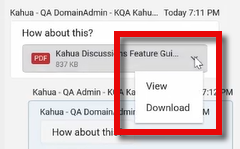
-
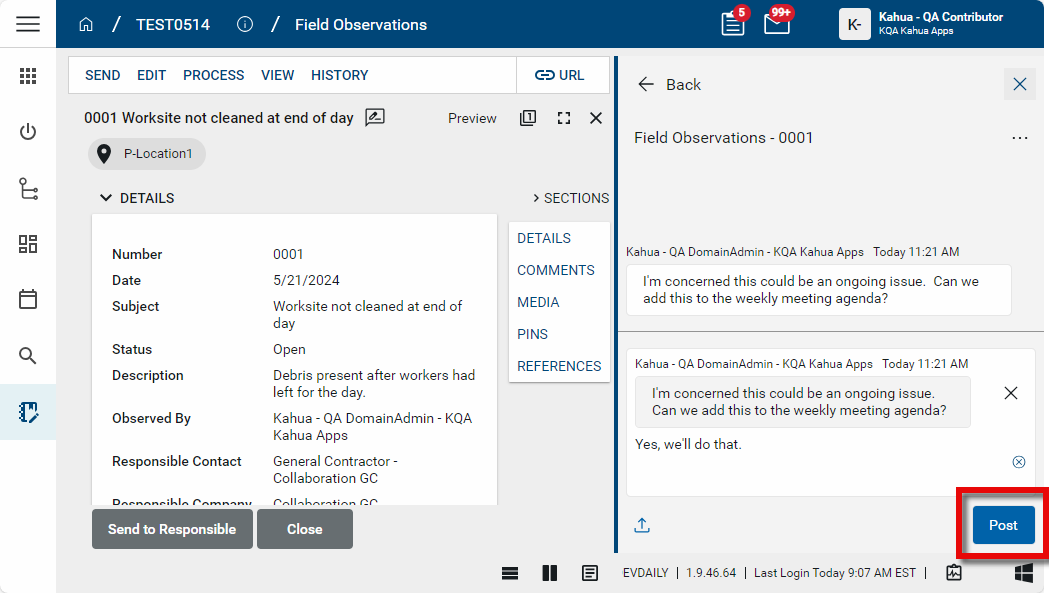
Click Post to post your message.
-
Once you've completed your post, click Back
to return to the list of discussions, or click the Close icon to close the Discussions panel.
Edit or delete your own posts
You have the ability to edit or delete your own posts in a discussion. The original posts are saved and can be viewed at any time by any user with access to the discussion by selecting View Edited Posts from the list of additional actions under the ellipsis icon .
To edit or delete your post, complete the following steps:
-
Navigate to the appropriate project or partition.
-
Open the application and the detail view of the record within to access the discussion. Click the Discussions icon
 next to the record name to open the discussions panel.
 -
Select the discussion with the post you want to edit or delete.
-
Hover over the post. The Edit
 and Delete
  icons will appear. Make the appropriate selection.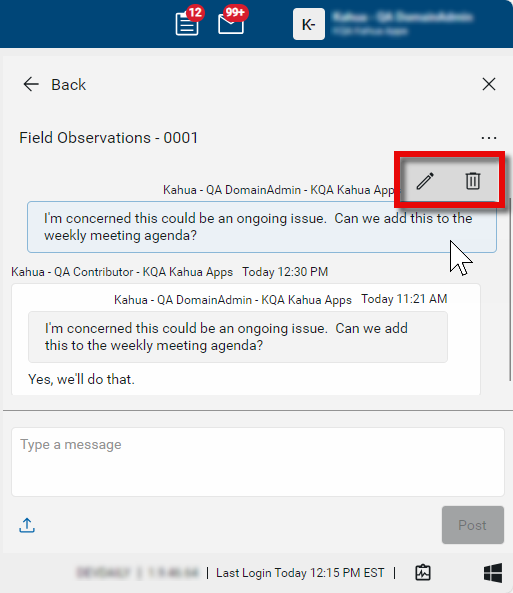
-
For editing, click the check mark
 icon once your edit is complete, or click the close icon
  to cancel without saving your changes.
 -
For deletion, once you click the delete icon your post is deleted. You can select Undo next to your post to undo the cancellation. You can undo the deletion at any time.
View edited post history
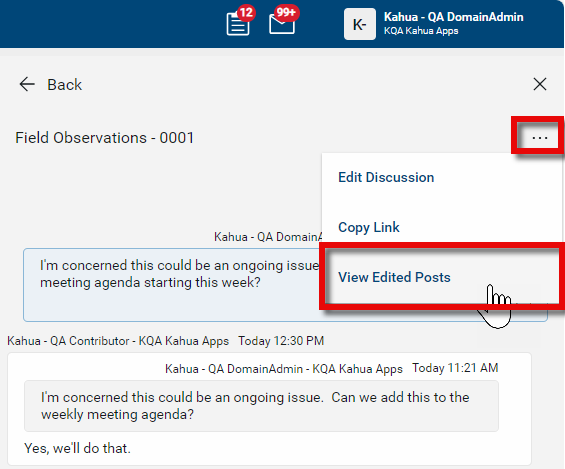
The original values of posts that were edited or deleted can be viewed at any time by any user with access to the discussion by selecting View Edited Posts from the list of additional actions under the ellipsis icon .
To view the history of edited or deleted posts, complete the following steps:
-
Navigate to the appropriate project or partition.
-
Open the application and the detail view of the record within to access the discussion. Click the Discussions icon
next to the record name to open the discussions panel. -
Select the discussion you want to view the history of.
-
Select the ellipsis icon
to open a list of additional actions. -
Select View Edited Posts.
-
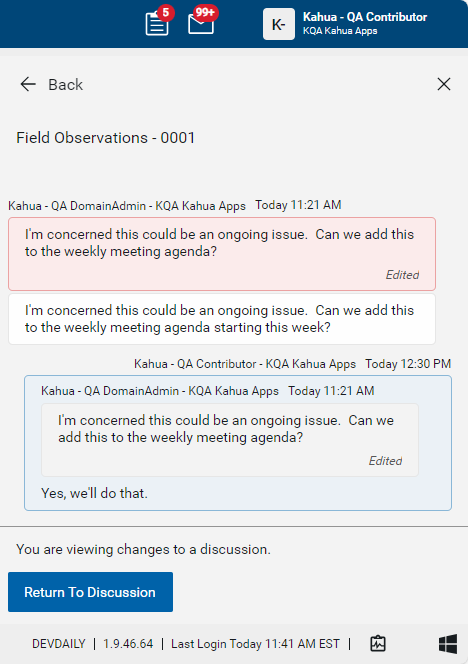
The original posts will appear with a light red background above the edited version.
-
Select Return To Discussion when you are done viewing the discussion changes.
Manage your discussion notifications
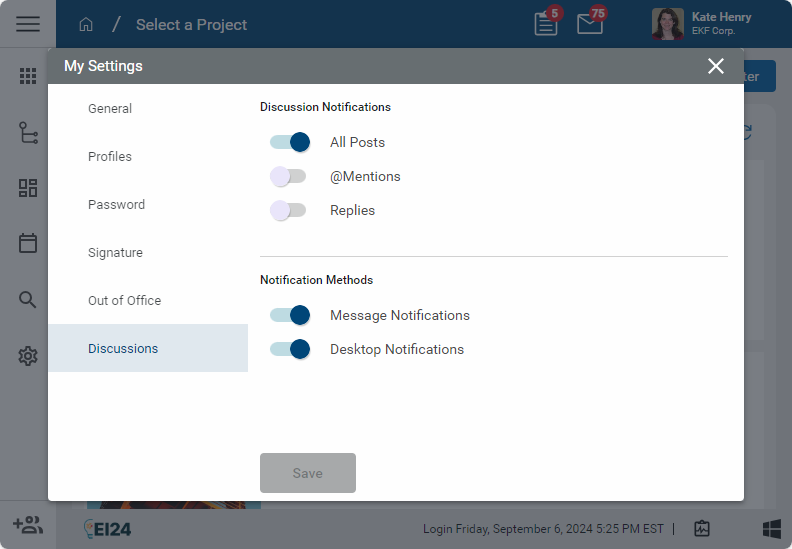
You can choose to be notified when you are mentioned in a discussion using the @mention feature, when someone replies to a post you made in a discussion, or when any post is made in a discussion that you are a participant in. You can choose to be notified with a Kahua message, a desktop notification, or both.
These settings are managed on the Discussions tab of the My Settings page. For more information, refer to Discussions.
Use the log view to determine which records have discussions
A Discussions column is present in all hub app default log views. The column will display an icon if one or more discussions are present on a record. The number of discussions with unread posts appears on the icon  . You can use the quickfilter Has Discussions to easily select records with discussions.
Modify the discussion name, privacy status, or participant list
The user who created the discussion has the ability to modify the Subject name and the privacy status of a discussion at any time. They can add or remove users from private discussions. Note that once created, a discussion cannot be deleted.
To modify the discussion Subject, privacy status, or participant list, complete the following steps:
-
Navigate to the appropriate project or partition.
-
Open the application and the detail view of the record within to access the discussion. Click the Discussions icon
next to the record name to open the discussions panel. Select the discussion you want to modify. -
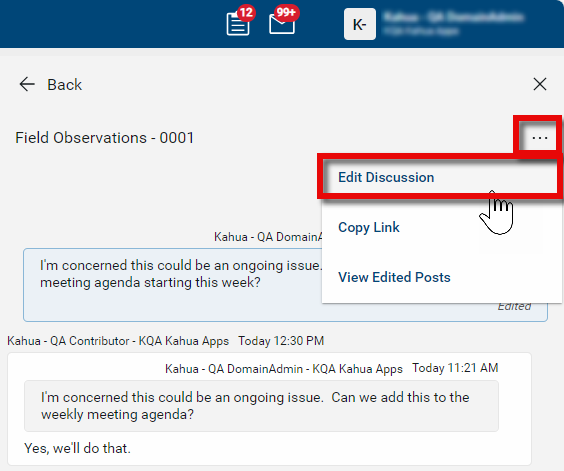
Select the ellipsis icon
 to open a list of additional actions.
 -
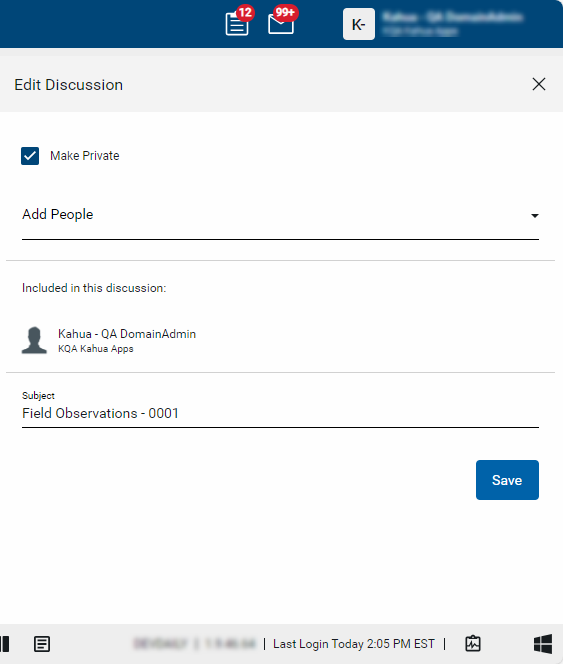
Select Edit Discussion to open the Edit Discussion page.
-
Select or clear Make Private to make the discussion private or public. If you select Make Private, add the appropriate users in the Add People field. Here you can also remove participants from private discussions. Modify the Subject field to change the name of the discussion.
-
Click Save when you are done.
Allow only public discussions
Your domain administrator can modify a setting in the Configuration app to allow only public discussions in your domain. This can only be done at the root domain level. Refer to Understand public vs. private discussions.
To only allow public discussions in your domain, complete the following steps:
-
Review the header to ensure that you are in the root domain.
-
Navigate to the Configuration application (Apps > Administration > Configuration).
-
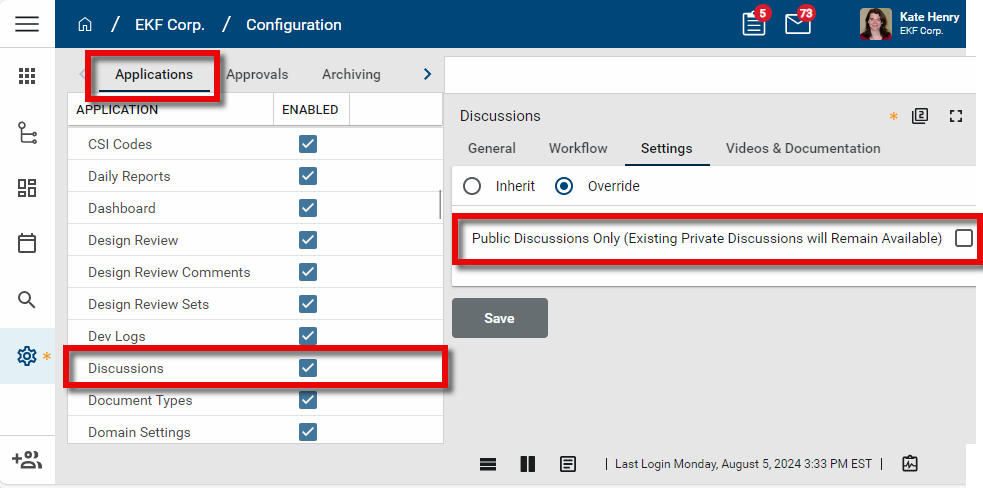
On the Applications tab, select Discussions. The detail page opens.
-
Select the Settings tab.
-
Select Override.
-
Select or clear the Public Discussions Only (Existing Private Discussions will Remain Available) setting. When enabled, users will not have the option to make a new discussion private. Any private discussions created before the setting is updated remain private.
-
Click Save.
Disable the discussions feature
Your domain administrator can disable the discussions feature for your domain. This can only be done at the root domain level.
To disable the discussions feature for your domain, complete the following steps:
-
Review the header to ensure that you are in the root domain.
-
Navigate to the Configuration application (Apps > Administration > Configuration).
-
On the Applications tab, select Discussions. The detail page opens.
-
Select the General tab.
-
Select Override.
-
Clear the Enabled check box. This will disable the discussions feature. Any existing discussions will be hidden, and the Discussions column and quickfilter will be removed from all log views.
-
Click Save.