Accepting a share invitation
A powerful feature of the Kahua platform is the ability to share project information across domains. For example, a general contractor can share a project's RFI log or submittal log on a project with the subcontractors on that project, ensuring everyone is on the same page. For more general information on sharing in Kahua, refer to Sharing in Kahua.
As the recipient of an invitation to share a list from an app from another organization's Kahua domain, you will accept or reject the invitation on behalf of your company. You can accept the share into an existing project in your domain, or create a new project to receive the share into.
Once the share is accepted, the records that the other organization is sharing with you will appear on their own list within the appropriate application in the selected project. The other organization will determine what permissions users in your company will have for the shared records.
Key elements about this feature include the following:
-
When an app is shared with you, the contents of that app appear in real-time in your domain. You are not viewing a copy of the data, you are viewing the actual records from their domain.
-
You are accepting the share on behalf of your company. Other users in your company who have access to the app being shared will also have access to the shared list.
-
The invitation to receive the share appears as a task in your Kahua domain. The share can be added to an existing project, or you can create a new project directly from the invitation and add the share to that new project.
-
After you accept the share, the records appear as a separate list in the app in the selected project in your own domain. You continue to log into your domain as always. You do not log in to their domain.
-
Your organization will be assigned a standard permission level by the company initiating the share. It is most common to have view-only permissions.
-
You may be granted permission to create, modify, or delete records in the shared list. If a record from the shared list is deleted in error, a domain administrator in the source domain may be able to recover it from their recycle bin app.
-
You may see a filtered list of records. For example, if the other organization shares the RFI app with you, they can choose to limit the records on the list to only RFIs where your company name is on the RFI record.
-
The share can be edited or ended at any time by the company who created the share. Depending on the settings they select, when the share is ended, a viewable copy of the records shared with you may or may not remain in your project.
How to . . .
 Accept a shared application
To accept an invitation to share an app, complete the following steps:
-
Click on the tasks icon
 on the Kahua header to open the Tasks app. For more general information on using tasks, refer to Tasks App.
 -
Open the Kahua Sharing Invitation task.
-
Note that the invitation includes the name of the app and the project from which it is being shared.
-
By default, the name of the project you are currently in appears as the project to add the share to.
-
To select a different project, click the drop-down arrow next to the current project name and select the correct project.
-
To create a new project, select Create New Project. Enter the appropriate information and save the new project. Return to the task and click the drowpdown arrow next to the project name and select the correct project.
-
-
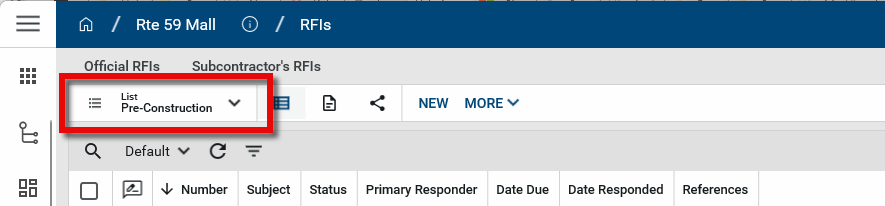
Accept the invitation. The app is now shared in your domain. To review the shared records, navigate to the correct project and open the application. Click on the list selector and select the share from the list.
Move an accepted share to a different project
It is not uncommon for the user accepting a share to inadvertently accept it into the wrong project. You can move an accepted share from one project to another in the Share Manager app. For more information, refer to Move an existing share to a different project.