CUI (Controlled Unclassified Information)
The acronym CUI refers to Controlled Unclassified Information. It is a feature in Kahua that can be used to identify records that will require sensitive handling by users in your domain and records that will be redacted for users who have not been granted permission to view the data. The feature is available on many apps in Kahua.
Important CUI must be enabled in your domain by the Kahua Support team. If you are interested in using CUI in your domain, reach out to Kahua Support or your account representative.
Key things to know about the CUI feature include the following:
-
When CUI is enabled in your domain, users with the appropriate permissions can label records with one of the following CUI labels: None (no data restrictions), Sensitive (for information only, no data restrictions), or Restricted (data restricted for users without CUI permissions).
-
Your organization may use different terms for the CUI labels in your domain than the defaults values listed here. If you have questions, check with your domain administrator.
-
In CUI-enabled apps, records labeled as Restricted will have all but a small number of fields redacted. Redacted fields appear with asterisks in place of the actual field values to users without permissions to view the content.
-
Records labeled as Restricted have additional limitations on the View, Send, and Add Kahua Doc actions.
-
CUI permissions are managed in the Groups app and are assigned by individual app. For each app that supports CUI, members of a group can have one of three access levels to view content on records labeled as "Restricted".
-
Users with CUI Admin Access Level permissions can view redacted information and also assign and modify sensitivity settings.
-
Users with CUI Standard Access Level permissions can view redacted information. They cannot modify sensitivity settings.
-
Users without CUI permissions cannot view redacted fields on records labeled as "Restricted".
-
How to . . .
 Understand the impact of each sensitivity rating
Important Your organization may use different terms for the CUI labels in your domain. Contact your domain administrator for more information if the labels in your domain are different than the defaults described here. The functionality remains the same when labels are modified.
When CUI is enabled in your domain, users with the appropriate permissions can label records in one of the following ways:
-
None - The content has no CUI label. There are no restrictions on its visibility in Kahua beyond the standard app permissions.
-
Sensitive - The content has been labeled as Sensitive. There are no restrictions on the record's visibility in Kahua beyond the standard app permissions. Flagging the content as Sensitive is intended to alert users that care should be taken in how the data is handled and distributed.
Note If a record labeled as Sensitive is sent as a Kahua message and that message is copied to the Communications app, the message in the Communications app will also have the Sensitive rating applied to it.
-
Restricted - The content has been labeled as Restricted. For each application, a pre-defined set of fields on each record are redacted and replaced with asterisks when viewed by users who do not have access to restricted information.
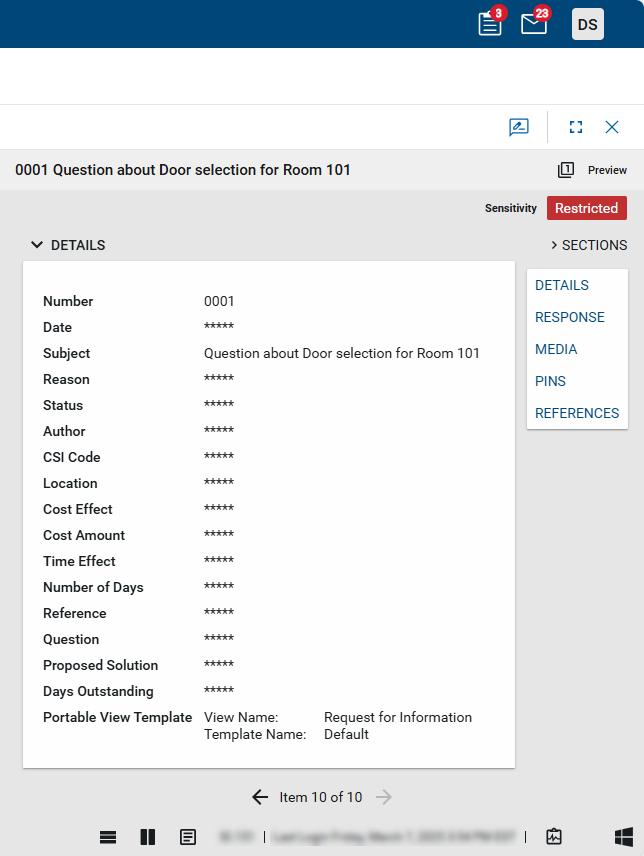
Additional impacts of a Restricted label on a record
Important Your organization may use different terms for the CUI labels in your domain. Contact your domain administrator for more information if the labels in your domain are different than the defaults described here. The functionality remains the same when labels are modified.
In addition to the altered appearance of redacted fields for users with no permissions to view restricted data, there are limits on viewing and sending records labeled as Restricted, and limits on adding the records as references in other apps in Kahua.
The following limits apply to viewing and sending records labeled as Restricted:
-
Users without CUI permissions are unable to select the View or Send action for restricted records.
-
Users with CUI permissions can select View on a restricted record, but only the un-redacted fields appear on the portable view.
These users can select Send on restricted records, but the message contains only a link to the original record. The message recipient must be a Kahua user to open the link, and that user's CUI permissions will apply to their view of the record.
To use Add Kahua Doc in References to add a record with a CUI "Restricted" label from one app to a record in another app, the following must be true:
-
You must have CUI permissions for the app where the record you are attempting to add originates from.
-
The record you are adding the reference to must also have a CUI "Restricted" label. You cannot add a CUI "Restricted" record as a reference to a record that has a CUI label of "None" or "Sensitive".
If you do not have the appropriate CUI permissions, or the records have incompatible CUI labels, an error message will appear when you attempt to select the record.
Apply a CUI label to a record
Important Only users who are members of a group with CUI Admin Access Level permissions for the app in use are able to apply a CUI label to a record. Refer to Manage CUI permissions.
In an app where CUI is available, the CUI label is applied as follows:
-
Select the record from the log view to open the detail page.
-
If the CUI label does not appear, select Edit to open the record in Edit mode.
-
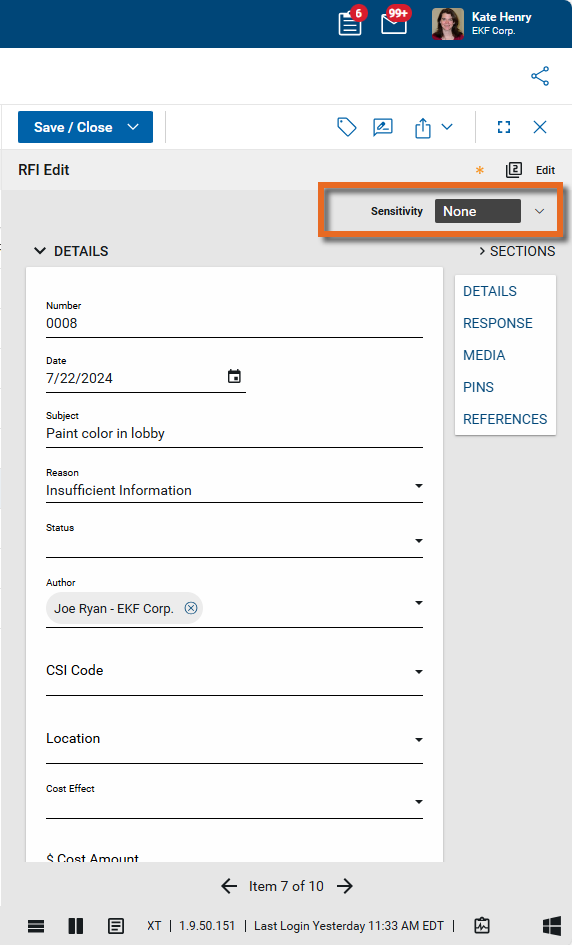
In the upper right corner, click the Sensitivity selector
 .
.
-
Select the appropriate option.
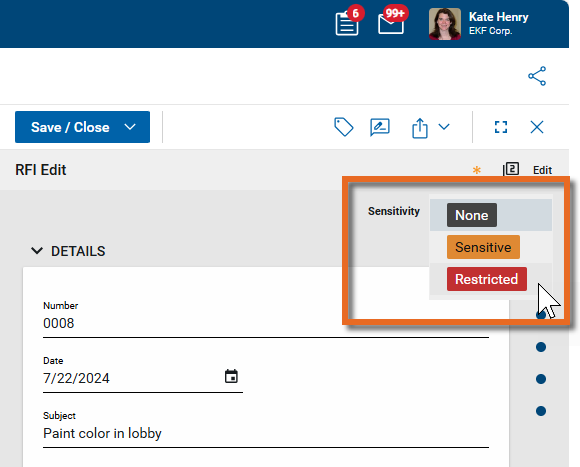
-
Click Save to save your changes.
Note When reducing the sensitivity level of a record, a warning message will appear.
View CUI status in a log view
In all apps that have CUI enabled, a Clearance column is available for log views. The CUI values of Sensitive or Restricted appear in this column. Log views can be modified to include this column. For more information on how to modify a log view to include additional columns, refer to Log Views and Log Reporting.
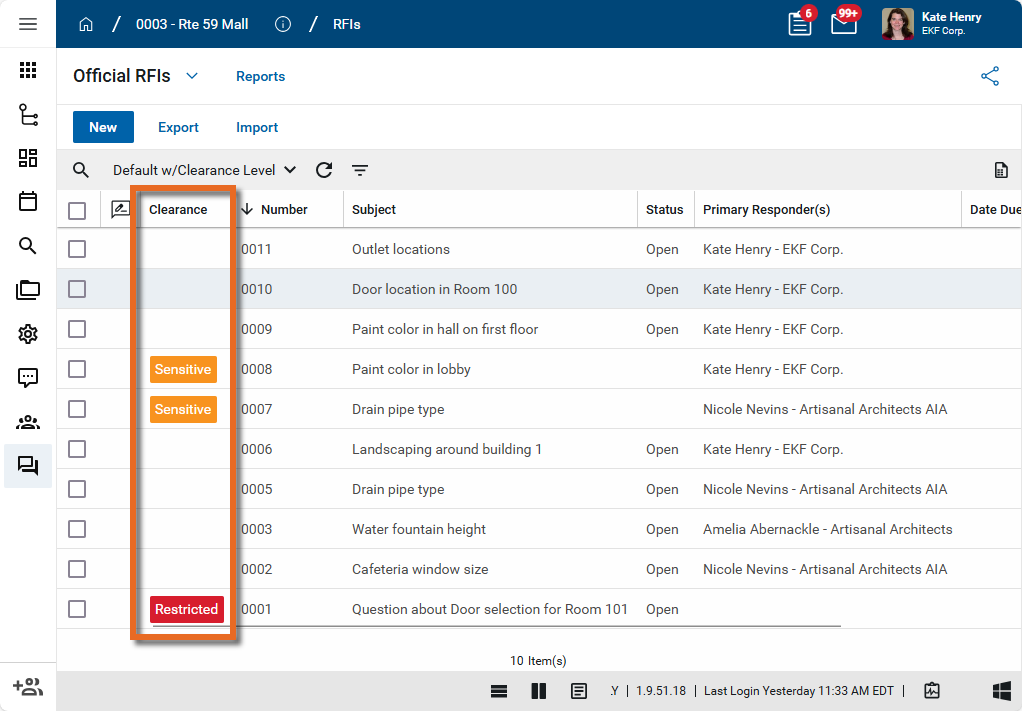
Note Your organization may use a different term for this column. Contact your domain administrator for more information if the default value of Clearance does not appear as an option in your log views.
Manage CUI permissions
CUI security is managed in the Groups application by your domain administrator. In each app that is capable of using CUI, two roles appear on the Permissions tab in the Groups app, alongside the usual roles of Moderator, Observer, Contributor, etc. The two CUI-related roles are as follows:
-
Standard Access Level- Users assigned this role can do the following:
-
View redacted information for records in this app
-
-
Admin Access Level - Users assigned this role can do the following:
-
Modify the sensitivity setting for records in this app
-
View redacted information for records in this app
-
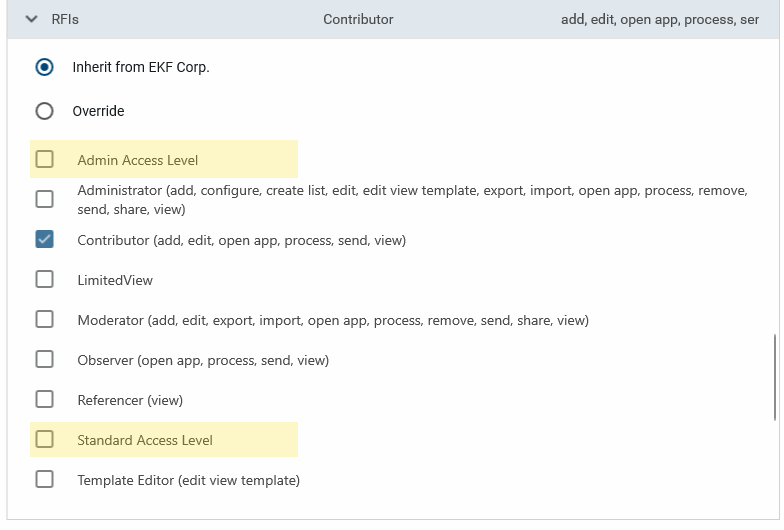
Note Contact Kahua Support if you want to modify the labels used for these roles in your domain.
You can add CUI permissions to existing groups, or create new groups to apply these permissions. For general information on working with groups, refer to Setting up groups. If you need assistance setting up groups and permissions, reach out to Kahua Support or your account representative.