Multi-Project Cost Documents
Applicable Packages This feature applies to Kahua for Owner, Education, General Contractor and Subcontractors using the Kahua supplied cost applications. If your domain has custom cost extensions or is using Source of Funds, or you are intending to use currencies besides the domain currency, updates are required prior to this functionality being enabled on your Kahua domain.
When enabled, the multi-project cost documents feature allows you to create cost documents in one project, typically at a program (parent) level, that include line items associated with child projects. This allows you to manage a single cost document, such as a contract or a budget, that includes work for multiple projects, while still assigning the cost values to the appropriate project.
This functionality is available for both Expense apps and Funding apps, including Budgets and related documents.
You have a "Campus Improvement" program, and the work done on each building is managed in separate projects, named "Building 1", Building 2", etc.
You set up a program level partition in Kahua, and underneath that program, you set up projects for each building to track the work performed. Each project has budgets, contracts (commitments) and actuals. Each of these may be fully or partially managed from the parent program, using Multi-Project Cost Documents.
You can set up initial budgets for the program and child projects either at the program level OR within each project. You can execute budget changes or budget adjustments from the program, allowing for smooth transfer of budget between child projects and to the parent program.
You have a contract with a company, such as a design firm, that is doing work at the program level and on the individual projects. The designer submits a single pay request each month, but can easily progress work against different building projects within the program.
You can:
-
Create a contract in the "Campus Improvement" partition that includes individual line items for work to be done on the individual Building 1, Building 2, etc. projects.
-
Have the program level contract and each related document such as a change order or pay request move through the approval process as a single record.
-
Enforce Cost Guards (over-committing prevention) at the child project level, even when performing actions at the program level.
-
Receive and approve an individual pay request per pay cycle, submitted against the program level contract, which includes line items for the individual projects.
-
Receive and approve change orders submitted for the contract that include line items for the individual projects.
-
Initiate changes to a multi-project contract either through Issues in the parent project, or with Issues in the child project where one or more contract items are assigned to the child project.
-
View the contribution to the project’s budgets, costs and actuals from the parent project in the project’s work breakdown structure (WBS).
Note that you can use the All Items view in the Log View manager to view these items in the related document logs.
Important things to know about this feature include the following:
-
Kahua Support must first make the Multi-Project Documents feature available for your domain. Once it is available, the feature must be enabled in your domain, then in the appropriate project, and finally on the documents where you want them to apply.
-
The individual line items are included in the Work Breakdown values for their associated project, and are visible via the drill-through capability.
-
When a Contract is set to be multi-project, the associated Change Requests, Change Orders, Schedule of Values Breakdown, and Pay Requests are automatically multi-project documents.
-
When a Purchase Order is set to be multi-project, the associated Purchase Order Change Orders and Invoices are automatically multi-project documents.
-
Budget, Budget Adjustment, and Budget Changes documents function independently, so creating one multi-project document does not require any other document to be multi-project.
-
When you are working with an Issue in a project, you are able to select multi-project documents that reference your current project. In the example above, this would mean that an issue created in the "Building #1" project could include the contract created in the "Campus Improvement" program project.
-
When you are working with an Issue or contract Change Orders in a project and the related contract has Associated Contract Lines enabled, the available contract lines to pick from are filtered by the item’s assigned project.
-
When you are using Cost (over-commitment) Guards, Kahua uses the configuration from the current document’s project to determine the calculations to use, but applies these to the cost item’s activity code in the item’s assigned project. The optimal setup is for the program and child project to use the Cost Guard configuration.
-
When using Process or Save/Copy, the cost item’s assigned project and related project coding are copied over.
-
When using Multi-Currency, the program and child projects must use the same exchange rates and project currency. The optimal setup is for the program and child projects to all share the same multi currency configuration.
-
When using the Data Store for reports or other purposes, the data store respects the cost items assigned project (partition) and the document’s project. Reports leveraging the data store may need to be reviewed and updated, particularly if they assume all the items on a given document are in the same project.
-
MPD does not support Cashflow Actuals, or Expense/ Budget lines sourced from documents. Expense and Budget lines sourced from WBS columns are supported.
The Multi-Project Documents feature is available for the following applications:
| Expenses | Funding | Other |
|---|---|---|
|
|
|
The Multi-Project Documents feature is not available for the following applications:
-
Planning Budget and Planning Adjustment
-
Purchase order invoices without a related purchase order
-
Funding Change Request
-
Sources of Funds (Sources of Funds has a version of cross-project functionality)
How to . . .
 Enable Multi-Project Cost Documents on your domain
There are several steps involved in enabling multi-project cost documents. The first step is to have your domain administrator enable the feature on your domain.
To enable the feature on your domain, complete the following steps:
-
Navigate to the Domain Settings app (Apps > Administration > Domain Settings).
-
Select Domain Defaults.
-
Select Enable Multi Project Cost Documents.
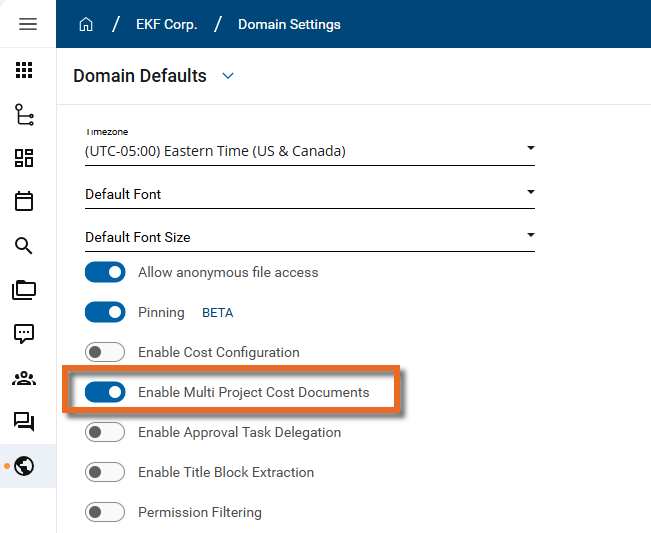
Important If the option to enable this feature does not appear on your Domain Defaults page, contact Kahua support or your account representative for assistance and to determine if the option can be made available for your domain.
-
Click Save.
Note If this selection is cleared after multi-project cost documents have been created, existing multi-project documents will continue to function normally, but no new multi-cost documents can be created.
Enable Multi Project Cost Documents for your project
Once the multi-project cost documents feature has been enabled in your domain, it can be enabled for a project.
To enable the feature on your project, complete the following steps:
-
Review the header to ensure that you are in the correct project or partition.
Important Unlike other settings, this setting is not inherited from the project above it in the hierarchy. It must be enabled for each project or partition where you want to apply it.
-
Navigate to the Configuration application (Apps > Administration > Configuration).
-
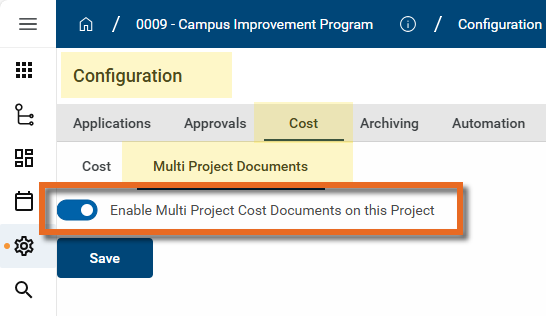
Select Cost > Multi Project Documents.
-
Select Enable Multi Project Cost Documents on this Project.
-
Click Save.
Enable and apply multi-project items to your cost document
Once the multi-project cost documents feature has been enabled in your project, it can be enabled for a cost document. You can then create line items in the document for the current project or projects lower in the hierarchy than the current project.
To enable the feature on your cost document and apply it to the document's line items, complete the following steps:
-
Review the header to ensure that you are in the correct project or partition.
-
Navigate to the appropriate cost app and open the appropriate document.
-
Scroll to the Items section of the document.
-
Select Enable multi-project items on this document.
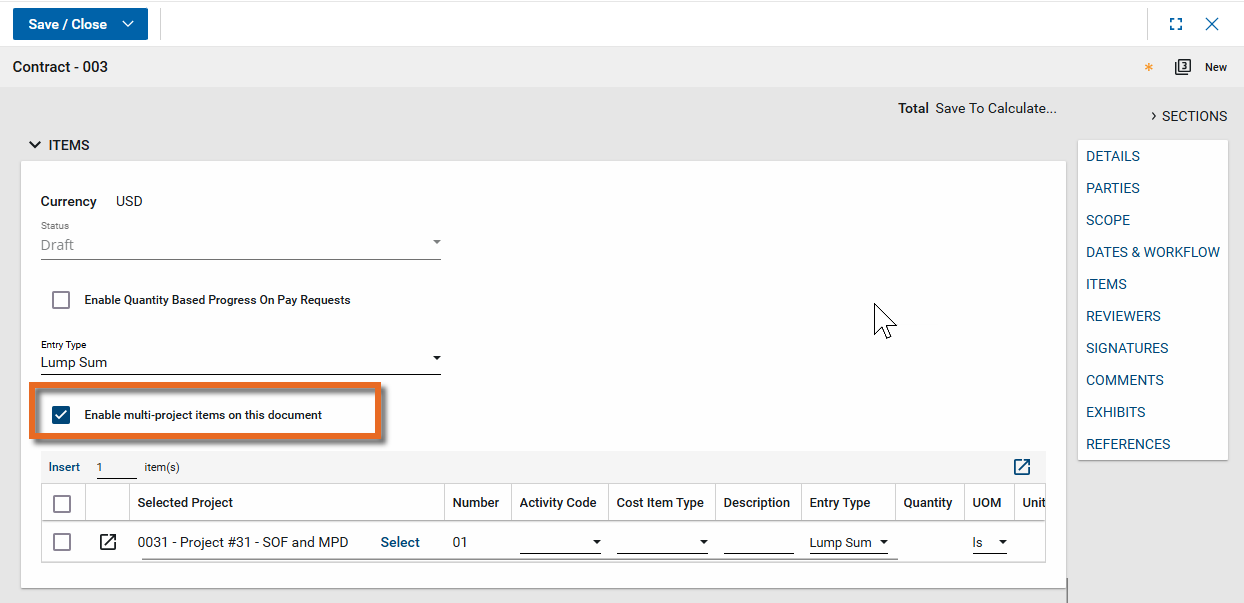
Note You can clear the Enable multi-project items on this document setting on a document at a later time, as long as all the items on the document and any associated documents (such as a change order for a contract) are part of the current project. Associated documents are checked when the original document is saved.
-
Insert the appropriate number of items in the grid. For more information on working with grids, refer to Item grids.
-
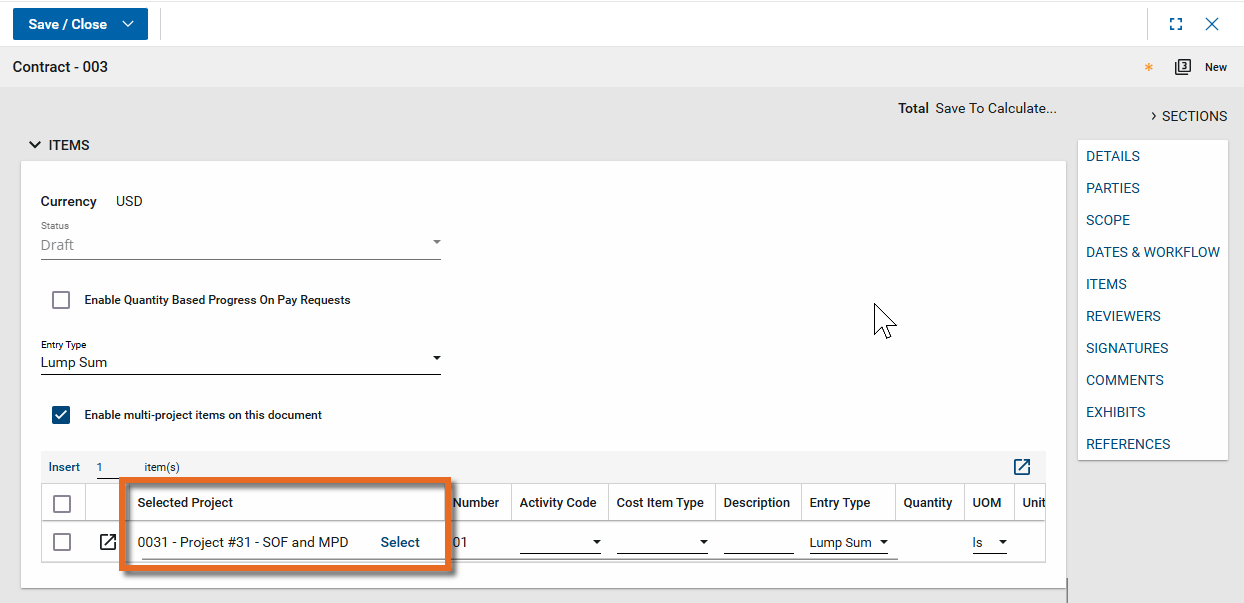
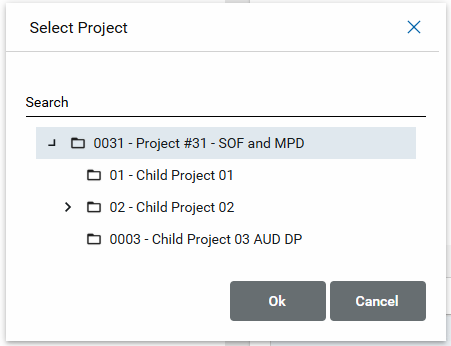
Note that the Selected Project column is available. By default, the currently open project is selected. To select another project lower in the hierarchy than the current project, click Select.
-
The project tree appears. Navigate the tree and select the appropriate project.
-
Once the project is selected, the remaining columns will contain values from the selected project. For example, the Activity Code field for the new line item will contain activity codes for the project in the Selected Project column.
-
Make any additional edits or updates as needed. Click Save when you are done.
Note Once a line item is saved, you cannot change the project associated with that line item. To use a different project, you must delete the original line item and create a new one with the correct project.
Review cost items in the project WBS
When multi-project cost documents are used, the individual line items associated with a project appear on that project's WBS.
When you review the item, there will be a hyperlink to the associated cost document. Clicking on that hyperlink will open the document in the project where it was created.
In the example above, if you open the WBS for the Building #1 project and want to drill into the line item associated with the Campus Improvement program contract, you can click on the contract name and the "Campus Improvement" project will open to the appropriate contract.
Review cost items in the cost document logs
In domains with Multi-Project Documents enabled and in apps that allow item-level views, there are two different item-level views available.
All Items (In Current Project) displays all the items assigned to that project, both from documents in the current project or parent projects
All Items On Documents in Current Project appears in projects that are Multi Project Cost Document enabled. This view shows all items that belong to documents within the current project, regardless of which project the items are assigned to.
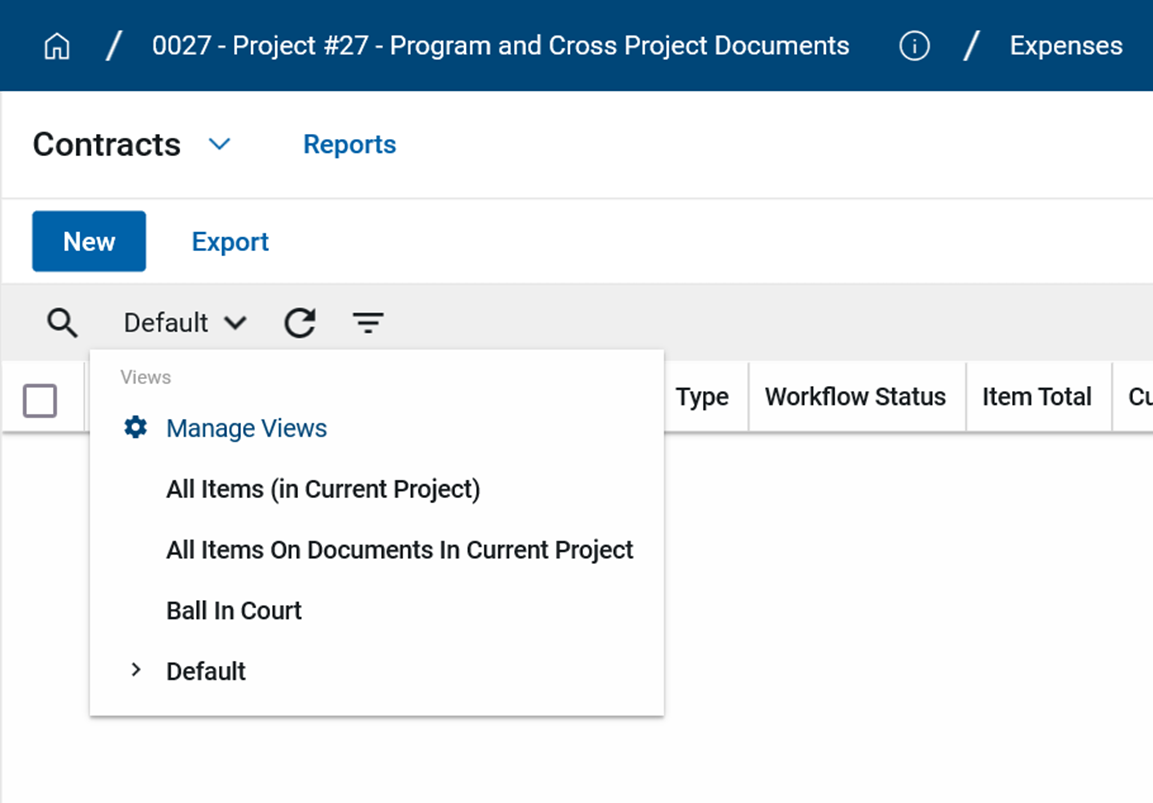
For more information on item-level views, refer to Apply an item-level log view in cost applications.