Project Directory App Configuration
The Project Directory app contains a list of the contacts and companies associated with a project. Throughout Kahua, most contact selection lists can be narrowed down to the contacts in the project directory for the currently open project. For more information on using the Project Directory app, including how to add or remove contacts and companies from the app, refer to Project Directory.
Note For general information on configuring an app, refer to Application configuration.
In addition to the general app configuration, there are two modifications that domain administrators can make:
-
Domain administrators can configure the Project Directory app to only allow contacts who are Kahua users to be added to the People tab of the Project Directory. This makes it easier to have only Kahua users selected on attributes that generate workflow tasks.
-
Domain administrators can create a "Project Directory Administrator" group. The presence of this group limits who can select contacts that are not part of the project directory. Only members of that group will be able to clear the Only Show Project Directory People option in contact selection fields. Other users will be required to select from contacts that are part of the project directory. In order for this option to function correctly, each project must have contacts added to the project directory.
-
When these two settings are used together, it ensures that only Kahua users are selected on attributes that generate workflow tasks.
How to . . .
 Limit Project Directory People to Kahua users
Domain administrators can configure the Project Directory app to only allow contacts who are Kahua users to be added to the People tab of the Project Directory. When enabled, only contacts who are Kahua users can be added to the Project Directory. This makes it easier to have only Kahua users selected on attributes that generate workflow tasks. To enforce this selection, your domain administrator can limit which users can select contacts that are not part of the project directory. Refer to Ensure users only select Project Directory Members throughout Kahua.
Important Enabling this setting will not affect existing Project Directory contacts, only the ability to add new ones.
To enable this setting, complete the following steps:
-
Review the header to ensure that you are in the correct project or partition. To apply this setting at the domain level, ensure that you are in the root domain.
-
Navigate to the Configuration application (Apps > Administration > Configuration).
-
Open the Applications tab and select the Project Directory People application. The application detail view appears.
Note There are three related selections on the Applications tab. Ensure that you have selected Project Directory People.
-
Click on the Settings tab and select Override.
-
Select Restrict Contacts to Kahua Users.
-
Click Save when you are done.
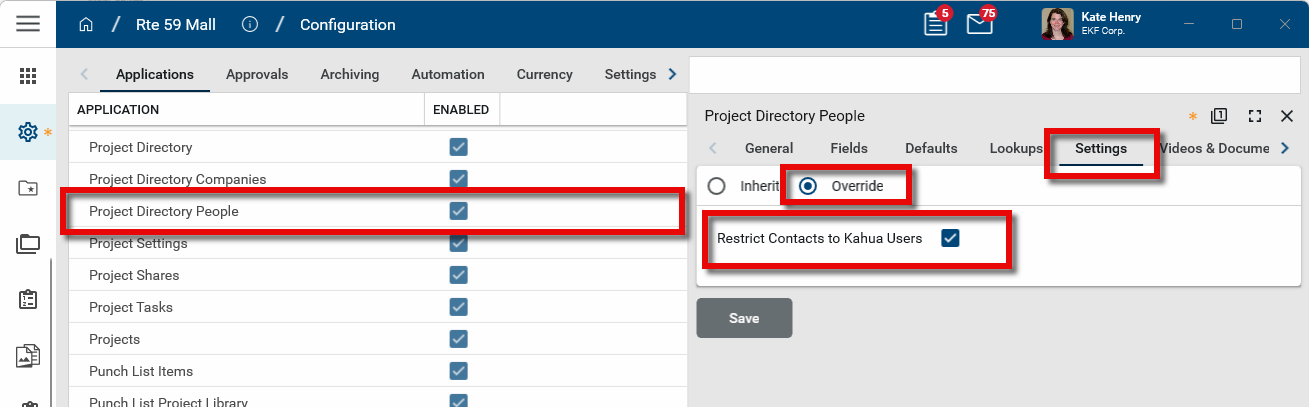
Note Enabling this setting will hide the Add from Group and Add Person options in the Project Directory app.
Ensure users only select Project Directory Members throughout Kahua
Your domain administrator can ensure your users are only able to select members of the project directory throughout Kahua by creating a special group at the root domain level in the Groups application. The presence of this group reduces who can select contacts that are not part of the project directory to members of that group.
-
When the "Project Directory Administrator" group is present, the Only Show Project Directory People option will only appear to domain administrators and members of that group.
-
Non-domain administrator users who are not in that group will only see members of the project directory in contact selection lists.
-
If no one has been added to the project directory for a project, all contacts will be available for selection. In order for this option to function correctly, each project must have contacts added to the project directory.
-
In conjunction with this setting, your domain administrator can enable the Restrict Contacts to Kahua Users configuration setting. The combination of these two settings ensures that only Kahua users are selected on attributes that generate workflow tasks. Refer to Limit Project Directory People to Kahua users.
To create this group, complete the following steps:
-
Review the header to ensure that you are at the root domain. This group must be located in the root domain to function correctly.
-
Navigate to the Groups application (Apps > Administration > Groups).
-
Select Create Group in the action bar. The New Group page opens.
-
In the Name field, enter "Project Directory Administrator". Click Save.
-
The Members tab opens. Select members for the group. To add a user to the group, type their name in the selection field and select them from the list of users in the Users application.
In contact selection fields, the Only Show Project Directory People option will appear only to these users. All other non-domain administrator users will only see members of the project directory. If no one has been added to the project directory for a project, all contacts will be available for selection. In order for this option to function correctly, each project must have contacts added to the project directory.