Universal Lookups
Universal lookups are custom lookup fields that can be made available in multiple applications. These fields allow you to properly align key information that may need to be captured across a variety of business processes. For example, you may have a common list of internal tracking codes you may want to select on different documents or to include as a categorization to help you catalog different records.
Universal lookup list values are managed in the Configuration app > Applications tab > Universal Lookups. Once the lookup field lists are configured, the fields can then be enabled in the applications where you want to use them.
Important When working in the Configuration app, it is important to review the header and ensure that you are working at the correct level in the hierarchy, either the root domain or at a partition or project level.
Settings that you establish at the root domain or lower levels will inherit down the hierarchy until they are overridden. For more information on the hierarchical structure of Kahua, refer to Understanding the hierarchical structure of Kahua.
Key elements of the Universal Lookups feature include the following:
-
You can enable up to five different universal lookup fields.
-
The lookup list values can be modified as needed at different levels in the partition/project hierarchy.
-
Once the lookup list values are established in the Configuration app, the lookup value fields must be enabled on the applications where you want them to appear. In the applications where they are enabled, you can edit the field label that appears in the app.
-
The enabled lookup value fields appear on the Details section in the Preview and Edit views of the records in their respective applications.
-
The enabled fields can be added to log views as desired. Refer to Log Views and Log Reporting.
-
Universal lookup fields can be enabled on the following applications:
-
Communications
-
Daily Reports
-
Field Observations
-
Issues
-
Meetings
-
Punch List
-
RFIs
-
Risk Register
-
Submittal Items
-
Submittal Packages
-
How to . . .
 Configure universal lookup values
To use the universal lookup fields, you must enter the list of values for each field that you want your users to choose from.
To configure universal lookup list values, complete the following steps:
-
Review the header to ensure that you are in the correct project or partition. The changes made here will inherit down the hierarchy until they are overridden in a partition or project at a lower level.
Note To apply these changes to the whole domain, ensure that you are in the root domain.
-
Navigate to the Configuration application (Apps > Administration > Configuration).
-
On the Applications tab, select Universal Lookup.
-
The detail panel opens. Select the Lookups tab.
-
There are five fields available for use, named "Custom Universal Lookup 1", "Custom Universal Lookup 2", etc.
Note You will change the label used to identify the field in the application in the app configuration. Refer to Enable universal lookup fields in an app.
-
On the left, select which of the fields you want to modify. Select Override.
-
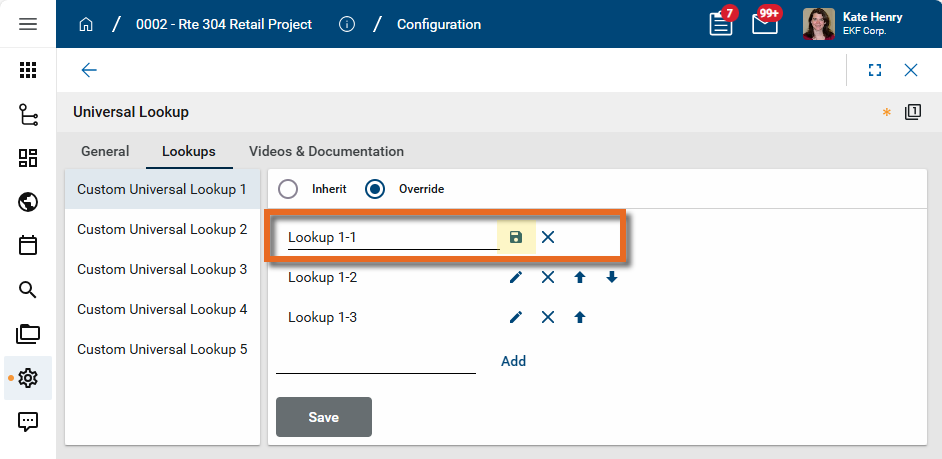
There are three initial values for each field, with generic default names of "Lookup 1-1", "Lookup 1-2", etc. To change these values, click the edit icon
 . Enter the correct value. Click the Save icon
  .
.
-
To remove a value, click the Remove icon
 for that value.
 -
To add a new value, enter it at the bottom of the list and click Add. This will add it to the bottom of the list. Click the Up
 and Down
  arrows to move it to a new position.
Note If the move arrows do not initially appear, click Save to refresh the page.
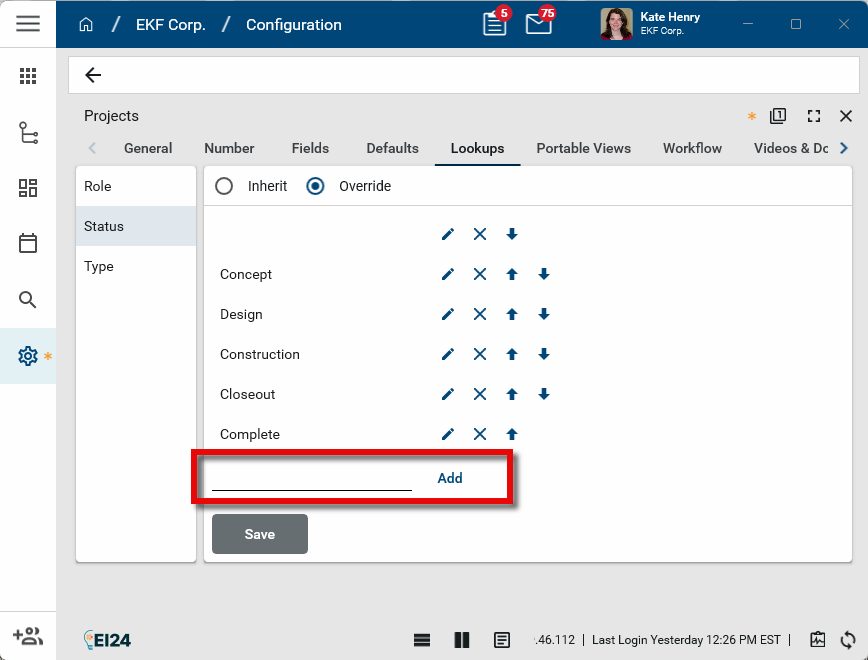
-
Make any additional changes to the order of the list by clicking the Up
and Down arrows to move values to a new position. -
Click Save to save your changes to this tab. The changes made will appear at your current level in the hierarchy and downwards, until they are overridden at a lower level.
Enable universal lookup fields in an app
The Fields tab allows you to hide or expose fields for an application, relabel them, or make the fields required.
To modify the fields for an application, complete the following steps:
-
Review the header to ensure that you are in the correct project or partition. The changes made here will inherit down the hierarchy until they are overridden in a partition or project at a lower level.
Note To apply these changes to the whole domain, ensure that you are in the root domain.
-
Navigate to the Configuration application (Apps > Administration > Configuration).
-
Open the Applications tab and select the appropriate application. The application detail view appears.
Important The fields are only available in the applications as noted above.
-
Click on the Fields tab and select Override.
-
Navigate to the "Custom Universal Lookup" fields.
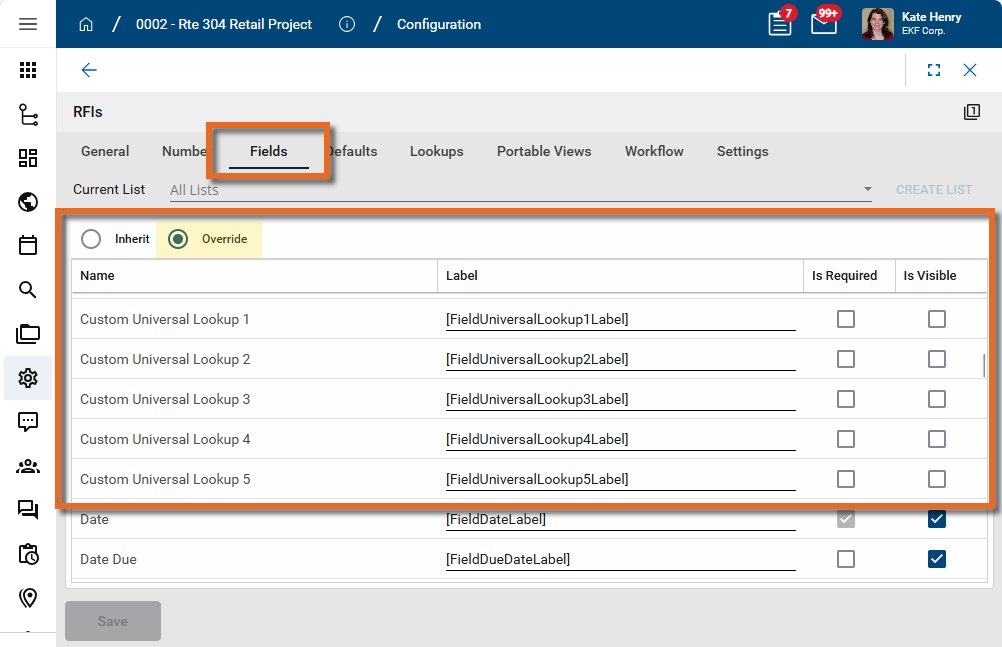
-
In the Label column, clear the default value and enter an appropriate label for the field. This label will appear to users in the app.
-
Select Is Visible to make the field visible in the app. The field will appear in the Details section of the app record.
-
If you want the field to be required, select Is Required.
-
Repeat the process for all the custom fields that you want to use.
-
Click Save to save your changes to this tab. The changes made will appear at your current level in the hierarchy and downwards, until they are overridden at a lower level.