Project Snapshots
The Project Snapshots app allows you to create a complete or partial archive of project data and files at any time for efficient retention of project information. With Project Snapshots, you can export a read-only copy of selected project data from Kahua applications to a ZIP file on your local computer or server.
When you use Project Snapshots to export your data, you can retrieve specific files or access the entire archive for reference, analysis, legal discovery, or retention purposes.
Note If you are interested in this app and it is not available in your domain, reach out to Support or your account representative for more information.
Key elements of the app include the following:
-
There are two export formats available. You can select which one to use in the Configuration app and your selection will inherit down through the hierarchy.
-
Snapshots can be run at any time. You can run it at the end of a project, at certain milestones, or manually on a regular basis such as monthly or weekly.
-
You can filter snapshot contents by common fields available across applications, including created date, modified date, created by, and company.
-
You can choose which applications to include, which reference file types to include, whether to include voided references, and whether to only include the latest File Manager file versions.
-
You can duplicate previously run snapshots, modifying settings as needed.
How to . . .
 Add Project Snapshots to your domain
Project Snapshots licenses must be purchased and added to your domain. Reach out to your account manager for more information.
Once you have obtained a license for Project Snapshots, you can assign the license to the appropriate user in the Licenses app. For more information on using the Licenses app, refer to Managing user licenses.
Select the Project Snapshot output format for your domain, partition, or project
There are two output formats available. Your domain administrator can select which one to use in the Configuration app and your selection will inherit down through the hierarchy. The formats are as follows:
-
The legacy format, which includes JSON files at the project level with information on all the records in the snapshot and JSON files at the record level with information on the individual record.
-
The updated format, which does not include JSON files. At the project level, an Excel formatted file is created with information about the included records. Other differences include the addition of a date-time stamp to the project folder name, elimination of individual folders for app records, and an updated naming convention for exported records.
To manage the format used on Project Snapshot output for a project or partition, complete the following steps:
-
Review the header to ensure that you are in the correct project or partition.
Important To apply these settings to your domain, ensure that you have navigated to the root level.
-
Open Apps > Administration > Configuration.
-
On the Applications tab, select Project Snapshot.
-
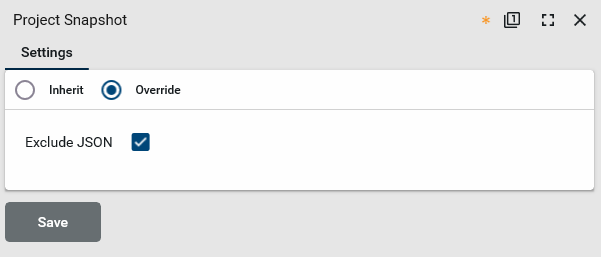
On the Settings tab, select Override.
-
To use the updated format, select Exclude JSON. Clear the check box to use the legacy format.
-
Click Save when you are done.
Create and run a project snapshot
To create and run a new snapshot, complete the following steps:
-
Ensure that you are in the correct project or partition.
Note that Project Snapshot works on the project or partition you are currently in, as indicated in the header. It will not include any projects or partitions lower in the hierarchy than you are currently in. For example, if you are in the "Northeast" partition, and there are several projects that are part of that partition, snapshot will only export records directly tied to the Northeast partition. It will not include records from the projects that are part of that partition.
-
Navigate to the Project Snapshots application (Apps > Administration > Project Snapshots).
-
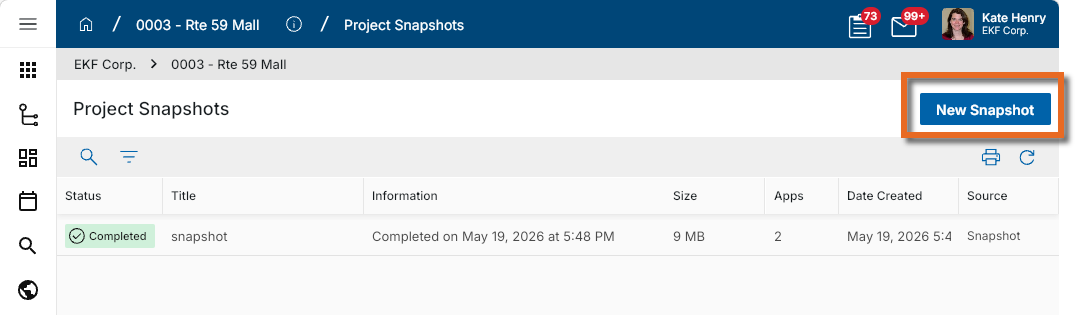
Click New Snapshot in the action bar.
-
Complete the following fields as appropriate:
Field Description Details Status When you create a new snapshot, the initial status is Draft. After the snapshot is run, the status updates as the process continues and ultimately shows when the snapshot is completed.
Project The current project or partition appears here. Snapshot only includes data from the currently selected project or partition. It does not include projects or partitions lower in the hierarchy.
Title Enter a title for the snapshot. This title is used as the default folder name inside the downloaded ZIP file.
Description Enter a description for the snapshot, if desired.
Apps Select the application or applications to include in the snapshot. Select All to include all supported applications.
File Manager Include only latest file versions
Select this option to only include the most recent version of files from File Manager.
Clear this option to include all file versions.
Filters Add Select Add to create one or more filters to limit the records included in the snapshot. Available filters can include values such as created date, modified date, created by, and company.
References Reference file types
Select the reference file types to include in the snapshot. To create a snapshot that only includes portable views and no reference files, do not select any reference file types.
Include voided references
Select this option to include voided reference documents in the snapshot.
-
Click Run.
-
When prompted, select the location where you want to save the ZIP file and click Save.
-
The snapshot begins to generate. A progress indicator appears in the log view to show the current status and elapsed time.
-
When the snapshot is complete, the completed record remains in the log view with completion details.
Note You can run snapshots at any time, such as at project closeout, at project milestones, or on a recurring basis such as weekly or monthly.
Review and duplicate a completed snapshot
Completed snapshot records retain your selections from the original run, including the selected apps, filters, and reference options.
To review or duplicate a completed snapshot, complete the following steps:
-
Review the header to ensure that you are in the correct project or partition.
-
Navigate to the Project Snapshots application.
-
Select a completed snapshot record from the log view.
-
Review the saved settings in the detail pane.
-
To reuse the same setup, select Duplicate.
-
Modify any fields or filters as needed.
-
Click Run to generate the new snapshot.
View the records in the snapshot
When the snapshot is complete, you will have a ZIP file containing all the saved records stored on your local computer or server. You can extract that zip file to an appropriate location.
If you are using the updated output (the Exclude JSON setting is selected), the records are saved in project folders that contain folders for each application, and record files within the application folders. An Excel formatted file at the project level contains information about all the exported records. The file name format for the exported record is the Entity ID + App Name + Shortlabel. Corresponding reference and media attachments are included with the record name prefixed to them.
If you are using the legacy output (the Exclude JSON setting is cleared), the records are saved in a folder structure that follows domain and project structure, and then the application structure. There is a JSON file at the project level that contains information on all the records in the snapshot. Within the application folders, there is a folder for each item, uniquely named with the item number, name and Kahua record number. The folder contains a PDF of the portable view of the item, a JSON file with information on the item, and any available reference material such as backup information and electronically signed documents.
Note The file name length for exported records, including the folder path, is limited to 220 characters. File names that exceed this length will be truncated.
Configure the app
Your domain administrator or another user with the appropriate permissions can configure the app in the Configuration application.
Important When working in the Configuration app, it is important to review the header and ensure that you are working at the correct level in the hierarchy, either the root domain or at a partition or project level.
Settings that you establish at the root domain or lower levels will inherit down the hierarchy until they are overridden. For more information on the hierarchical structure of Kahua, refer to Understanding the hierarchical structure of Kahua.
The Configuration app can be accessed directly through the apps list (Apps > Administration > Configuration), or, in some applications, by right-clicking on an application in the launch bar and selecting Configure. When you select Configure for an app from the launch bar, the detail view of the configuration page for that application opens automatically.
For general information about the Configuration app, refer to Configuration app.
For general information on configuring this app in Configuration, refer to Application configuration.
The following items are part of the application configuration and are specific to this application:
| Options | Description |
|---|---|
| Settings tab | |
| Exclude JSON | Select this option to use the updated snapshot output format that does not include JSON files. Clear the option to use the legacy output format that includes project-level and record-level JSON files. |