New group membership settings
Membership in a group is how users are granted access to partitions and projects in your domain. Group members have the permissions associated with the application roles assigned to that group on the group's Permissions tab. For more information, refer to Setting up groups.
These new settings allow administrators to explicitly grant and remove access at selected levels, and to include or not include access to hierarchical child levels as needed. For more information on the partition / project hierarchy in Kahua, refer to Understanding the hierarchical structure of Kahua.
Each user's membership in a group can be established using one of the following three options:
-
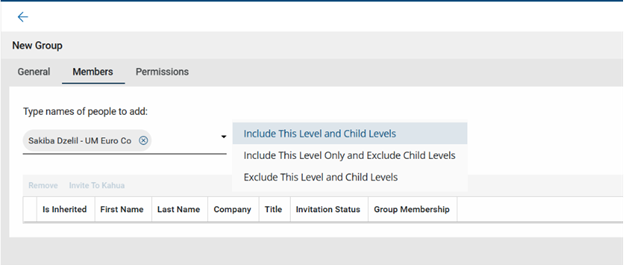
Include this level and child levels - This selection grants the user access to the current level and to all child levels below this one in the hierarchy.
-
Include this level only and exclude child levels - This selection grants the user access to only this level. It does not grant access to any child levels below this one in the hierarchy.
-
Exclude this level and child levels - This selection excludes the user from having access at this current level and child levels below this one in the hierarchy. It is used when a user has been granted access at a higher level but needs to be removed at this level and below.
For detailed information on applying the new group membership settings, refer to Manage group membership below.
How to . . .
 Manage group membership
Group membership is how users are granted access to partitions and projects in your domain.
Note For more information on the partition / project hierarchy in Kahua, refer to Understanding the hierarchical structure of Kahua.
Depending on your selections, users can be granted access to the level in the hierarchy that you are currently on and all child levels below it, to only the current level and no child levels, or they can be excluded from the current level and all child levels below it.
To add members to an existing group and manage their access at the current level in the hierarchy, complete the following steps:
-
Review the header to ensure that you are in the correct project or partition. It is important to make changes at the appropriate level.
-
Navigate to the Groups application (Apps > Administration > Groups).
-
Select the group you want to manage from the list of groups.
-
The detail panel opens to the Members tab. The list of any existing group members will appear, with their inheritance status, name, company name, title, invitation status, and current group membership.
Note You can click on a column header to sort by that column or enter a value in the search field to filter the list by that value.
-
To add a user to the group, type their name in the selection field and select them from the list of users in the Users application.
Note For information on the Users application, refer to Working in the Users application.
-
Select one of the following access level options for this user:
-
Include this level and child levels - This selection grants the user access to the current level and to all child levels below this one in the hierarchy.
-
Include this level only and exclude child levels - This selection grants the user access to only this level. It does not grant access to any child levels below this one in the hierarchy.
-
Exclude this level and child levels - This selection excludes the user from having access at this level and child levels below this one in the hierarchy. You should use this option when a user has been granted access to this group at a higher level but needs to be removed at this level and below.
-
-
Click Add to add the user to the group with the selected access level.
-
To remove a user's access at certain level in the hierarchy, navigate to that level and apply the Exclude this level and child levels option to that user at that level. The user will be excluded from access at this level and all child levels, unless they are added back to a lower level with access.
To remove a user completely from a group, you must first navigate to the level in the hierarchy where they were first added to the group. At this level, the value in the Is Inherited column will be "No". Select the user in the list, click Remove and click Ok on the confirmation message. The user will be removed from the group at this level and all levels in the hierarchy.
Manage group membership for new users in your domain
By default, when new users are added to your domain, they are automatically added to the Domain Users group at the root domain with the Include this level and child levels permission. This group allows general access to commonly used applications.
Note You can change this default by selecting the Exclude new users from the Domain User group setting on the Domain Settings > Domain Defaults page. If this setting is enabled, all new users must be manually added to the appropriate groups with the appropriate group membership selection.
Once added to the Domain Users group, you can manage users' group memberships at different levels of the hierarchy by navigating to the appropriate partitions or projects and modifying the Group Membership selection as described in the Manage group membership section.