Projects app
The Projects app provides another way to access the Project Information page. The project information page is where you can view basic information about the project. Users with the appropriate permissions can edit project information. This page is also where basic information about a project is entered when the project is first created.
Important Your domain may use either the Projects app or the Portfolio Manager app to manage project information. They are similar, but the Portfolio Manager application has some additional functionality. If your domain uses the Portfolio Manager app, refer to Portfolio Manager.
To open the Projects app, navigate to Apps > All Apps > Projects. The projects and partitions below the level of your currently open project appear.
How to . . .
 Open the project information page
From the Projects app, you can open and edit the Project Information page for projects below the level of the currently open project or partition.
-
Review the header to ensure that you are in the correct project or partition.
-
Navigate to Apps > All Apps > Projects. The projects and partitions below the level of your currently open project appear.
-
Select a project. The Project Information page appears in the detail pane.
-
For more information about the actions you can take on the Project Information page, including Edit, Delete, History, Move, and Copy, refer to Project Information.
Edit multiple project information records at once
From the Projects app, you can use the multi-edit function to modify fields on on the Project Information page for multiple projects at one time.
To edit information for multiple projects at one time, complete the following steps:
-
Select the check boxes next to the records you want to edit.
-
Select Multi Edit from the action bar. The Multi Edit page opens.
-
You can edit individual fields. To copy a field value to other records, select the value on the record. Select Copy to All to copy the value to all other records, or select Copy to Selected to copy the value to selected records.
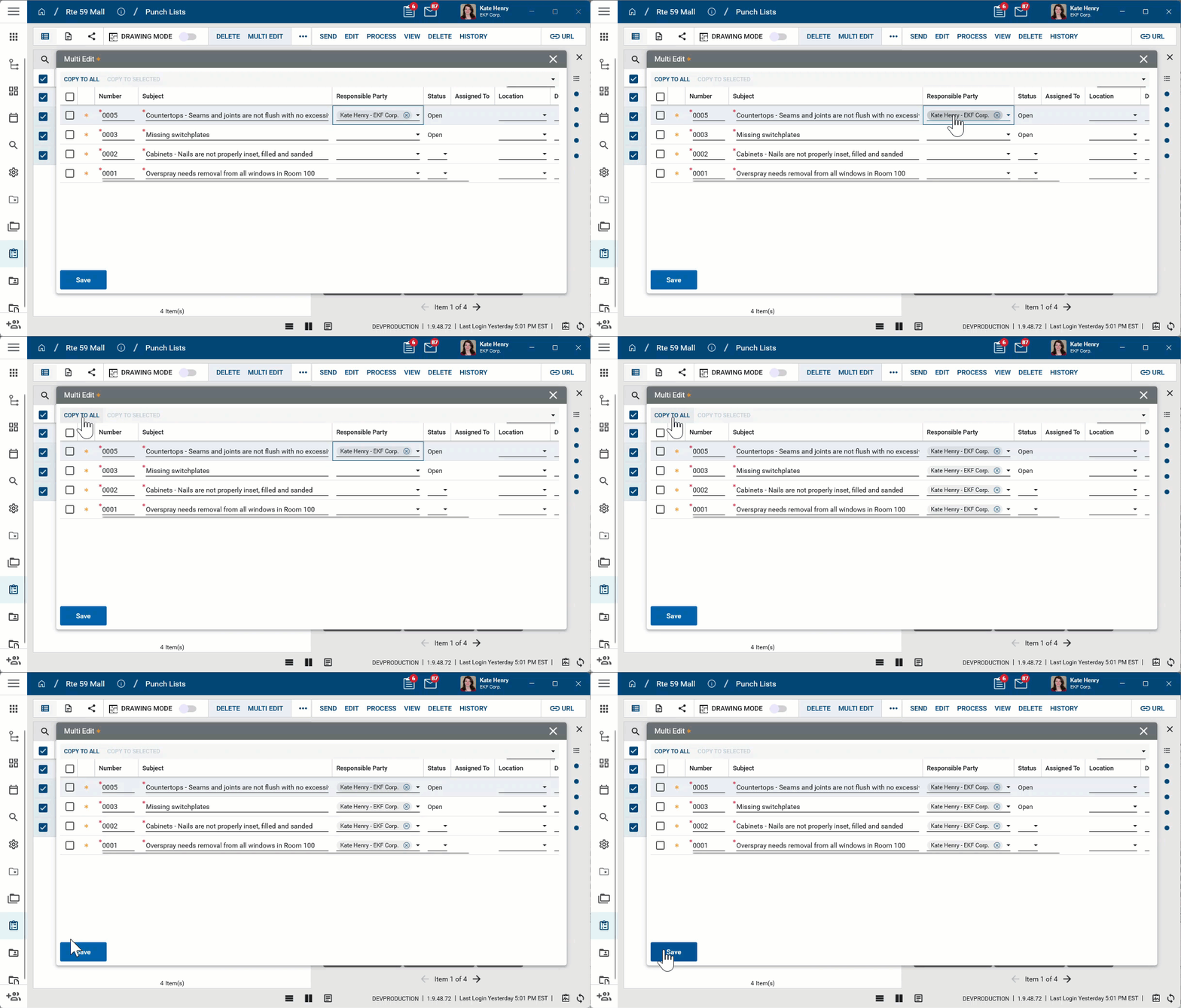
Note The Multi Edit page lists fields from the log view applied when Multi Edit is selected. To update fields which are not present on the default log view, create a new log view that includes all the fields you want to edit and then apply that log view before selecting Multi Edit.
-
Click Save when you are done.
Create a new project
You can create a new project from the Projects app by selecting New in the action bar. Creating a project this way will create a blank project at a level in the hierarchy below the currently open project or partition.
To create a project from a template or to have more flexibility with where in the hierarchy your project is created, you should create the project from the Project Finder app. For more information on creating new projects, refer to Creating a new project.
Configure the app
Your domain administrator or another user with the appropriate permissions can configure the Projects app in the Configuration application.
Important When working in the Configuration app, it is important to review the header and ensure that you are working at the correct level in the hierarchy, either the root domain or at a partition or project level.
Settings that you establish at the root domain or lower levels will inherit down the hierarchy until they are overridden. For more information on the hierarchical structure of Kahua, refer to Understanding the hierarchical structure of Kahua.
The Configuration app can be accessed directly through the apps list (Apps > Administration > Configuration), or, in some applications, by right-clicking on an application in the launch bar and selecting Configure. When you select Configure for an app from the launch bar, the detail view of the configuration page for that application opens automatically.
For general information on configuring this app in Configuration, refer to Application configuration.
The following items are specific to the Projects application: