Configuring weather data for a project
Weather data for each project is set up in the Configuration application. Weather data is used in daily reports. Weather data also appears with projects on the Kahua home page. Refer to Daily Reports and Kahua Home Page.
Note Weather data can be configured for locations in the following countries and territories: American Samoa, Canada, Guam, Mexico, Northern Mariana Islands, Poland, Puerto Rico, United Kingdom, United States, and the US Virgin Islands.
Key things to know about weather data collection and configuration in Kahua are:
-
On the Configuration app > Weather tab, you can select a postal code for a project. The weather for this postal code is applied when you select Add Current Conditions on a daily report.
-
You can also enable the collection and storage of weather data for your project for the selected postal code. You can select a daily time range for collection of the weather data (e.g., all day or standard work hours) and frequency.
-
In order to enable the collection and storage of weather data, you must select an end date for the project on the Project Information page.
-
The collected and stored weather data can be applied to a daily report by selecting Add Daily Conditions in the weather section of the daily report.
-
The most recently stored weather data will appear with the project when a project appears on the Kahua home page.
-
You can allow users to select different postal codes for the daily reports as the project progresses. This can be useful if your project is built over a significant physical distance encompassing multiple postal codes, such as a highway construction project or a pipeline project. If the postal code is changed on an individual daily report, users must select Add Current Conditions to apply current weather data to the daily report. Weather data for postal codes changed on individual daily reports is not collected and stored, so the Add Daily Conditions option is not available.
How to . . .
 Configure weather data collection for a project
When weather data is collected and stored for a project, it can be applied to daily reports by selecting Add Daily Conditions and it will appear with the project when that project appears on the home page.
Note Users who are not domain administrators can be granted the ability to manage the weather configuration. In the Groups application > Permissions tab > Configuration section, select the Weather Administrator permission. Refer to Manage permissions for a group.
To configure weather data collection for a project, complete the following steps:
-
Review the header to ensure that you are in the correct project or partition.
-
Prior to configuring the weather data collection, ensure that an End Date has been entered for the project on the Project Information page. Without an End Date selected, the weather data will not be automatically saved.
To review the Project Information page, select the information icon
 next to the project name in the header. For more information on editing the Project Information page, refer to Edit project information.
 -
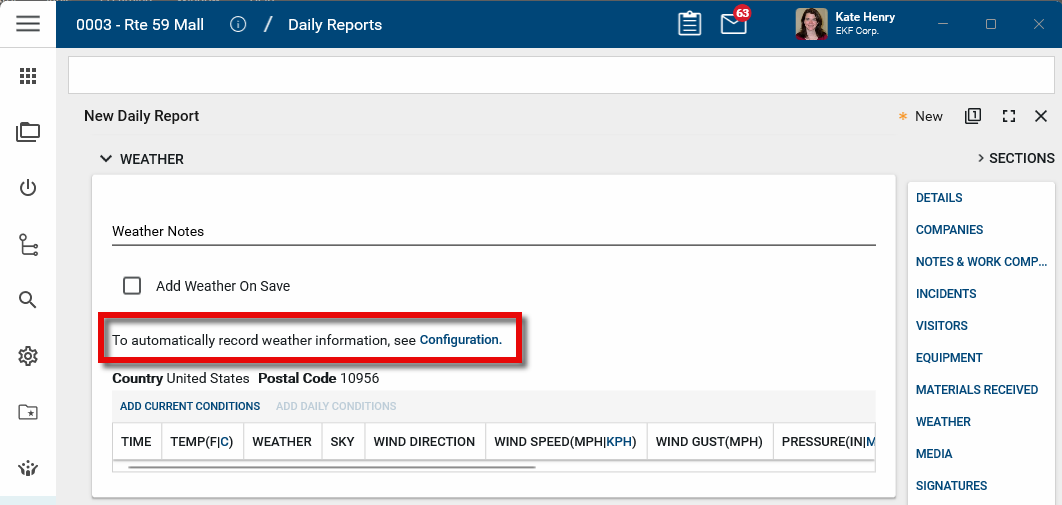
Navigate to the Configuration application (Apps > Administration > Configuration). Select the Weather tab.
Alternatively, from a Daily Report in your project, select the option in the Weather section to open the Configuration app and select the Weather tab.
-
Select Override.
-
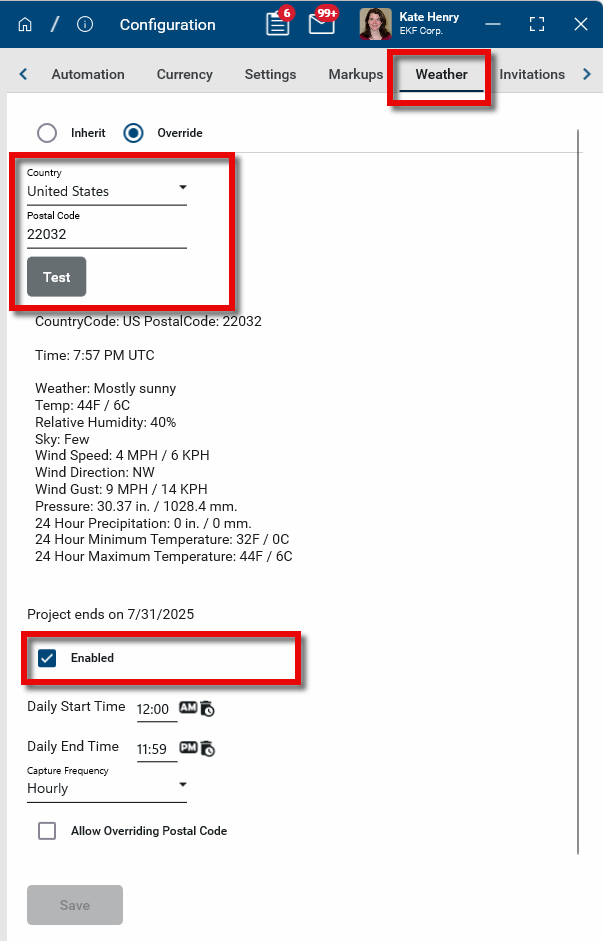
Select the correct Country and Postal Code. Weather data can be configured for locations in the following countries and territories: American Samoa, Canada, Guam, Mexico, Northern Mariana Islands, Poland, Puerto Rico, United Kingdom, United States, and the US Virgin Islands.
-
Click Test to ensure that the weather details are captured properly.
-
Select Enabled to enable capturing of the weather data.
Important If the message Your project must have an end date to automatically save weather data appears on the page, you will not be able to select the Enabled check box until you enter a project end date. Select the information icon
next to the project name in the header to enter the date, then close and re-open the Configuration application. For more information, refer to Edit project information.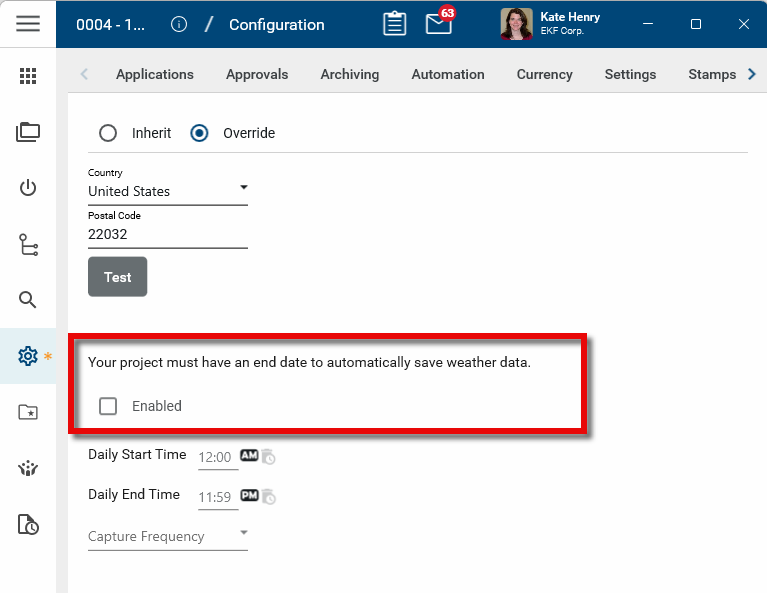
-
Enter the Daily Start Time and Daily End Time for weather data capture.
-
Select one of the Capture Frequency options: Hourly, Every 4 hours, or Daily.
-
Click Save when you are done. The weather data will now be captured at selected frequency for the selected time range. The stored weather data can be applied by selecting Add Daily Conditions in the Weather section of a daily report.
Allow override of postal codes on daily reports
If your project is built over a significant physical distance encompassing multiple zip codes, such as a highway construction project or a pipeline project, you may want to allow users to select different postal codes for the daily reports as the project progresses.
To allow users to select different postal codes on individual daily reports, complete the following steps:
-
Review the header to ensure that you are in the correct project or partition.
-
Navigate to the Configuration application (Apps > Administration > Configuration). Select the Weather tab.
Alternatively, from a Daily Report in your project, select the option in the Weather section to open the Configuration app and select the Weather tab.
-
Select Override.
-
Select Allow Overriding Postal Code. When selected, users will be able to change the postal code on a daily report and add the current conditions for that postal code.
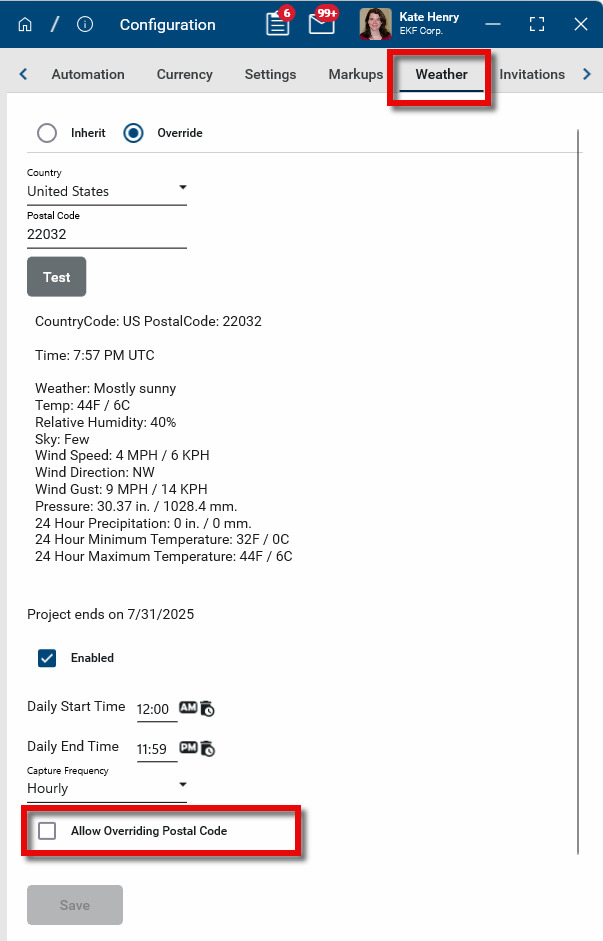
Important Note that Add Daily Conditions, which adds stored weather data to a daily report, is not available when using the postal code override. Users will be required to use Add Current Conditions instead.
-
Click Save when you are done.
Note If the Daily Reports app is open when this setting is updated, you may need to close and re-open the app for this functionality to appear.