Funding Budget Changes
Applicable Packages This article applies to the Kahua for K-12 Education, Kahua for Owners, Kahua for General Contractors, and Kahua for Subcontractors packages. If you are not sure if this is relevant to you, please contact your domain administrator.
The Funding Budget Changes application allows you to add or remove funds to the project budget. This is used when a net change occurs to the overall budget after the original budget is approved, and allows for a clear audit trail of any changes impacting total project budget.
Note To re-allocate project budget from one activity code to another, without changing the overall budget total, use a Budget Adjustment. Refer to Funding Budget Adjustments.
Key elements of the Funding Budget Changes app are as follows:
-
Budget changes documented in the Funding Budget Changes app occur after the original budget is approved.
-
The Funding Budget Changes app allows for an audit trail of any changes impacting the total project budget.
-
Amounts documented in the Funding Budget Changes app will display in the Work Breakdown app. The column the budget change appears in will be dependent on its status.
-
Budget changes support bypassing cost guards. For more information, refer to Budget Adjustments and Budget Changes - Bypass Cost Guards.
How to . . .
 Create a Budget Change
To create a new budget change, complete the following steps:
-
Review the header to ensure that you are in the correct project or partition.
-
Navigate to the Budget Changes app ( Apps > Cost Management > Funding > Budget Changes).
-
Click New in the action bar.
-
Complete the following fields as appropriate:
Note Depending on how this app is configured for your domain, there may be fields or sections listed here that do not appear for you, fields and sections that appear for you which are not listed here, or fields and sections which appear in a different order. If you have any questions, check with your domain administrator.
Field Description Details Number Allow Kahua to auto-number the record, or enter a different value.
Note The number format can be configured by your domain administrator. Refer to Number.
Date Enter the appropriate date. Description Enter a brief description. Reason Select the reason.
Note This lookup list is managed in the Configuration app. Refer to Lookups.
Notes Enter any appropriate notes. View Template If appropriate, select a portable view template other than the default here.
Note For more information on portable views, refer to Portable Views.
Dates & Workflow Workflow Status The current status in the workflow. Assigned To User currently assigned an action. Sent for Review / Reviewed If you are using the Review workflow, these fields will be filled in automatically. Otherwise they can be manually completed.
Note To use the review workflow, the Use Review Workflow setting must be enabled on the Settings tab in configuration and the approval must be configured in Configuration > Approvals. Refer to Approval configuration.
Sent for Signature / Executed If you are using the Signature workflow, these fields will be filled in automatically. Otherwise they can be manually completed.
Note To use the signature workflow, the Use Signature Workflow setting must be enabled on the Settings tab in configuration and the approval must be configured in Configuration > Approvals. Refer to Approval configuration.
Items Currency If using multi-currency, this field will appear and auto-populate with the currency set for the project. Modify as needed.
Note Currency for a project is managed on the Currency tab in the Configuration app. Refer to Currency.
Status Select the status. Entry Type Select the appropriate value:
-
Unit Price
-
Total Value
-
Unit Price Calculated
-
Lump Sum
For more information on working with grids, refer to Item grids. Number This field auto-populates and is read only. Activity Code Select the appropriate activity code. Cost Item Type / Item Category Select the appropriate values. Description Enter a description of the item.
Note If Default Description to Activity Code Description is selected in Configuration, the activity code description will be applied by default but can be edited.
QTY / UOM / Unit Price If the Entry Type is set to "Unit Price" or "Unit Price Calculated", the QTY (Quantity), UOM (Unit of Measure), and Unit Price fields will appear.
Status The status of the line item appears here. Total The total amount for the line item is entered here. Currency If multi-currency has been configured, available currencies can be selected here. Reviewers Reviewer information appears here.
Note To use the review workflow, the Use Review Workflow setting must be enabled on the Settings tab in configuration and the approval must be configured in Configuration > Approvals. Refer to Approval configuration.
Signatures Signature information appears here.
Note To use the signature workflow, the Use Signature Workflow setting must be enabled on the Settings tab in configuration and the approval must be configured in Configuration > Approvals. Refer to Approval configuration.
Comments Enter any comments as appropriate.
Comments are recorded with the author name, and date and time the comment was saved. Comments from other users appear here.
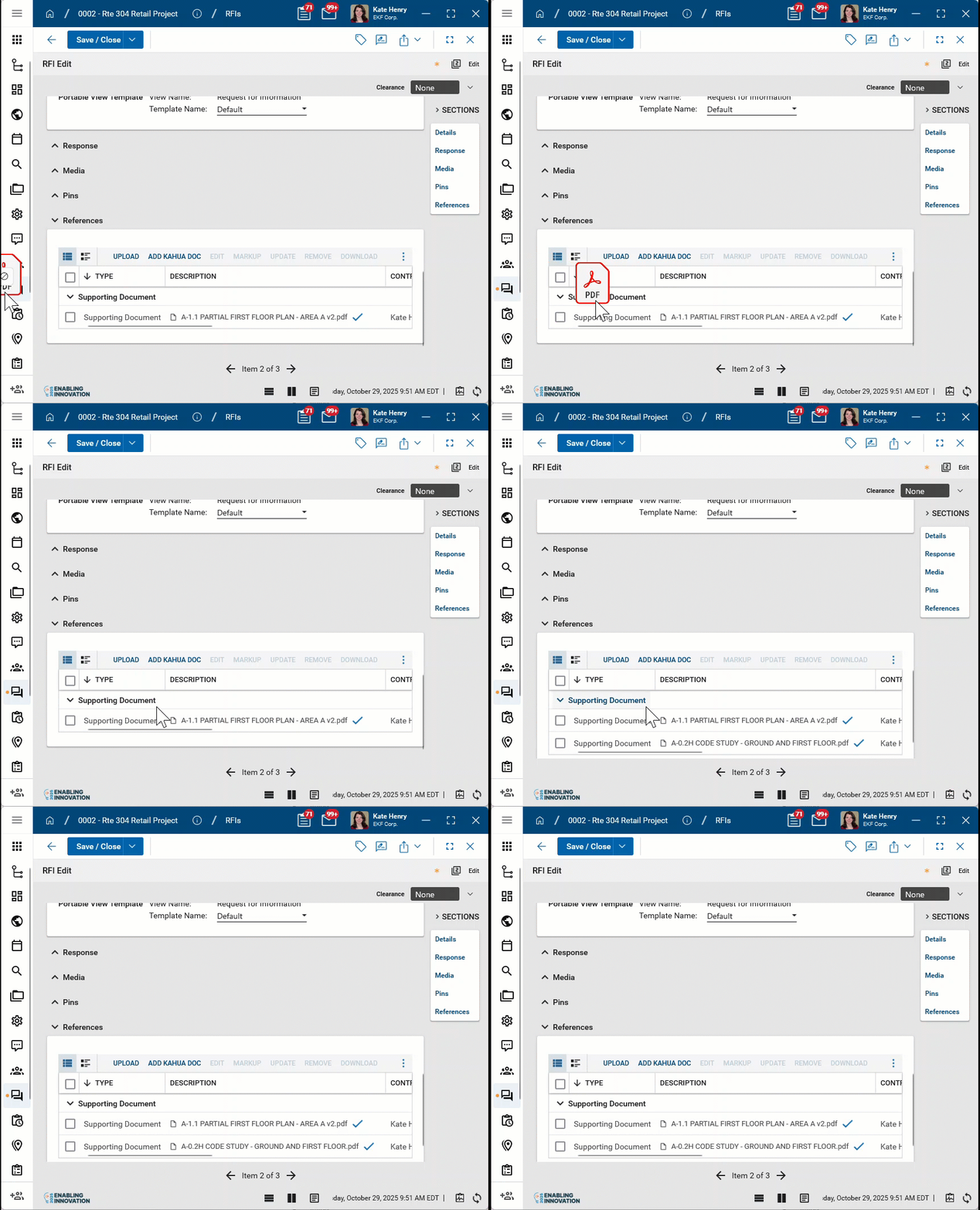
References Upload or select any relevant files or documents. You can use drag and drop to add a file to this section. For more information on using this section, refer to References section.
-
-
Click Save when you are done.
Import items
You can import items into a budget change record. Once you have created and saved the record, the Import/Export options appear on the record action bar.
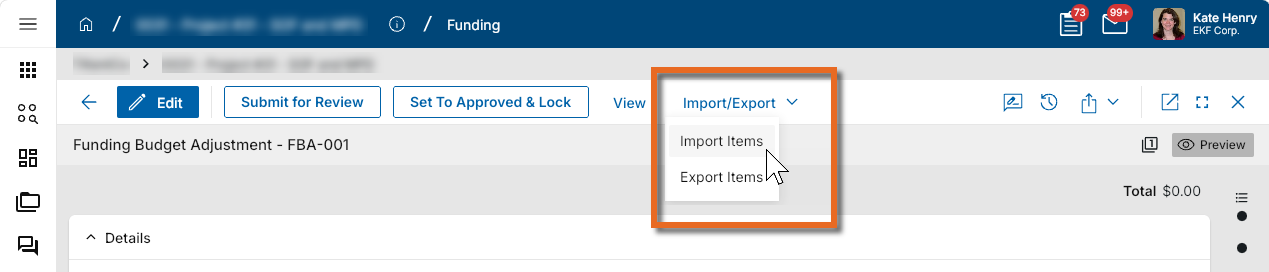
Enter a single item into the items grid. Then export the item to access the correctly formatted spreadsheet file for the import. Once the exported file is available, add the appropriate values for the items you want to import to the exported spreadsheet. You can then import those items. For more detailed information on the importing process, refer to Importing records.
Submit a budget change for review or signature
Note To use the review or signature workflows, the appropriate settings must be enabled on the Settings tab in configuration and the approval must be configured in Configuration > Approvals. Refer to Settings tab and Approval configuration.
If configured appropriately, you can submit the budget change for review or signature. It is sent as a task to the user designated in the approval configuration.
To do so, complete the following steps:
-
Review the header to ensure that you are in the correct project or partition.
-
Navigate to the Budget Change application (Apps > Cost Management > Funding > Budget Change).
-
Select the appropriate budget change from the log view and click on it to open the detail view. Select Submit for Review or Submit for Signature from the action bar. You may need to click the More icon
 to access the appropriate action.
-
The request for review or signature is sent as a task to the appropriate user and fields in the Dates & Workflow section are updated.
Create an approval document
Your project may be configured to require an approval document as part of the approval workflow for creating a budget change. Approval documents are created in the References section of the record.
To create an approval document, select Add Approval Doc, name the document and select the appropriate supporting files. These files are then combined into a single PDF that can become part of the approval workflow.
For more detailed information on creating an approval document, refer to Create an approval document.
Set the workflow status manually
If not using workflow, the budget status can be updated manually. To do so, complete the following steps:
-
Review the header to ensure that you are in the correct project or partition.
-
Navigate to the Budget application (Apps > Cost Management > Funding > Budget).
-
Select the appropriate budget from the log view and click on it to open the detail view. Select the desired Set to . . . option from the action bar. You may need to click the More icon
to access the appropriate action. 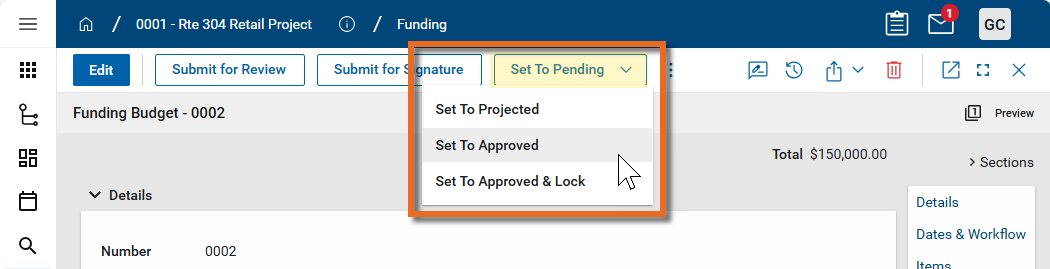
-
The Workflow Status field is updated automatically. To update date fields, click Edit and enter values as desired. Click Save when you are done.
Void a budget
If needed, you can void a budget.
To do so, complete the following steps:
-
Review the header to ensure that you are in the correct project or partition.
-
Navigate to the Budget application (Apps > Cost Management > Funding > Budget).
-
Select the appropriate budget from the log view and click on it to open the detail view. Select Void from the action bar. You may need to click the More icon
to access the appropriate action. -
The Status field is updated to "Void".
Generate a log report or other reports
You can generate a report from a selected log view, or use one of the built-in reports available by default in each application. For more information on creating your own reports, including how to set up scheduled reports, refer to Creating ad hoc reports.
Note For information on modifying the logo that appears on reports in your project, refer to Managing report logos.
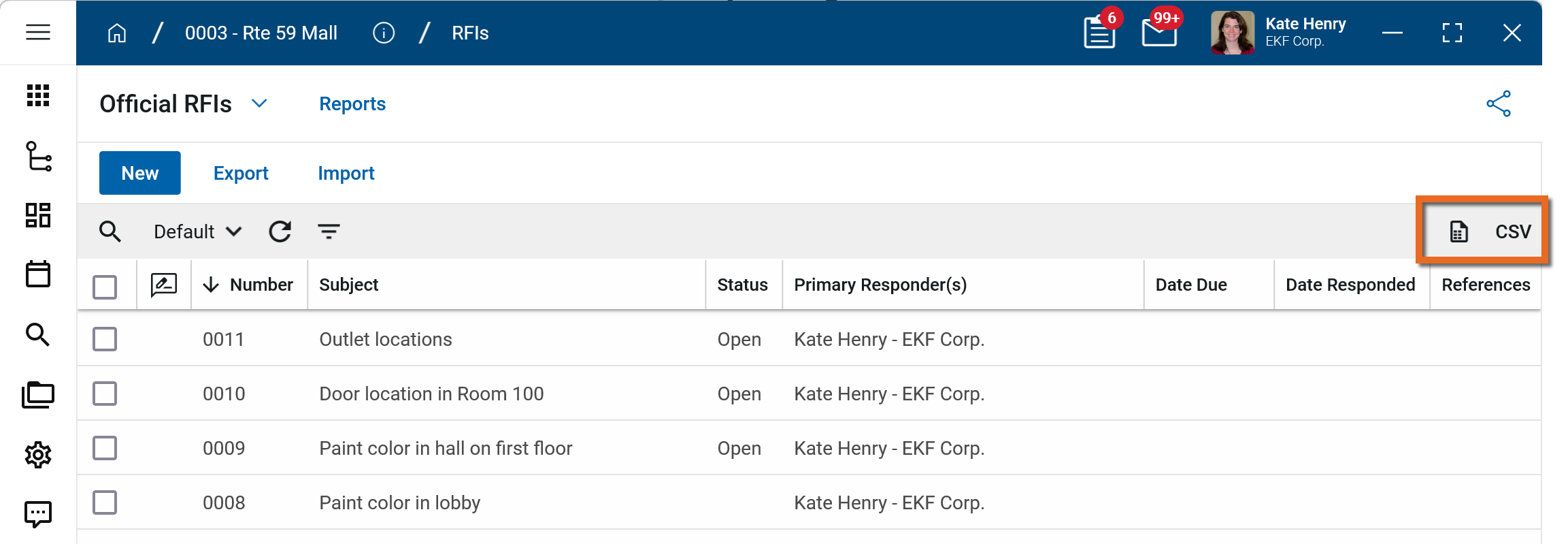
To generate a report from a log view with up to 10,000 records, click the More icon  and select Print. If your log view contains more than 10,000 records, the Print option will be disabled and you can select
  to download the records to a CSV file instead.
To generate an application report, complete the following steps:
-
Navigate to the application.
-
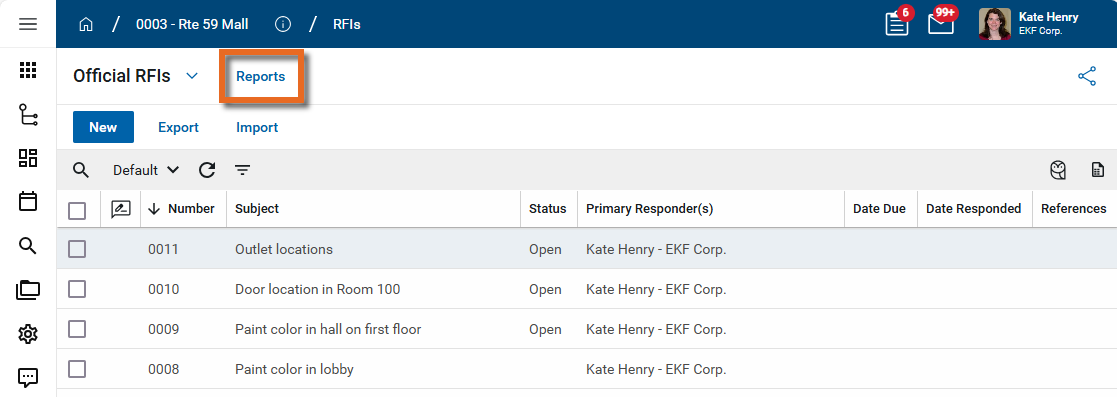
Select Reports in the application title bar.
-
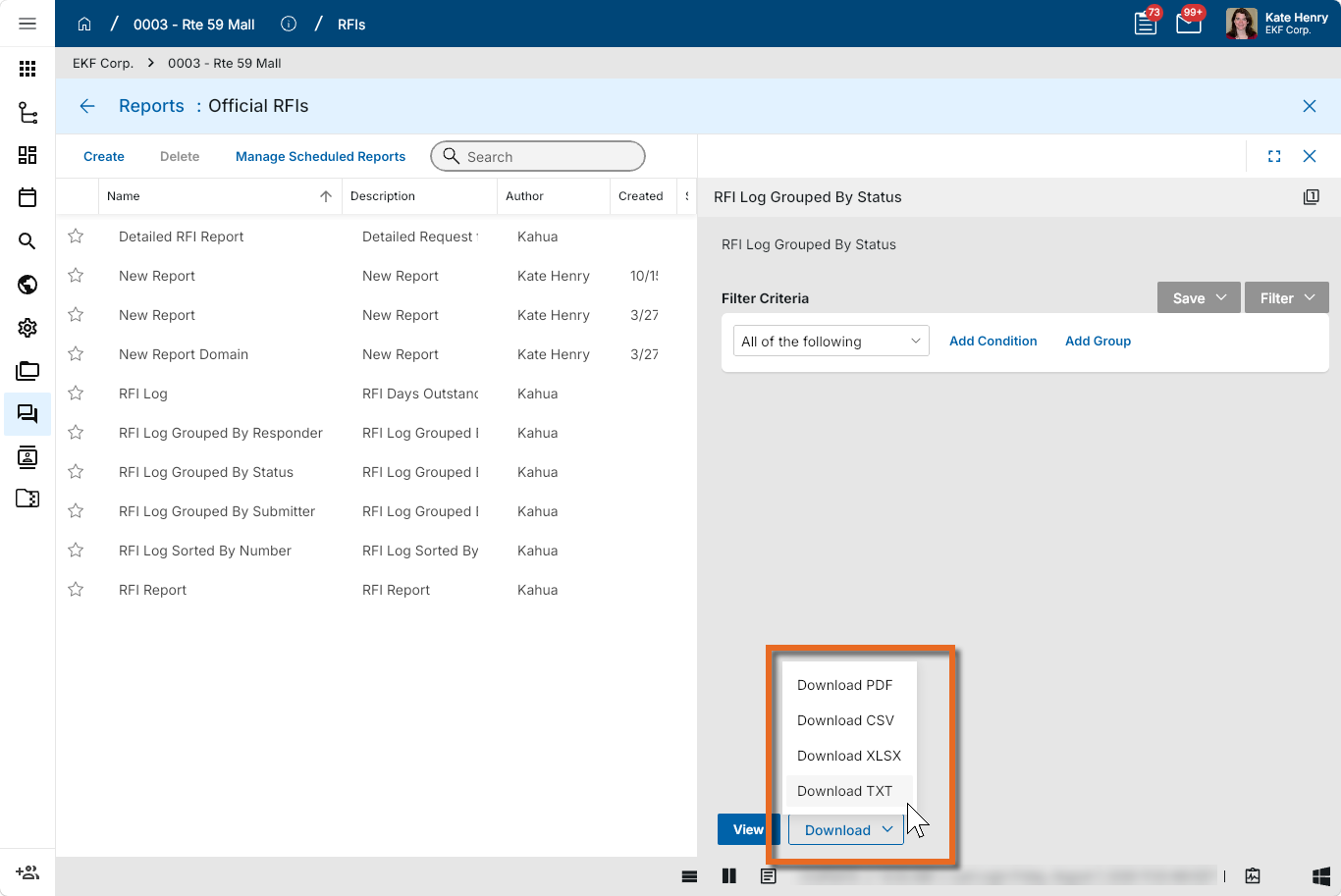
Select the report you want to run.
-
Apply any desired filters.
-
Select View or Download as appropriate. For more information, refer to Viewing Reports.
-
Click the Close icon
 when you are done.
Configure the app
Your domain administrator or another user with the appropriate permissions can configure the app in the Configuration application.
Important When working in the Configuration app, it is important to review the header and ensure that you are working at the correct level in the hierarchy, either the root domain or at a partition or project level.
Settings that you establish at the root domain or lower levels will inherit down the hierarchy until they are overridden. For more information on the hierarchical structure of Kahua, refer to Understanding the hierarchical structure of Kahua.
The Configuration app can be accessed directly through the apps list (Apps > Administration > Configuration), or, in some applications, by right-clicking on an application in the launch bar and selecting Configure. When you select Configure for an app from the launch bar, the detail view of the configuration page for that application opens automatically.
For general information about the Configuration app, including how to set up an approval workflow, refer to Configuration app.
For general information on configuring this app in Configuration, refer to Application configuration.
The following items part of the application configuration and are specific to this application:
| Options | Description |
|---|---|
| Settings tab | |
| Use Review Workflow |
Select this option to make the Review workflow available. Note You must also configure the Review approval in Configuration > Approvals. Refer to Approval configuration. |
| Use Signature Workflow |
Select this option to make the Signature workflow available. Note You must also configure the Signature approval in Configuration > Approvals. Refer to Approval configuration. |
| Use Manual Status Override |
Select this option to allow users with the appropriate permissions to use workflow action buttons to increment status of a record (to Pending, Approved, etc.). This option is typically used when workflow is not enabled. |
| Use Manual Approve & Lock |
Select this option to have the Set to Approved and Lock option available to users with the appropriate permissions. When Set to Approved and Lock is selected, the status of both the document and its items are set to "Approved" and the document moves to the "Locked" step in the workflow. |
| Cost Status Read Only |
Select this option to have the cost status of the contract and line items appear as read-only. The fields cannot be manually edited. This requires the status field to be updated by only workflow or the selection of action items (e.g. Set to Pending, Set to Approved, etc.), depending on other cost configuration selections. |
| Default Description to Activity Code Description |
Select this option to have the activity code's description applied to the Description field of an item in a cost items grid. The activity code's description is applied as the default value, but it can be edited. |
| Settings tab - Cost Unit Settings | |
| Default Entry Type | Select a default value. |
| Can View? | If selected, the Entry Type field is visible on the Items section. |
| Can Change? | If selected, the Entry Type field is editable. |
| Allow Item Entry Type Selection? | If selected, the Entry Type field appears in the grid for individual items. |
| Excluded Entry Types | Select entry types to remove them from the drop-down list. |
| Settings - Tax Settings | |
| Default Tax Entry Type | Select None or Separate Line Item. |
| Can View? | If selected, the Tax Type field is visible on the Items section. |
| Can Change? | If selected, the Tax Type field is editable. |
| Allow Manual Tax Entry? | |
| Set Taxable on New Items? | |
| Excluded Entry Types | Select tax entry types to remove them from the drop-down list. |
Available application roles
Application roles determine which actions users can perform in the app. Roles are assigned to groups in the Groups app > Permissions tab. Members of the group then have the permissions associated with the roles assigned to the group.
The following roles are available for this application:
| Role | Details |
|---|---|
| Administrator |
Full administration, including add, configure, create lists, edit, import, export, share, view, send, process, remove, and edit view templates. |
| Contributor |
Can add, edit, open, view, send, and process records. |
| Moderator |
Can add, edit, import, export, remove, share, open, view, send, and process records. |
| Observer |
Can open, view, send, and process records. |
| Referencer |
View-only access to records. |
| TemplateEditor |
Can edit view templates. |
Note To manage these permissions, open the Groups app and assign the appropriate application role to the group. Only users with the appropriate permissions can manage application roles. For more information, refer to Managing Permissions.