Assets
The Assets app in Asset Manager is used to create and manage the physical asset records for a project. Assets are created from asset types that have already been defined and made available to the project. Use this app to capture asset details, asset-specific attributes, current condition information, related media, tagged records, and reference files.
Important Each asset must be associated with a location. Locations are set up in the Locations app. For more information, refer to Setting up locations.
Key elements to know about this application include the following:
-
Assets are the individual physical instances of equipment or other tracked items in a project. They are created from asset types defined in Asset Manager > Types. Refer to Types.
-
A project location must be assigned before an asset record can be saved. For more information, refer to Setting up locations.
-
Individual assets can be made available to other projects by promotion to the domain level.
-
The Attributes section displays the asset-specific attributes associated with the selected asset class and type. These values help capture details such as serial number and other instance-level data.
-
If Required Submittals are set up in the Classes-Master app, you can generate a list of required submittal items for an asset. Refer to Required Submittals.
-
Assets can have parent/child relationships, allowing you to track assets that are component parts of a larger parent asset. Refer to Track asset components.
-
Assets can be associated with barcodes. For more information, refer to Barcodes.
-
You can import and export asset records by using the standard Kahua import and export process.
How to . . .
 Create an asset
To create a new asset, complete the following steps:
-
Review the header to ensure that you are in the correct project or partition.
-
Navigate to Asset Manager > Assets.
-
Click New in the action bar.
-
Complete the following fields as appropriate:
Field Description Type Select the appropriate asset type for the asset you are creating.
Note The available list is based on the asset types set up in the Asset Manager > Types app for this project. Refer to Types.
Name Enter the name of the asset. Description Enter a brief description of the asset . -
Click Next in the action bar.
-
Complete the following fields as appropriate:
Note Depending on how this app is configured for your domain, there may be fields or sections listed here that do not appear for you, fields and sections that appear for you which are not listed here, or fields and sections which appear in a different order. If you have any questions, check with your domain administrator.
Field Description Details Class The class associated with the selected asset type appears here. Discipline The discipline associated with the asset class appears here. Type If desired, modify the selected asset type for the record.
Asset ID Enter the Asset ID.
Note Depending on your configuration, the Asset ID may be required to be unique for this project or for this domain. If you have questions about how this app is configured for you project, contact your domain administrator. Refer to Settings tab.
Name Enter the name of the physical asset. Description Enter a brief description of the asset. Location Select the project location for the asset.
Important A location is required before the record can be saved. For more information on locations, refer to Setting up locations.
Parent Asset If appropriate, select a parent asset for this asset.
For more information, refer to Track asset components.
Responsible Company If applicable, select the company responsible for the asset. This may default from the selected asset type.
Status Select the appropriate status for the asset.
Note This lookup list is managed in the Configuration app. Refer to Lookups.
Status Change Notification Select the contacts or contact groups to be notified if there is a change in the Status field.
Note Your domain administrator can select a default value for this field in the Configuration app. Refer to Defaults.
Attributes Asset attributes Complete the asset-level attributes that appear for the selected asset type and class. These fields vary based on configuration.
Current Condition Inspection Date Displays or captures the date of the inspection associated with the current condition entry. Inspection App Displays the application from which the inspection or condition information originated, if applicable. Inspection Number Displays the related inspection number, if applicable. Inspection Type Displays the type of inspection recorded for the asset. Priority Displays the priority assigned to the current condition entry. Remaining Life (Years) Displays the estimated remaining life of the asset in years. Planned End Date Displays the projected end date based on current planning information. Total Repair Cost Displays the total repair cost associated with the current condition entry, if available. Summary Displays a summary of the current condition. Active Deficiencies Lists open deficiencies associated with the asset, including inspection date, type, number, description, status, and date resolved. Media Upload or select any relevant image files. You can use drag and drop to add an image file to this section. For more information on using this section, refer to Media section.
Linked Documents Any linked records associated with the asset appear here. References Upload or select any relevant files or documents. You can use drag and drop to add a file to this section. For more information on using this section, refer to References section.
Condition History Note The Show Conditions and Deficiencies setting must be enabled in Configuration for this section to appear.
Conditions Displays prior condition records for the asset, including inspection date, source app, inspection number, inspection type, and priority.
Deficiencies Displays prior deficiency records associated with the asset, including inspection date, type, number, description, status, and date resolved.
-
When you are done, click Save.
Promote and use domain assets
You can promote existing assets to the domain level, allowing them to be re-used in other projects.
To promote an existing asset to be available throughout your domain, complete the following steps:
-
Review the header to ensure that you are in the correct project or partition.
-
Navigate to the Asset Manager > Assets application (Apps > Asset Management > Asset Manager > Assets).
-
From the log view, select the asset you want to promote to open the detail pane.
-
From the action bar, select Promote to Domain. You may need to select the More icon
 if the option is hidden for space reasons.
 -
Click Continue on the confirmation message. The asset is promoted to the domain level and available for selection in all projects.
If the promoted asset is a child asset to another asset, the full parent chain is included when the asset is promoted.
To use an asset that has been promoted to the domain level, select Use Domain Assets in the appropriate project. Select the appropriate assets and click Update. The assets are added to the project.
Note The asset types and asset classes associated with the added assets are added to the Asset Manager > Types and Asset Definition > Classes - Project for the project and are now available for selection when creating new assets or asset types in the project.
Generate and track required submittals
If Required Submittals are enabled in the Classes-Master app, you can define what submittal items are required for any Types or Assets created based on those classes. Refer to Required Submittals.
The Required Submittals section appears at the bottom of the asset page, listing the required submittals as set up in the appropriate class.
To generate the required submittal items in the Submittal Items app, select Generate Submittals from the action bar. New submittal item records are created and the corresponding Asset is automatically tagged.
Note If the Generate Submittals action is initiated multiple times, only the submittal items that have not yet been generated will be created. Duplicate submittal item records are not created.
The number of Required Submittals and Approved Submittals appears in the Details section of the record detail view.
Note An approved submittal is defined as a required submittal item where the Count as Approved flag is set to true on the submittal item associated with the asset class. Only submittals marked as required are included in this calculation. For more information, refer to Responses to Count as "Approved".
Track asset components
You can define parent/child relationships between assets to track components at the individual part level. By defining parent/child relationships, you gain a granular view of your equipment’s structure, allowing you to attribute data to specific parts while maintaining a complete picture of your high-value assets.
To designate that an asset is component of another asset, select the appropriate parent asset in the Parent Asset field.
The hierarchy of child assets appear as clickable links on the Components tab in the detail view.
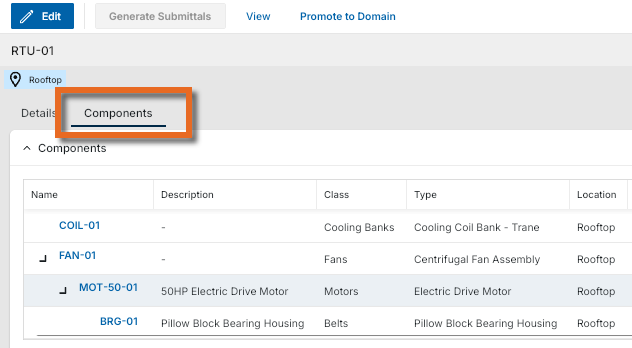
Note The Components tab must be enabled on the Settings tab of the app configuration. Refer to Settings tab.
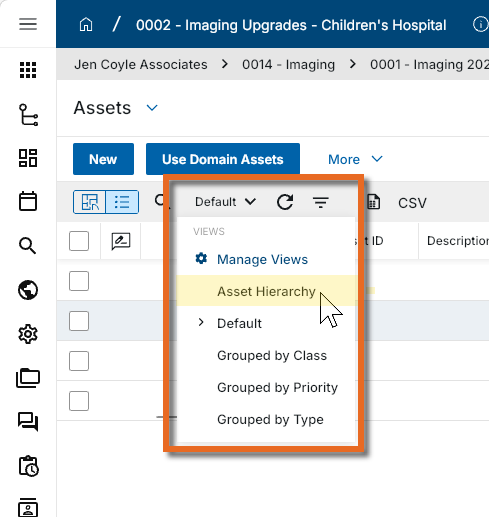
The Asset Hierarchy log view shows assets in an expandable hierarchical view.
The full parent chain is included when a child asset is promoted to the domain level.
Parent assets can be included in the import process.
Import existing records
If you need to create multiple asset records at once, you can do so through the import process.
You will first generate an export of an existing record to access the correctly formatted spreadsheet file for the import. Once the exported file is available, add the appropriate values for the records you want to import to the exported spreadsheet. You can then import those records. For more detailed information on the importing process, refer to Importing records.
Note In addition to the standard Import and Export options, the Asset Manager > Assets app can be configured to allow you to complete an import or export using the COBie (Construction Operations Building Information Exchange) format by selecting Import (COBie) or Export (COBie) from the More menu in the action bar. To enable these options, an administrator can selectEnable COBie Import/Export in Configuration.
Generate a log report or other reports
You can generate a report from a selected log view, or use one of the built-in reports available by default in each application. For more information on creating your own reports, including how to set up scheduled reports, refer to Creating ad hoc reports.
Note For information on modifying the logo that appears on reports in your project, refer to Managing report logos.
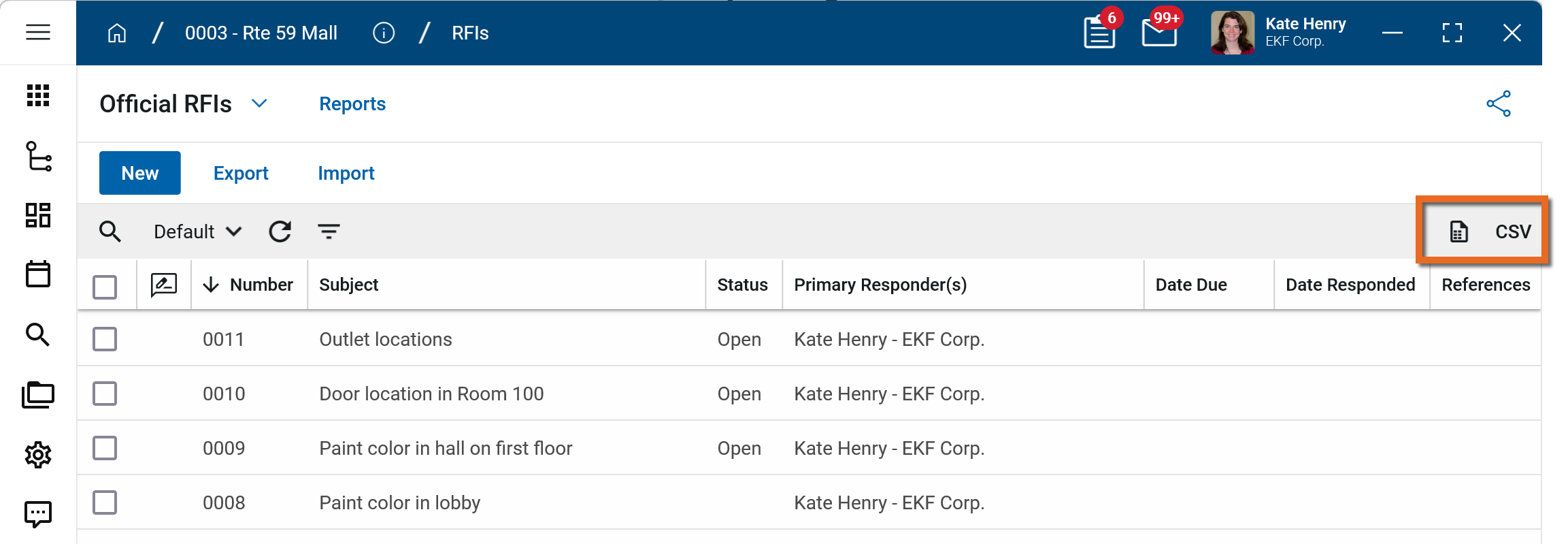
To generate a report from a log view with up to 10,000 records, click the More icon  and select Print. If your log view contains more than 10,000 records, the Print option will be disabled and you can select
  to download the records to a CSV file instead.
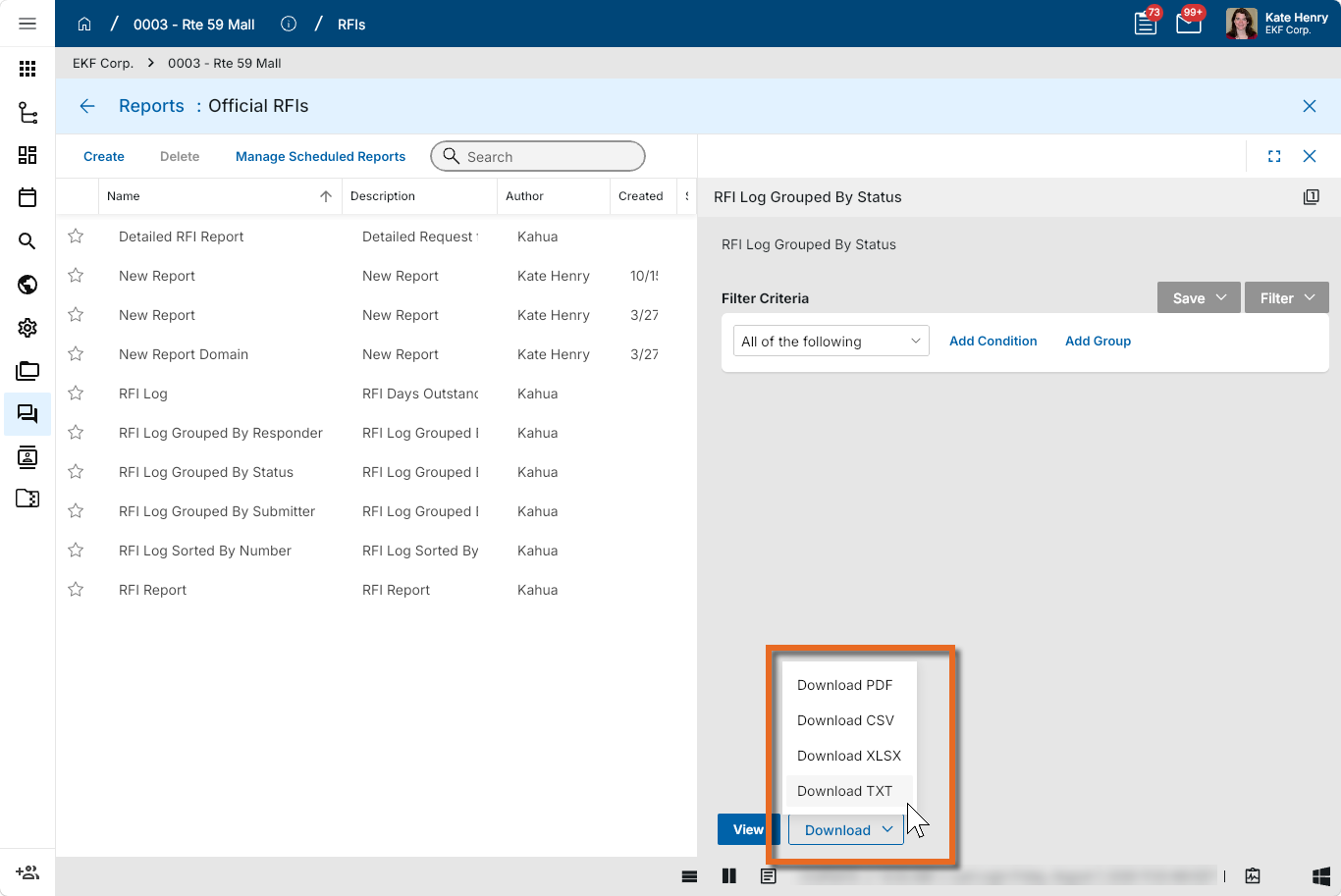
To generate an application report, complete the following steps:
-
Navigate to the application.
-
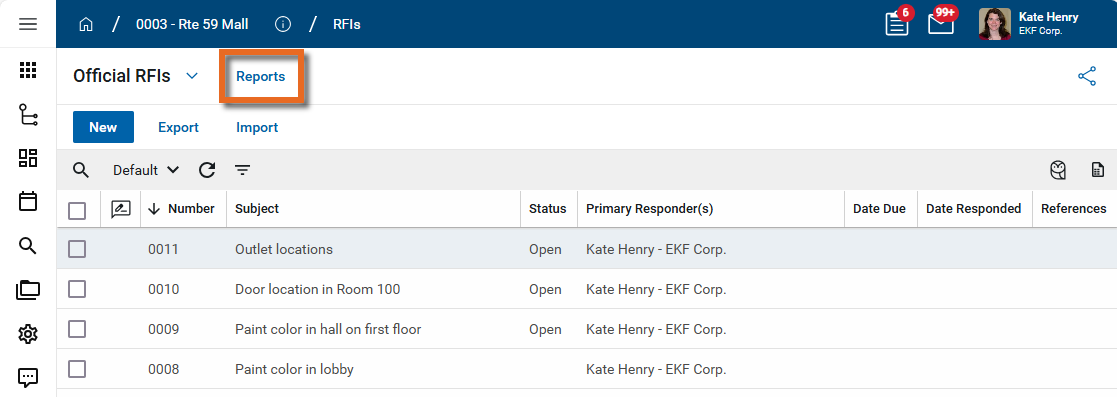
Select Reports in the application title bar.
-
Select the report you want to run.
-
Apply any desired filters.
-
Select View or Download as appropriate. For more information, refer to Viewing Reports.
-
Click the Close icon
 when you are done.
Perform standard actions on a single record (print, send, view history, delete, etc.)
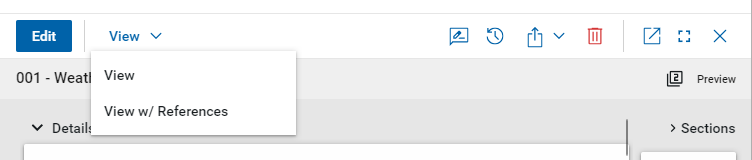
From the detail view of a record, there are several standard actions you can take. Depending on your permissions, some or all of the following options may be available to you:
-
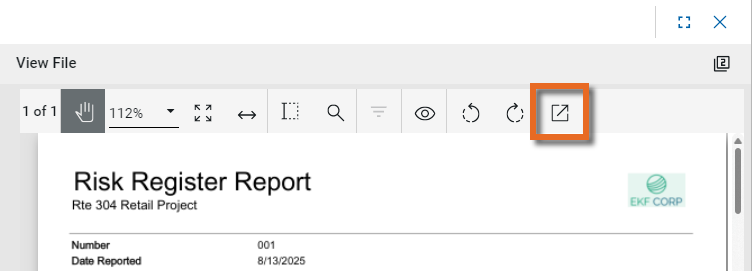
View and View w/References - Select View or View w/References to open a PDF view of the current record. The PDF file can be printed or shared from the viewer by clicking on the Open PDF icon
 .
.
Note Only references where the Include on Send value is set to "Yes" are included in the View w/References.
Additionally, if Include Markup on Send is set to "Yes", any markups on the file are included. -
Discussions
 - Select this icon to open the Discussions panel. If enabled in your domain, the discussions feature allows you to participate in public or private conversations associated with specific records. For more information, refer to Discussions.
 -
View History
 - Select this icon to open the History page for the record. The history page provides details regarding all activity (creation, edits, saves, etc.) performed on the record. Click view edit to drill down into more detail on a specific action. Click hide edit to close the action detail. Click the Close icon
  to close the history page.
 -
Send actions
 - Click this icon to select an appropriate Send action for the record. The following options may be available to you:
-
Copy Link and Copy Portable View Link - Select this option to copy a URL link for the record or record's portable view to your clipboard. This link can be sent outside of Kahua. Users with the appropriate permissions will be able to open Kahua directly to that record or portable view by using the link.
-
Copy QR Code and Copy Portable View QR Code - Select this option to generate a QR code for the currently open record or record's portable view. The QR code can be shared directly from your screen, or copied to your clipboard to be shared as appropriate. This QR code can be shared outside of Kahua. Users with the appropriate permissions will be able to open Kahua directly to that record or portable view by using the link.
-
Send - Select this option to open a new Kahua message with the open record included as an attachment. References with the Include on Send value set to "Yes" are also included. For more information, refer to Messages app.
-
-
Delete
 - Select this option to delete the open record. You must agree to the confirmation message before the record is deleted.
Alternatively, right-click on the record in the log view and select Delete, or select multiple records from the log view and select Delete.
Note If a record is deleted in error, your domain administrator may be able to recover it through the Recycle Bin app. For more information, refer to Using the Recycle Bin.
-
Open in a new window
 - Select this option to open the current record as read-only in a new window (desktop host) or browser tab (web host). This allows you to navigate to other records in the original Kahua instance while keeping the read-only window or tab open for reference. To re-open the record on the read-only window or tab in Kahua, select Open in the header.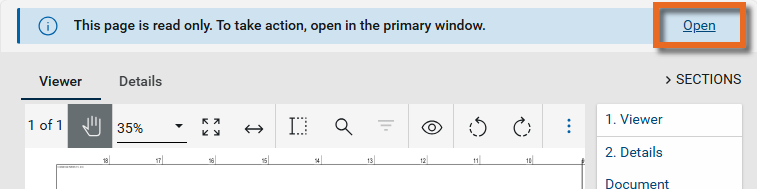
-
Maximize
 and Minimize
  - Select Maximize to open the record to a full screen view. From the full screen view, select Minimize
  to return to the original view.
 -
Close
- Select the close icon to close the currently open item.
Configure the app
Your domain administrator or another user with the appropriate permissions can configure the app in the Configuration application.
Important When working in the Configuration app, it is important to review the header and ensure that you are working at the correct level in the hierarchy, either the root domain or at a partition or project level.
Settings that you establish at the root domain or lower levels will inherit down the hierarchy until they are overridden. For more information on the hierarchical structure of Kahua, refer to Understanding the hierarchical structure of Kahua.
The Configuration app can be accessed directly through the apps list (Apps > Administration > Configuration), or, in some applications, by right-clicking on an application in the launch bar and selecting Configure. When you select Configure for an app from the launch bar, the detail view of the configuration page for that application opens automatically.
For general information about the Configuration app, including how to set up an approval workflow, refer to Configuration app.
For general information on configuring this app in Configuration, refer to Application configuration.
The following items are part of the application configuration and are specific to this application:
| Options | Description |
|---|---|
| Settings tab | |
| Disable duplicate name creation during import | Enable this setting to prevent duplicate named records from being created during import. |
| Enable Components | Select this option to have the Components tab appear on the asset detail view. Refer to Track asset components. |
| Enforce unique Asset ID across the domain |
Select this option to require unique Asset IDs throughout your domain. Note This option can only be set at the domain level. |
| Enforce unique Asset ID at this project (does not apply to assets at domain level) | Select this option to require unique Asset IDs in the current project. |
| Enable COBie Import/Export | Select this option to have Import COBie and Export COBie appear for selection in the app's More menu, in addition to the standard Import and Export options. |
| Show Conditions and Deficiencies | Select this option to have the Conditions and Deficiencies sections appear on the asset record. |
| Enable Asset Nameplate Scan | |
Available application roles
Application roles determine which actions users can perform in the app. Roles are assigned to groups in the Groups app > Permissions tab. Members of the group then have the permissions associated with the roles assigned to the group.
The following roles are available for this application:
| Role | Details |
|---|---|
| Administrator | Full administration, including add, configure, create lists, edit, import, export, share, view, send, process, remove, and edit view templates. |
| Contributor | Can add, edit, open, view, send, and process asset records. |
| Moderator | Can add, edit, remove, import, export, share, open, view, and send asset records. |
| Observer | Can open, view, and send asset records. |
| Referencer | View-only access to asset records. |
| DomainAssetContributor | Can edit attributes on domain assets and entities. |
Note To manage these permissions, open the Groups app and assign the appropriate application role to the group. Only users with the appropriate permissions can manage application roles. For more information, refer to Managing Permissions.